I have very elementar project, measuring temperature by SHT31 (I2C) and advertising measured value via BLE at XIAO nRF52840. Im using ArduinoBLE.h library and powering that from one 18650 via battery pads. Everything works fine except of power consumption - minimum I got is some 6mA, which is far too much than expected uA. I set advertising interval to 5 sec (via BLE.setAdvertisingInterval) and temperature reading each 10s with delay (10000) command. Even when nRF52840 is doing nothing, consumtion cant get under those 6mA. The same result, when I disconnect that SHT31 sensor for to ensure myself, sensor is not responsible for this high total consumption. I hava no idea what to do to get those “magic” uA instead of mA.
delay(10000) only pauses the sketch; it does not guarantee that the MCU and peripherals enter a low-power state. The 6 mA baseline therefore suggests the processor, USB stack, onboard flash, LED, or another peripheral remains active.
I would first test Seeed’s low-power example using the Seeed nRF52 Boards core, with BLE and the sensor removed, and measure current through the battery connection. Then add BLE advertising and the SHT31 back separately to identify the increase.
Also note that BLE.setAdvertisingInterval() uses 0.625 ms units, so five seconds would be 8000, not 5. For the lowest consumption, remove USB/Serial activity, turn off the LEDs, use single-shot SHT31 measurements with its heater disabled, and explicitly enter the nRF52840’s sleep state between events. The advertised sub-5 uA figure is standby current; continuous BLE advertising will produce a higher average.
Jovelyn is absolutely right on the money here! It is a very common trap. Using the standard delay(10000) just pauses your sketch while leaving the main CPU spinning its wheels in a high-power active state.
While the Nordic SoftDevice is incredibly efficient at automatically waking up the radio, firing off the BLE advertisement, and shutting the radio back down, it does not automatically put the main CPU to sleep.
using a standard Arduino delay(10000), the MCU is essentially just sitting there twiddling its thumbs in a high-power active state for 10 seconds. The CPU clocks keep running, which is exactly why they are seeing a constant 6mA draw.
To actually tap into the microamp range that Nordic hardware is famous for, your application loop has to explicitly yield to the power management API (using commands like sd_app_evt_wait() or __WFE()). This tells the CPU to suspend its operations and go into a true sleep state until the next RTC timer or BLE event wakes it up.
If you want to see this in action, check out our [[e-paper nRF52840 “NO-power” (🏆 Winner Winner... Microamp Dinner!™ 1.54" E-Paper & Xiao). It shows exactly how to leverage these sleep states with some Nordic PPKII Graphs to drop the power floor down to the low microamp range while still running peripherals!
Keep at it! Once you swap out those delays for proper sleep APIs, you will absolutely hit those magic microamp numbers.
There’s been some debate that delay() doesn’t reduce current consumption, but in my experience, using delay() has reduced current consumption down to the microampere range. Please take a look at the current waveform in Post #1 below. The sections labeled “Sleep” are where I used delay().
Guys, I have experimented with tips you provided me three days (and nights ) without significant success. Still around 5mA of consumption. Then I asked my AI friend Gemini and he solved it in 3 seconds. He proposed me raw structure of Arduino sketch with Bluefruit library. I just add block managing SHT31 sensor. And what a surprise - consumption is now 5uA, except of moment, when SHT31 measures temperature. Advertising interval is set to 5 sec (8000 units) and temperature is measured each 10 sec. And best point - believe it or not, waiting for next measurement is controlled by delay(10000) command. Now it works as expected with low power. Thanks to all of you for your support.
Awesome, You got it going, Would you post the code?
Use the code tags above “</>” paste it in there.
I would be interested in seeing what it suggested , Was it boiler plate or some custom creation we may all benefit from?
The contribution is appreciated. This is a good example why we mark posts as “Solutions” so others can find the answers fast. If it is not proprietary as this is not from Gemini the whole community advances.
 using a standard Arduino
  in a high-power active state for 10 seconds. The CPU clocks keep running, which is exactly why they are seeing a constant 6mA draw.
 to drop the power floor down to the low microamp range while still running peripherals!
 PJ
PJ 

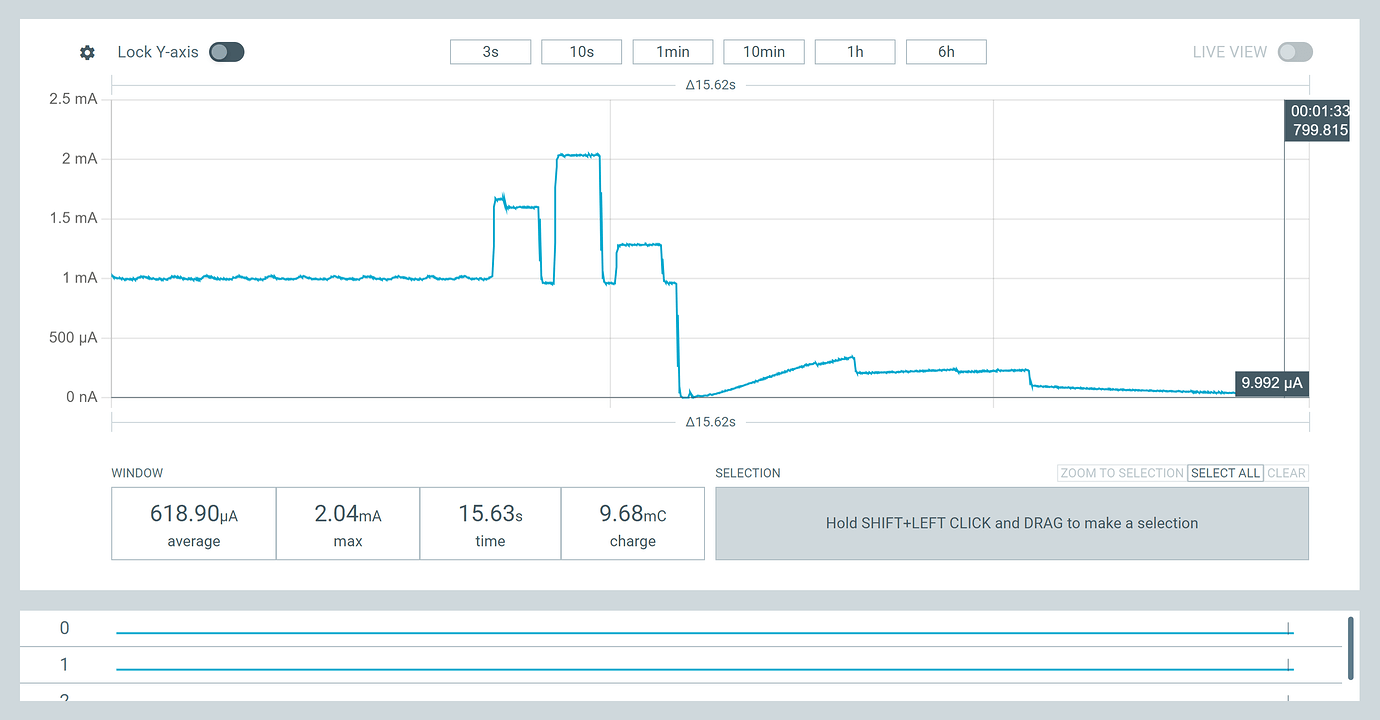

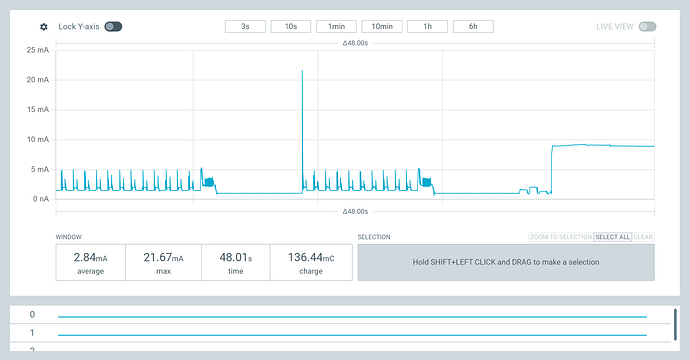
 ) without significant success. Still around 5mA of consumption. Then I asked my AI friend Gemini and he solved it in 3 seconds. He proposed me raw structure of Arduino sketch with Bluefruit library. I just add block managing SHT31 sensor. And what a surprise - consumption is now 5uA, except of moment, when SHT31 measures temperature. Advertising interval is set to 5 sec (8000 units) and temperature is measured each 10 sec. And best point - believe it or not, waiting for next measurement is controlled by delay(10000) command.
 paste it in there.