Community supported product related questions, routinely checked by Seeed’s Engineers
i need to connect a recomputer j30 to a DS90UB960-Q1EVM board, the board uses a 40-pin with the P/N QSH-020-01-H-D-DPA and the j30 uses a mipi csi connector with 15 pins. Is there an adapter board which can convert 40 pins to 15 ?
Hello, may I ask if this DS90UB960-Q1EVM board was purchased from Seeed? If so, could you please provide the product’s SKU? This will help us look up the information for you.
Hey folks,
I’ve hooked up a BLE module to my XIAO ESP32-C3 (5V to module VCC, GND common). Everything works briefly, but the XIAO resets when advertising starts.
Specs:
XIAO ESP32-C3 (3.3V logic)
BLE module powered at 5V via VIN
Using Arduino IDE 2.2 and BLEPeripheral library
Anyone seen brown-out resets like this?
Suspecting 5V draw spikes—should I add a decoupling cap or better power sequencing? Appreciate any input!
Thank you for your hard work !
I have a question about the BC02 BLE Beacon.
Can it be used as a simple BLE Tracker within home assistant?
Curently, I’m using a bunch of Holyiot devices in correlation with the the HA Bluetooth integration. But theses devices are not good for outdoor usage, especially if the temperature drops below zero.
So I’d like to use the BC02 BLE Beacons.
As I can’t find any related thread, I’ll try my best here.
Thanks for any advice.
I am using the Jetson J2012 product from Seeed Studio, and I am working with the Toshiba TC358743 HDMI-to-CSI driver on JetPack 6.1.0.
I can detect the camera and capture frames when using the CAM1 CSI port, but it does not work on the CAM0 CSI port. When I connect it to CAM0, I see a timeout error.
Has anyone encountered this issue before? I can share the log file dts file.
HI there,
Yes, It’s been posted here before… The DEV tree needs to be the Seeed Specific one, Hit the search button the post and fix or info is there.
HTH
GL  PJ
PJ 
Cool tech! Can’t wait to get more involved!
Hey,
I am looking for mechanical drawings for “reComputer J401 - Open-source carrier board”, especially the position and dimensions of the mounting holes. I don’t seem to find this information in the datasheet. Could anyone share with me where I can find this?
Thank you!
ve been working on a project for two days and it’s not working for me. I’m using an ESP32 C6 ANDESP32 S3 C3 Round Display for XIAO - 1.28 inch Round Touch Screen, 240×240, 65k Colors, RTC, Charging Circuit, TF Card Slot I can’t get anything to be written on the screen. Can anyone help? A working code for the watch would also help. Thank you.
Hi there,
And welcome here…
So this Demo.
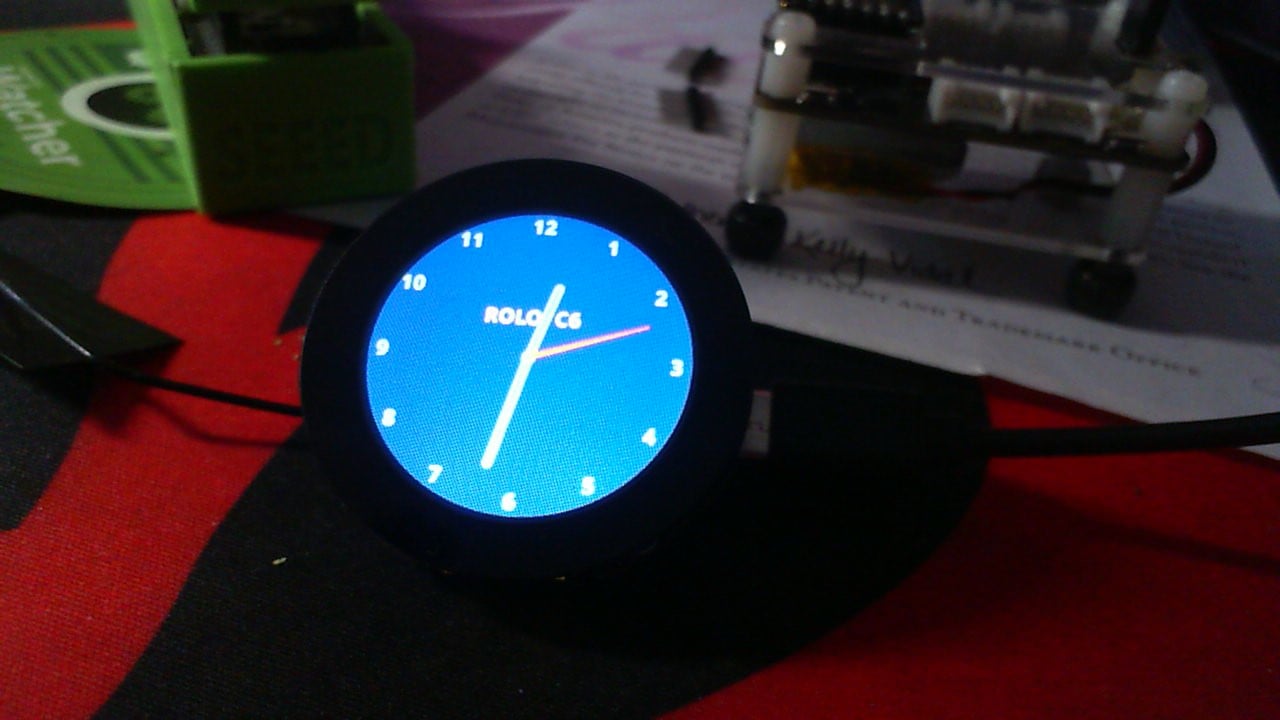
and this Link should get you started , code and compiler output is present.
Start a New thread, 
Post the code you have or You are trying and we can comment.
Everything works , but it is a process to get it going.
HTH
GL PJ
I’m very sorry to have to post this here, but I can find no way to post some questions I have about XIAO nRF52840 + Wio-SX1262. I have not been able to find the answers to my questions despite a lot of research. Can someone please explain to me how/where to post a question?
Thanks1
Hi there,
And welcome here…
So it’s a Spam prevention thing, you need to read a few threads and like a post or post a question in a alike category. Then the create a new thread will magically appear then you can post your topic and start a new thread. 
HTH
GL PJ
utilizing an XAIO nRF52840 Ble for my sim racing steering wheel buttons. Having an issue with rapidly pulsing signals when I press a button. Any help with will be appreciated, have already soldered capacitors across the switches with no success
Hi there,
And Welcome here…
So after you look around and like and read a few posts you can make your own thread on the subject. The Jist of it has been discussed here though before so have a look at the search for the BLE stuff, what is the setup ? Can you describe it more?
How is it powered , USB ? battery ?
Has it always had this or from a change or edit made , cause it ?
HTH
GL PJ
add a pis to you post maybe also, and if you post the code , use the code tags above “</>” paste it in there.
Lots of smart folks here willing to help.
It is powered by a single 18250 cell, I am using a 4 switch cluster mimicking a d-pad, 4 switches for buttons A,B,X,and Y. A 5th switch for my horn button and a joystick for camera control. It has had the button bounce issue all along and have added the Bounce2 library as well. Already bald, so cant pull my hair out
Hi there,
So , it’s not rogaine  but , GPIOTE (GPIO Tasks and Events) The classic RTOS in the way I’m thinking , here is what I know others have run up against and one fellow even used the combo of BLE wireless mouse and HID lib’s
to get it done in the end.
AI agrees,
If you are getting a rapid torrent of pulses when pressing a button on the XIAO nRF52840, you are looking at classic hardware switch bounce being amplified by how the underlying RTOS or hardware handles interrupts.
Since adding standard capacitors didn’t tame it, the issue is almost certainly because the software is reacting to microsecond-level transitions that are too fast for simple RC filtering or standard software debouncers like Bounce2 to cleanly absorb when high-priority interrupts are involved.
Here is exactly what is happening under the hood and how to fix it:
1. The RTOS Culprit: Port Event vs. IN Event
If you are running an RTOS framework (like Zephyr OS or the Arduino nRF52 mbed core), it configures the nRF52840’s GPIOTE (GPIO Tasks and Events) peripheral in one of two ways. This makes a massive difference:
- PORT DETECT (Low Power Mode): Zephyr defaults to using the shared
PORTevent sense mechanism (SENSEfield in thePIN_CNFregister) for normal GPIO callbacks. This is a level-sensitive interrupt. If a button bounces rapidly, it sets off a cascading storm of interrupts that can completely choke the RTOS context switching mechanism, causing a burst of weird, rapid pulsing output events. - IN EVENT (High Accuracy Mode): If the framework or a library spins up a dedicated
GPIOTE->EVENTS_IN[x]channel, it uses an edge-triggered hardware latch. This mode is blindingly fast and will catch every single microscopic glitch of a physical button switch—far faster than an Arduino loop can handle it.
2. Why Bounce2 or Capacitors Are Failing
- The RTOS Thread Latency: Libraries like
Bounce2rely on synchronous polling inside your main execution loop (bounce.update()). If the RTOS context-switching or Bluetooth (BLE) high-priority interrupts are busy maintaining the radio connection link for your steering wheel, your loop execution will stall slightly. The button bounces long before the loop gets around to reading the line again, allowing intermediate spikes to sneak through or go undetected until it is too late. - Capacitor Discharge Current: Simply soldering a cap across the switch without an inline resistor creates an instant, high-current discharge path when the switch closes. This can actually generate more electrical noise on the line, tricking the highly sensitive nRF52840 input buffers into seeing rapid high/low transitions.
HTH
GL PJ
I will look for what info I have on this , it has been flushed out pretty well AFAIK
#include <bluefruit.h>
#include <AceButton.h>
using namespace ace_button;
// ----------------------------------------------------------------------------
// Pin Assignments (Matches your exact layout)
// ----------------------------------------------------------------------------
const int PIN_JOY_X = A0;
const int PIN_JOY_Y = A1;
const int PIN_DPAD_UP = 2; // Also serves as system wake pin
const int PIN_DPAD_DOWN = 3;
const int PIN_DPAD_LEFT = 4;
const int PIN_DPAD_RIGHT = 5;
const int PIN_SW1 = 6;
const int PIN_SW2 = 7;
const int PIN_SW3 = 8;
const int PIN_SW4 = 9;
const int PIN_SW5 = 10;
// Group the buttons into a centralized array for processing
const uint8_t BUTTON_PINS = {
PIN_DPAD_UP, PIN_DPAD_DOWN, PIN_DPAD_LEFT, PIN_DPAD_RIGHT,
PIN_SW1, PIN_SW2, PIN_SW3, PIN_SW4, PIN_SW5
};
const uint8_t NUM_BUTTONS = 9;
// AceButton and Bluetooth instances
AceButton buttons[NUM_BUTTONS];
BLEHidGamepad blegamepad;
// Power and System States
unsigned long lastActivityTime = 0;
const unsigned long SLEEP_TIMEOUT = 300000; // 5 minutes in milliseconds
// Variables used to calculate the real-time Gamepad report state
uint32_t currentButtonsPressed = 0;
bool dpadState[4] = {false, false, false, false}; // UP, DOWN, LEFT, RIGHT
// Joystick Rolling Average Filters
int avgX = 512;
int avgY = 512;
// ============================================================================
// ACEBUTTON CENTRAL EVENT ROUTER
// ============================================================================
void handleGamepadEvent(AceButton* button, uint8_t eventType, uint8_t buttonState) {
uint8_t pin = button->getPin();
bool isPressed = (eventType == AceButton::kEventPressed);
// Track system activity whenever any state changes
lastActivityTime = millis();
// 1. Process D-pad events
if (pin >= PIN_DPAD_UP && pin <= PIN_DPAD_RIGHT) {
uint8_t index = pin - PIN_DPAD_UP;

dpadState\[index\] = isPressed;
}
// 2. Process Action / Modifier buttons (SW1 - SW5)
else if (pin >= PIN_SW1 && pin <= PIN_SW5) {
uint8_t bitShiftIndex = pin - PIN_SW1; // Maps SW1 to bit 0, SW2 to bit 1, etc.

if (isPressed) {

  currentButtonsPressed |= (1 << bitShiftIndex);

} else {

  currentButtonsPressed &= \~(1 << bitShiftIndex);

}
}
}
// ============================================================================
// MAIN SETUP Routine
// ============================================================================
void setup() {
// Initialize the Bluefruit Bluetooth system
Bluefruit.begin();
Bluefruit.setTxPower(4);
Bluefruit.setName(“XIAO Wireless Controller”);
blegamepad.begin();
// Initialize universal AceButton event engine
ButtonConfig* config = ButtonConfig::getSystemButtonConfig();
config->setEventHandler(handleGamepadEvent);
config->setDebounceDelay(20); // Sharp, 20ms debounce without capacitor drag
// Configure hardware pins as internal pull-ups and register with AceButton
for (uint8_t i = 0; i < NUM_BUTTONS; i++) {
pinMode(BUTTON_PINS\[i\], INPUT_PULLUP); // Activating internal 13k resistors

buttons\[i\].init(BUTTON_PINS\[i\]);
}
// Configure Battery Read Circuitry
pinMode(PIN_VBAT, INPUT);
pinMode(VBAT_ENABLE, OUTPUT);
digitalWrite(VBAT_ENABLE, LOW);
pinMode(LED_RED, OUTPUT);
digitalWrite(LED_RED, HIGH); // Turn off Red LED
// Configure Bluetooth Broadcasting
Bluefruit.Advertising.addFlags(BLE_GAP_ADV_FLAGS_LE_ONLY_GENERAL_DISC_MODE);
Bluefruit.Advertising.addTxPower();
Bluefruit.Advertising.addAppearance(BLE_APPEARANCE_HID_GAMEPAD);
Bluefruit.Advertising.addService(blegamepad);
Bluefruit.Advertising.restartOnDisconnect(true);
Bluefruit.Advertising.setInterval(32, 244);
Bluefruit.Advertising.start(0);
lastActivityTime = millis();
}
// ============================================================================
// EXECUTION LOOP
// ============================================================================
void loop() {
// 1. Constantly scan all 9 hardware switch pins with AceButton
for (uint8_t i = 0; i < NUM_BUTTONS; i++) {
buttons\[i\].check();
}
// 2. Read and Smooth out Joystick Inputs
int rawX = analogRead(PIN_JOY_X);
int rawY = analogRead(PIN_JOY_Y);
avgX = (avgX * 3 + rawX) / 4;
avgY = (avgY * 3 + rawY) / 4;
int8_t bleX = map(avgX, 0, 1023, 127, -127);
int8_t bleY = map(avgY, 0, 1023, 127, -127);
// Apply a clean center deadzone
if (abs(bleX) < 18) bleX = 0;
if (abs(bleY) < 18) bleY = 0;
// Wake tracking for the analog sticks
if (abs(bleX) > 15 || abs(bleY) > 15) {
lastActivityTime = millis();
}
// 3. Decode D-pad Hat Switch positions instantly from modern global states
uint8_t hat = 0;
if (dpadState[0] && dpadState[3]) hat = 2; // Up & Right
else if (dpadState[1] && dpadState[3]) hat = 4; // Down & Right
else if (dpadState[1] && dpadState[2]) hat = 6; // Down & Left
else if (dpadState[0] && dpadState[2]) hat = 8; // Up & Left
else if (dpadState[0]) hat = 1; // Up
else if (dpadState[1]) hat = 5; // Down
else if (dpadState[2]) hat = 7; // Left
else if (dpadState[3]) hat = 3; // Right
// 4. Handle Low-Battery Warning Flashes
int batteryRaw = analogRead(PIN_VBAT);
if (batteryRaw < 490) {
digitalWrite(LED_RED, (millis() / 500) % 2);
} else {
digitalWrite(LED_RED, HIGH);
}
// 5. Send optimized data reports over Bluetooth
blegamepad.reportButtons(currentButtonsPressed);
blegamepad.reportHat(hat);
blegamepad.reportJoystick(bleX, bleY, 0, 0, 0, 0);
// 6. Safe System Deep Sleep Management
if (millis() - lastActivityTime > SLEEP_TIMEOUT) {
Bluefruit.Advertising.stop();

digitalWrite(LED_RED, HIGH);

digitalWrite(VBAT_ENABLE, HIGH);

pinMode(PIN_DPAD_UP, INPUT_PULLUP_SENSE);

NRF_POWER->RESETREAS = 0xFFFFFFFF;

sd_power_system_off();
}
delay(10);
} // <— Make sure this is the ONLY closing bracket at the very end!
Thank you, I have included my code as well. This is after removing Bounce2 and installing AceButton. Removed all capacitors and resistors. Still the same rapid fire pulses.
Hi there,
So , the C&P had some issues…
I ran it through the Wash-machine…
Give this one a go.
#include <bluefruit.h>
#include <AceButton.h>

using namespace ace_button;

// -----------------------------------------------------------------------------
// Pin Assignments
// -----------------------------------------------------------------------------
const int PIN_JOY_X      = A0;
const int PIN_JOY_Y      = A1;

const int PIN_DPAD_UP    = 2;   // Wake pin
const int PIN_DPAD_DOWN  = 3;
const int PIN_DPAD_LEFT  = 4;
const int PIN_DPAD_RIGHT = 5;

const int PIN_SW1        = 6;
const int PIN_SW2        = 7;
const int PIN_SW3        = 8;
const int PIN_SW4        = 9;
const int PIN_SW5        = 10;

const uint8_t NUM_BUTTONS = 9;

const uint8_t BUTTON_PINS[NUM_BUTTONS] = {
  PIN_DPAD_UP,
  PIN_DPAD_DOWN,
  PIN_DPAD_LEFT,
  PIN_DPAD_RIGHT,
  PIN_SW1,
  PIN_SW2,
  PIN_SW3,
  PIN_SW4,
  PIN_SW5
};

// -----------------------------------------------------------------------------
// Objects
// -----------------------------------------------------------------------------
AceButton buttons[NUM_BUTTONS];
BLEHidGamepad blegamepad;

// -----------------------------------------------------------------------------
// State
// -----------------------------------------------------------------------------
unsigned long lastActivityTime = 0;
const unsigned long SLEEP_TIMEOUT = 300000UL; // 5 minutes

uint32_t currentButtonsPressed = 0;
bool dpadState[4] = { false, false, false, false }; // UP, DOWN, LEFT, RIGHT

int avgX = 512;
int avgY = 512;

// Previous HID state, used to avoid spamming reports
uint32_t lastButtonsSent = 0xFFFFFFFF;
uint8_t lastHatSent = 0xFF;
int8_t lastXSent = 127;
int8_t lastYSent = 127;

// -----------------------------------------------------------------------------
// AceButton Event Handler
// -----------------------------------------------------------------------------
void handleGamepadEvent(AceButton* button, uint8_t eventType, uint8_t buttonState) {
  (void) buttonState;

  // Only handle real press/release events
  if (eventType != AceButton::kEventPressed &&
      eventType != AceButton::kEventReleased) {
    return;
  }

  const uint8_t pin = button->getPin();
  const bool isPressed = (eventType == AceButton::kEventPressed);

  lastActivityTime = millis();

  // D-pad
  if (pin >= PIN_DPAD_UP && pin <= PIN_DPAD_RIGHT) {
    uint8_t index = pin - PIN_DPAD_UP;
    dpadState[index] = isPressed;
    return;
  }

  // Action buttons SW1-SW5
  if (pin >= PIN_SW1 && pin <= PIN_SW5) {
    uint8_t bitShiftIndex = pin - PIN_SW1;

    if (isPressed) {
      currentButtonsPressed |= (1UL << bitShiftIndex);
    } else {
      // IMPORTANT FIX:
      // Clear only this button bit.
      currentButtonsPressed &= ~(1UL << bitShiftIndex);
    }
  }
}

// -----------------------------------------------------------------------------
// Helpers
// -----------------------------------------------------------------------------
uint8_t getHatState() {
  if (dpadState[0] && dpadState[3]) return 2; // Up + Right
  if (dpadState[1] && dpadState[3]) return 4; // Down + Right
  if (dpadState[1] && dpadState[2]) return 6; // Down + Left
  if (dpadState[0] && dpadState[2]) return 8; // Up + Left

  if (dpadState[0]) return 1; // Up
  if (dpadState[3]) return 3; // Right
  if (dpadState[1]) return 5; // Down
  if (dpadState[2]) return 7; // Left

  return 0; // Neutral
}

void enterSystemOff() {
  Bluefruit.Advertising.stop();

  digitalWrite(LED_RED, HIGH);     // LED off
  digitalWrite(VBAT_ENABLE, HIGH); // Disable battery divider if active-low

  // Put all buttons into a quiet state before sleep
  for (uint8_t i = 0; i < NUM_BUTTONS; i++) {
    pinMode(BUTTON_PINS[i], INPUT_PULLUP);
  }

  // Only D-pad up is used as wake source
  pinMode(PIN_DPAD_UP, INPUT_PULLUP_SENSE);

  delay(20);

  NRF_POWER->RESETREAS = 0xFFFFFFFF;
  sd_power_system_off();
}

// -----------------------------------------------------------------------------
// Setup
// -----------------------------------------------------------------------------
void setup() {
  Bluefruit.begin();
  Bluefruit.setTxPower(4);
  Bluefruit.setName("XIAO Wireless Controller");

  blegamepad.begin();

  ButtonConfig* config = ButtonConfig::getSystemButtonConfig();
  config->setEventHandler(handleGamepadEvent);
  config->setDebounceDelay(40); // More stable than 20 ms for real switches/wires

  for (uint8_t i = 0; i < NUM_BUTTONS; i++) {
    pinMode(BUTTON_PINS[i], INPUT_PULLUP);
    buttons[i].init(BUTTON_PINS[i]);
  }

  pinMode(PIN_VBAT, INPUT);
  pinMode(VBAT_ENABLE, OUTPUT);
  digitalWrite(VBAT_ENABLE, LOW); // Enable battery divider if active-low

  pinMode(LED_RED, OUTPUT);
  digitalWrite(LED_RED, HIGH); // LED off

  Bluefruit.Advertising.addFlags(BLE_GAP_ADV_FLAGS_LE_ONLY_GENERAL_DISC_MODE);
  Bluefruit.Advertising.addTxPower();
  Bluefruit.Advertising.addAppearance(BLE_APPEARANCE_HID_GAMEPAD);
  Bluefruit.Advertising.addService(blegamepad);
  Bluefruit.Advertising.restartOnDisconnect(true);
  Bluefruit.Advertising.setInterval(32, 244);
  Bluefruit.Advertising.start(0);

  lastActivityTime = millis();
}

// -----------------------------------------------------------------------------
// Loop
// -----------------------------------------------------------------------------
void loop() {
  // Scan buttons
  for (uint8_t i = 0; i < NUM_BUTTONS; i++) {
    buttons[i].check();
  }

  // Read joystick
  int rawX = analogRead(PIN_JOY_X);
  int rawY = analogRead(PIN_JOY_Y);

  avgX = (avgX * 3 + rawX) / 4;
  avgY = (avgY * 3 + rawY) / 4;

  int8_t bleX = map(avgX, 0, 1023, 127, -127);
  int8_t bleY = map(avgY, 0, 1023, 127, -127);

  if (abs(bleX) < 18) bleX = 0;
  if (abs(bleY) < 18) bleY = 0;

  if (abs(bleX) > 15 || abs(bleY) > 15) {
    lastActivityTime = millis();
  }

  uint8_t hat = getHatState();

  // Battery warning
  int batteryRaw = analogRead(PIN_VBAT);

  if (batteryRaw < 490) {
    digitalWrite(LED_RED, (millis() / 500) % 2);
  } else {
    digitalWrite(LED_RED, HIGH);
  }

  // Send HID reports only when changed
  if (currentButtonsPressed != lastButtonsSent) {
    blegamepad.reportButtons(currentButtonsPressed);
    lastButtonsSent = currentButtonsPressed;
  }

  if (hat != lastHatSent) {
    blegamepad.reportHat(hat);
    lastHatSent = hat;
  }

  if (bleX != lastXSent || bleY != lastYSent) {
    blegamepad.reportJoystick(bleX, bleY, 0, 0, 0, 0);
    lastXSent = bleX;
    lastYSent = bleY;
  }

  // Sleep timeout
  if (millis() - lastActivityTime > SLEEP_TIMEOUT) {
    enterSystemOff();
  }

  delay(10);
}
Main fixes:
- Corrected the release bug:
currentButtonsPressed &= ~(1UL << bitShiftIndex); - Ignores non-press/release AceButton events.
- Sends HID reports only when the value changes.
- Increased debounce to 40 ms.
- Puts pins into a cleaner state before System OFF sleep.
Try it out and I can give you more of the diagnosis.
HTH
GL PJ
