XIAO MG24 vs nRF54L15 for low-power Matter/Zigbee actuator?

Hi all,

I’m working on a battery-powered project to control a water valve via Thread/Matter or Zigbee. The device should consume <100 µA at idle but be able to wake up on a message to toggle the valve.

My questions:

Is XIAO MG24 or XIAO nRF54L15 capable of doing that ?

Has anyone used MG24 or nRF54L15 as a Thread/Matter/Zigbee actuator on battery?

What are real-world idle and wake-up consumption numbers?

Is it feasible to have a sleepy end-device that wakes on messages reliably to control a relay?

Any feedback on development experience ?

Thanks for any advice, experiences, or pointers to similar projects!

Hi there,

So, You’re on the right track – both XIAO MG24 and XIAO nRF54L15 are absolutely capable of being a battery-powered valve actuator for Thread/Matter or Zigbee. The key is understanding how “wake on message” really works in these stacks.

How I see it in the field.

1. Hardware capability (short answer: yes)

  • XIAO MG24 (EFR32MG24)
    • Native support for Matter over Thread, Zigbee and BLE. Seeed Studio+1
    • Designed specifically for battery-powered Matter devices – it’s basically the textbook example for this use case. Seeed Studio+1
    • Real measurements from the Seeed forum:
      • ~60 µA in “light sleep”
      • ~1.9 µA in “deep sleep” with on-board peripherals disabled. Seeed Studio Forum
  • XIAO nRF54L15

So purely on silicon + board design: yes, both are capable of <100 µA average, as long as the application is designed correctly.

2. How “wake on message” actually works (Thread/Matter/Zigbee reality)

There is no true “hardware RF interrupt from any random packet while you’re at 1–2 µA”.
All the common stacks (Thread, Matter, Zigbee) use some form of Sleepy End Device (SED):

  • The node sleeps with the radio off most of the time.
  • A parent router buffers messages for it.
  • The sleepy node wakes up periodically, turns the radio on briefly, sends a poll (“anything for me?”), receives pending messages, and goes back to sleep.

For Thread/Matter this is standardized: SED / synchronized SED in Nordic’s and Silabs’ docs. Silicon Labs Docs+2docs.nordicsemi.com+2

So the trade-off is:

  • Longer poll interval → lower average current, but more latency (e.g. valve might react 1–5 s after the command).
  • Shorter poll interval → snappier control, but higher average current.

Trying to literally wake :face_with_peeking_eye: “on RF message edge” means running the receiver most of the time → mA range, not µA.
For a water valve, a 500 ms – 2 s response is usually acceptable, and that’s well within what a SED can do at <100 µA average if tuned right.

3. Is <100 µA idle feasible for a valve actuator?

Yes, with the right relay/valve choice and SED settings:

  1. Use a latching relay or motorized ball valve
  • Coil only energized during open/close, not held continuously.
  • Idle state current then drops back to just the MCU + radio (tens of µA average, or single-digit µA if polls are rare).
  1. Configure the node as a Thread / Zigbee Sleepy End Device:
  • MG24: Silabs has SED and ICD (Intermittently Connected Device) power-optimized profiles; example measurements for door lock–class devices hit ~10–20 µA average with tuned parameters and slow polling. Silicon Labs Docs+2community.silabs.com+2
  • nRF54L15: Nordic has docs specifically on low-power Matter over Thread configuration and SED behavior; they’re targeting multi-year battery life for similar devices. Nordic DevZone+1
  1. Choose a poll interval that matches your battery goal:
  • Example: poll every 1–2 seconds → snappy valve reaction, still usually under your <100 µA average target if everything else is trimmed (LEDs off, debug off, no extra sensors burning current).
  • If you want multi-year battery life, you can push poll intervals out further (seconds to tens of seconds) and accept more latency.

So yes: a sleepy end-device that wakes on buffered messages and toggles a latching relay is a very standard pattern and absolutely feasible.

Also I would add ,

  • MG24: Silabs SDK + Simplicity Studio → easier out-of-the-box for Matter/Zigbee today.
  • nRF54L15: nRF Connect SDK → super strong toolchain, slightly steeper learning curve, excellent for low-power and long-term maintainability.

Choose your Path and GO!

HTH
GL :slight_smile: PJ :v:

It would be helpful to know what the required response time is for the actuator to be activated, and the size of the battery.

If you plan to use Zigbee on the MG24, the EM2 (Zigbee Sleepy End Device) current would probably be sub 10uA.

Thanks a lot for the detailed explanation — this really helps clarify how SED behavior works and what to expect in terms of power consumption. It’s reassuring to know that both MG24 and nRF54L15 can stay under 100 µA with the right configuration.

A quick note for @grobasoz:
For my use case, a reaction time of around 3 seconds is perfectly fine, and the device will run on 4×AA batteries, so I’m mainly trying to maximize battery life while keeping the wake-up behavior reliable.

I also have a few follow-up questions:

  1. Are there any ready-made examples for a Sleepy End Device that can wake up to receive a buffered message (Zigbee)? A minimal example would be great to start from.

  2. Is it possible to implement this using the Arduino IDE, or is it mandatory to use the manufacturer SDKs (Simplicity Studio for MG24 or nRF Connect SDK for nRF54L15)? My understanding is that low-power wireless stacks are often not available in Arduino environments.

  3. From your explanation, it sounds like the MG24 might be the easier starting point for someone who doesn’t know either SDK yet — would you agree?

Thanks again for the super helpful breakdown. Your message really helped me understand the trade-offs and what’s needed to make this work on battery power.

For Zigbee you will need to use Simplicity Studio and the Zigbee SDK. Quite tricky. You can use the Arduino framework for the Matter development, but I don’t know how well the Matter SED devices are implemented.

In both cases, a 3 second “latency” would cause significant battery drain.

Generally a SED device (either Matter or Zigbee) is a “client”, sending messages when woken up by some external activity, eg button press. They can also send messages when “polled” but generally only wake up to retrieve the message on a very infrequent basis…

Your device is a “server “, ie responding to messages from the network. In most cases they are implemented as FFD’s or full function devices that are powered permanently and take a role in the network. Example is a light.

You would need a longer latency or larger batteries for your requirements.

Thanks again for all the explanations. Based on your answers and my own research, here is my current conclusion:

  1. Arduino IDE
    It seems not possible to implement Zigbee or Thread SED on XIAO MG24 or nRF54L15 using Arduino IDE.

  2. XIAO MG24

  • You need to use Simplicity Studio.

  • Unfortunately, the XIAO board is not recognized by Simplicity Studio, and there’s no documentation explaining how to make it work.

  • This makes it quite complicated for someone without significant experience with the SDK.

  1. XIAO nRF54L15
  • You need to use nRF Connect SDK.

  • The XIAO board is not present by default, but the Matter example from the Seeed XIAO wiki provides all the necessary information to get started.

  • I haven’t found any Zigbee examples yet.

  • For Thread, I found the Window Covering (SIT) example, which has a 500 ms latency and consumes less than 100 µA. This seems like a good starting point.

  • I assume that by reusing the configuration files from the Matter example in the Seeed wiki, it should be possible to adapt it for my actuator. Would that be correct?

I’d appreciate any advice or confirmation on this approach — especially regarding reusing the Matter example configs for Thread SED.

Thanks again for your help!

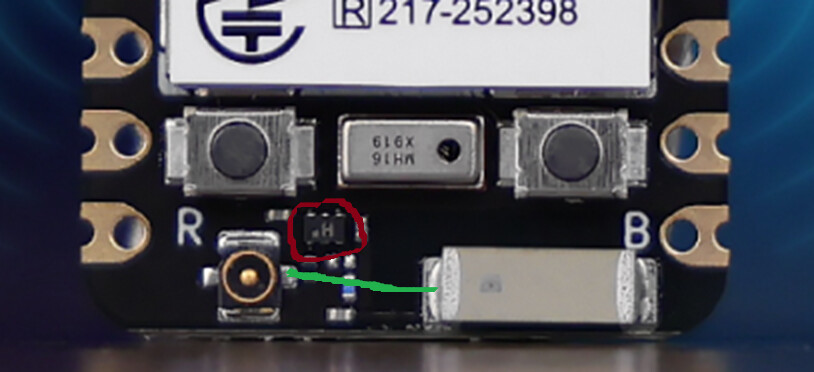
There is somethng you should know about XIAO nRF54L15, it has a 5G radio switch (FM8625H) on the board with a quiscent current of about 100uA. So whatever you can achieve in nRF54L15 Soc you have to add 100uA to it. Or you can switch it on and off to save some battery. Unfotunately the documentation for FM8625H is pretty thin and I haven’t had the chance to test it yet.

1 Like

Check this thread:

https://forum.seeedstudio.com/t/build-projects-for-xiao-mg24-using-simplicitystudio/293803/12

1 Like

Thanks for the detailed summary.

I think it’s important to be aware that you are trying to create a fairly “complicated” embedded project so it’s inevitable that there may be some “learning” required.

Adding Low Power is, in itself, quite tricky especially with Matter and the XIAO MG24.

Then your requirements of low power with low latency are conflicting. Either one or the other but not both. Edit> I’m referring mainly to Zigbee devices here.

That’s very interesting - and would truly be impressive. It would be beneficial to do some “real world” testing :slight_smile:

1 Like

Thanks everyone for the additional details.

@nomad – thanks for the clarification about the RF switch (FM8625H).
If I understand correctly, using the external antenna (which is recommended for better range) means the RF switch must be powered, and that adds around 100 µA of constant consumption.
Is this the same situation on the XIAO MG24, since it uses a similar RF switch?
And is there any clean workaround, such as:

  • desoldering the switch and manually routing the external antenna, or

  • removing the internal antenna and soldering the external antenna directly?
    I’m not sure whether this is realistic or if it breaks the RF chain.

@lboue – thanks, I totally missed that part. I’ll try it.

@grobasoz – I’m going to try the Window Covering example first, and if I can’t reach a low enough power consumption, then I may switch to a mains-powered design instead.

Thanks again for all the help!

Good luck. It will be interesting to see your result :slight_smile:

The switch is started by default (see platform-seeedboards/zephyr/boards/arm/xiao_nrf54l15
/xiao_nrf54l15_nrf54l15_cpuapp.dts) on this line

rfsw_pwr: rfsw-pwr {
compatible = “regulator-fixed”;
regulator-name = “rfsw-pwr”;
enable-gpios = <&gpio2 3 GPIO_ACTIVE_HIGH>;
regulator-boot-on;
};

so you could do some switching on and off but there is a trick. Matter/Thread sends some sync frames “during standby“ independent of your control. I’m currently testing this behaviour. (EDITED: IT’S NOT WORKING by turning switch on and off ).

You could also remove FM8625H but have you seen how tiny it is (1.1mm x 0.7mm) ? From where i’m standing i’m having doubts about making a solder bridge after removig it.

As grobasoz said low latency and low power don’t go hand in hand. I thnk for your task you need Synchronized Sleepy End Device (SSED) but you have to do some testing about the power requirements.

I’m currently running a BME280 sensor connected to a Nrf52840 Dongle with 30 sec sensor read interval (active sleep with unused ram turned off) and it needs 18 uA. If if push the read interval to 60 sec it needs only 10 - 11 uA.

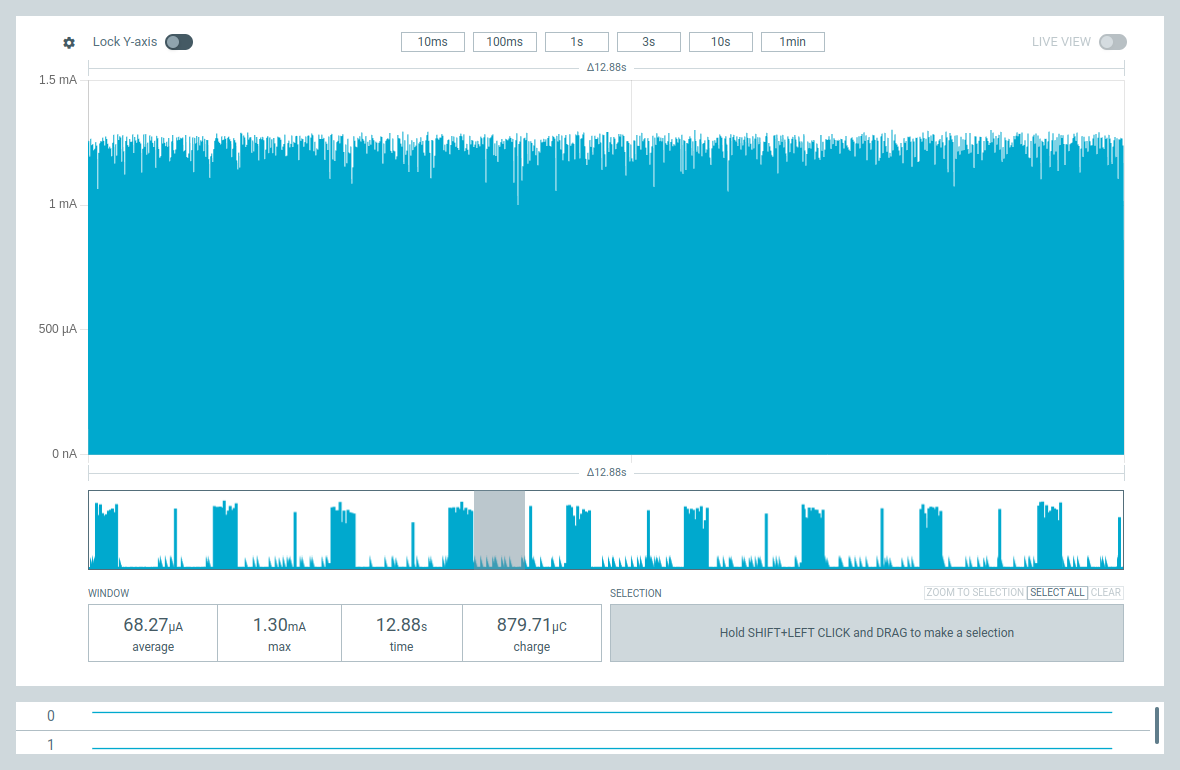
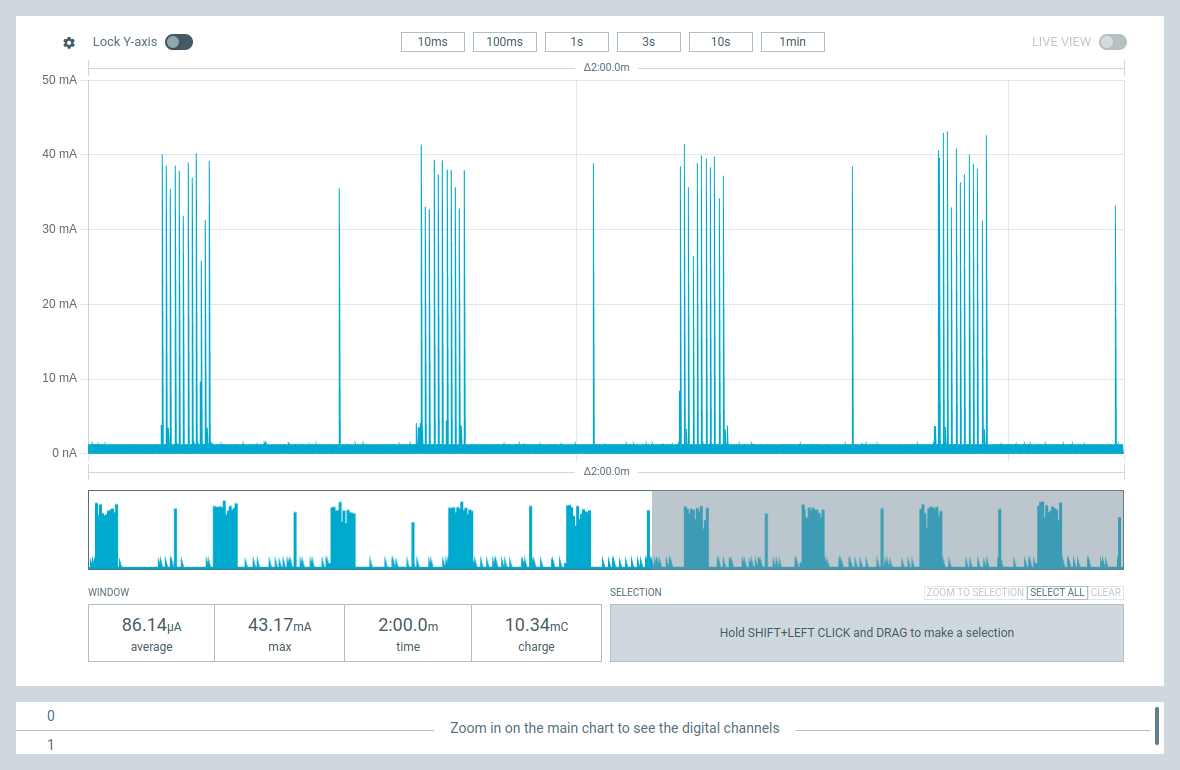
Here are the current diagrams (PPK2) for a Matter over Thread sensor based on XIAO nRF54L15 and BME280.

The sampling rate is 0,5 Hz (2 / sec), Voltage 3,7 V. BME sensor takes about 6 - 7 uA.

Without power regulator and RF switch it can go down to about 12 uA and even better with a higher or variable sampling rate.

I might be able to remove the RF switch from the board but my target is to run it from a CR2450 battery and the regulator will get in the way.

I wish I had this MCU on a board design like nRF52840 Dongle (what a simple and extraordinary board that is !)

2 Likes

Thanks for sharing. Yes, that RF switch is really a pity. I hope they will release a new version without the RF switch.

2 Likes