@msfujino actually i tried the above method many times no response
In 3v3 3.3v is coming no issue with power supply system (checked when powered by usb)
actually i also never erased the frimware i simply did the change the rdp level from BB to AA
during first connection it is in BB then i changed to AA after that alone the board is not responding
I tried changing BB→AA to see if the same issue occurs for you.
The memory contents being all FFFF might simply mean nothing was written after the AT firmware was deleted. Try creating a simple sketch in the Arduino IDE and uploading it via ST-Link.
The memory contents won’t be visible unless you click Read.
actually i tried upload a simple blink sketch via arduino ide using stlinkv2 this is the error came
Sketch uses 13236 bytes (5%) of program storage space. Maximum is 262144 bytes.
Global variables use 1228 bytes (1%) of dynamic memory, leaving 64308 bytes for local variables. Maximum is 65536 bytes.
“C:\Users\guru\AppData\Local\Arduino15\packages\STMicroelectronics\tools\STM32Tools\2.2.1/win/busybox.exe” sh “C:\Users\guru\AppData\Local\Arduino15\packages\STMicroelectronics\tools\STM32Tools\2.2.1/stm32CubeProg.sh” 0 “C:\Users\guru\AppData\Local\arduino\sketches\6E8E70E30C6477F22519CB6950B3FE18/Blink.ino.bin” 0x0
STM32CubeProgrammer v2.21.0
ST-LINK SN : B55B5A1A00000000B945EF01
ST-LINK FW : V2J46S7
Board : –
Voltage : 3.29V
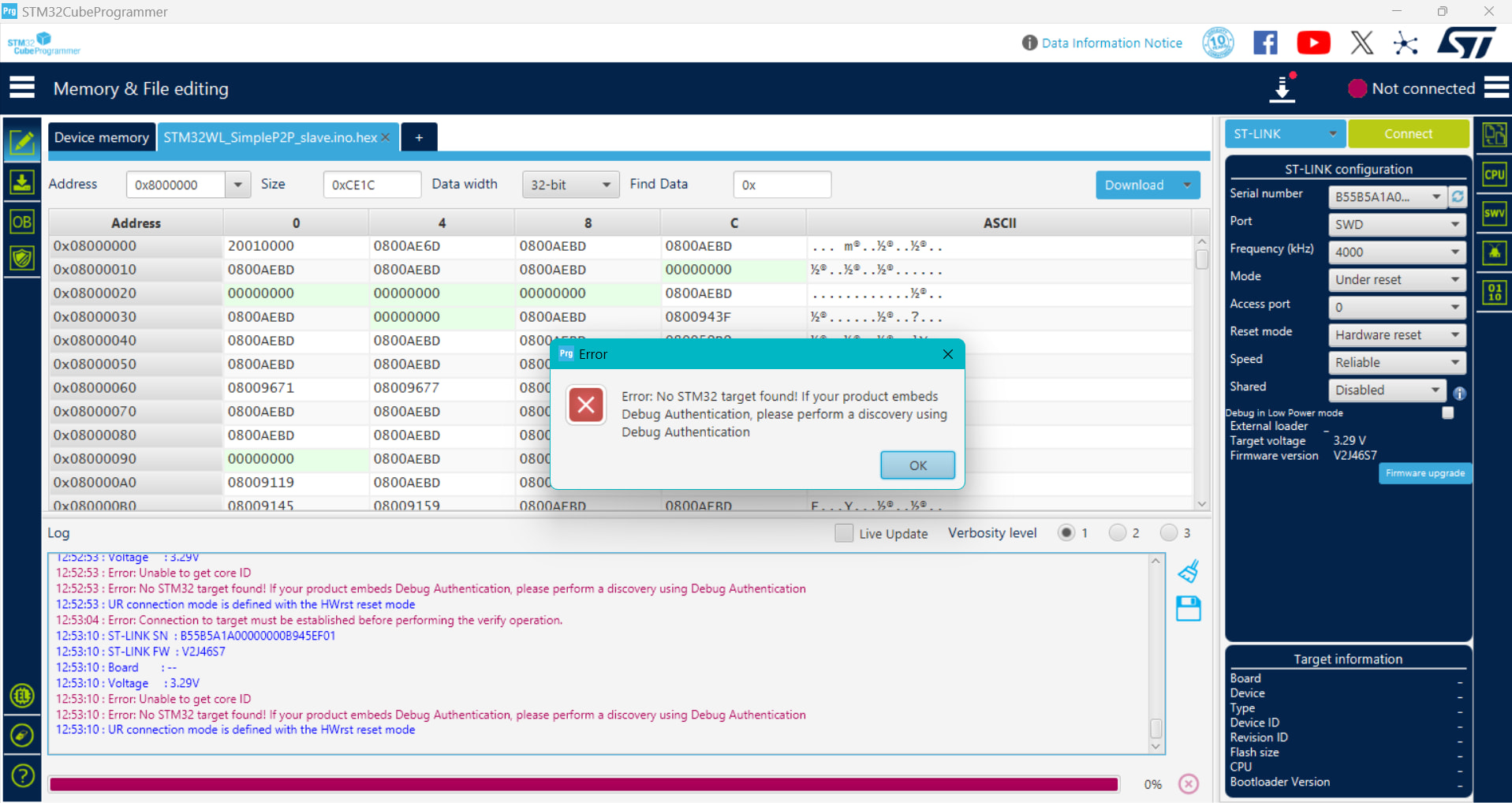
Error: Unable to get core ID
Error: No STM32 target found! If your product embeds Debug Authentication, please perform a discovery using Debug Authentication
Failed uploading: uploading error: exit status 1
same error came in cube programmer …
**** For reference ****
When compiled with ArduinoIDE2, the hex file is created in the folder below. Select and write the file with STA32CubeProgrammer.
In case of Windows
C:\Users\username\AppData\Local\Temp\arduino\sketches\32 digit HEX string\sketchname.ino.hex
In case of Linux
/tmp/arduino/sketches/32 digit HEX string/sketchname.ino.hex
15:46:42 : Memory Programming …
15:46:42 : Opening and parsing file: STM32WL_P2P_Verify_slave.ino.hex
15:46:42 : File : STM32WL_P2P_Verify_slave.ino.hex
15:46:42 : Size : 68.76 KB
15:46:42 : Address : 0x08000000
15:46:42 : Erasing memory corresponding to segment 0:
15:46:42 : Erasing internal memory sectors [0 34]
15:46:43 : Download in Progress:
15:46:44 : File download complete
15:46:44 : Time elapsed during download operation: 00:00:02.005
15:46:44 : Verifying …
15:46:44 : Read progress:
15:46:44 : Download verified successfully
This is a programmer’s log message. Are you trying to upload it in a different way than I am?
again and again same problem i complied in arduino it created a .hex file i took that and uploaded via cube programmer but same error the core id is not detected @msfujino
The screenshot appears to show that it is not connected.
Before uploading, you must ensure it is connected.
I suspect there may be some misunderstanding about the operation method.
Currently, is the RDP an AA or a BB? Please check the actual device.
1 Like
thats the main problem my board is not even connecting after connection only i can upload the code right
currently the rdp is at level AA only because i changed from level BB to AA after that only the board is not connecting
Looking at your post #97, it seems like the data just can’t be read. From this state, click Read and tell me whether RDP is AA or BB.
the photo i posted on post#97 is the first and last time my board is connected after that i cant connect so i cant see the current rdp level at present
Please tell me the voltage at the 3V3 pin.
Have you tried clicking Connect while holding Reset?
the voltage at 3v3 is 3.29v
yes i tried that too
One small doubt : when you are overwritting the frimware in arduino first you need to remove the rdp from BB to AA right have you done this
16:50:33 : UR connection mode is defined with the HWrst reset mode
16:50:33 : ST-LINK SN : 112D060032124353354B4E00
16:50:33 : ST-LINK FW : V2J37S7
16:50:33 : Board : –
16:50:33 : Voltage : 3.13V
16:50:33 : SWD freq : 4000 KHz
16:50:33 : Connect mode: Under Reset
16:50:33 : Reset mode : Hardware reset
16:50:33 : Device ID : 0x497
16:50:33 : Revision ID : Rev Y
16:50:33 : Debug in Low Power mode is not supported for this device.
16:50:33 : UPLOADING OPTION BYTES DATA …
16:50:33 : Bank : 0x00
16:50:33 : Address : 0x58004020
16:50:33 : Size : 96 Bytes
16:50:33 : Bank : 0x01
16:50:33 : Address : 0x58004080
16:50:33 : Size : 8 Bytes
16:50:33 : UPLOADING …
16:50:33 : Size : 1024 Bytes
16:50:33 : Address : 0x8000000
16:50:33 : Read progress:
16:50:33 : Error: Data read failed
This is the log message when connecting after changing BB to AA. The last line differs from yours, doesn’t it?
You might have to use another RoRa-E5-mini to reach a conclusion.
yes actually this is same log i also recieved when changing rdp see the picture can you check after this you can upload any frimware to the board
If the target and STLink cannot connect, nothing can be done.
What message appears when you try to connect now?
One small doubt : when you are overwritting the frimware in arduino first you need to remove the rdp from BB to AA right have you done this
When RDP=BB, you cannot read or write memory contents. Therefore, when uploading, RDP must be set to AA.
so you changed the from rdp to AA in cube programmer and then went to arduino to upload you frimware am i right
@msfujino thank you so much i am going to try on another board