XIAO-ESP32S3 Sense: Error while using the SD card and TFT display simultaneously

Hi all,

I am trying to build a mini camera with Seeedstudio XIAO-ESP32-S3-Sense and Waveshare Pico 240x135 ST7789 display.

I have configured the User_Setup for the display using the Round Display example on the seeedstudio website.

User setup is included as a comment in the following code.

The code works in this order:

  1. setup(): initializes camera, sd card, display and shutter button pin
  2. loop(): it gets a frame from camera buffer
    2.a. passes it to the TFT display using pushScaledFrame()
    2.b. if the shutter button is pressed, it instead passes the frame to captureAndSave()
    2.c. returns the frame to camera buffer and loop repeats

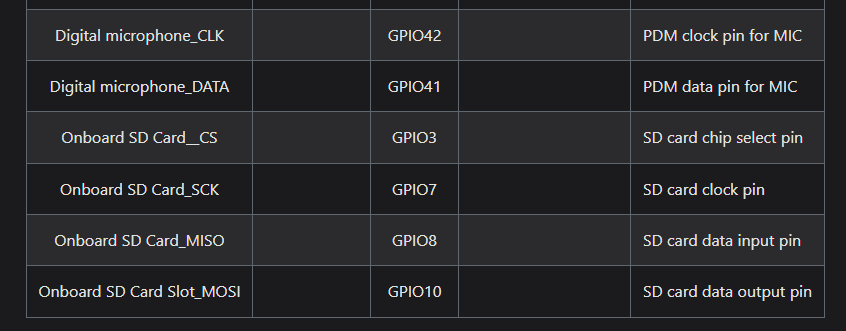
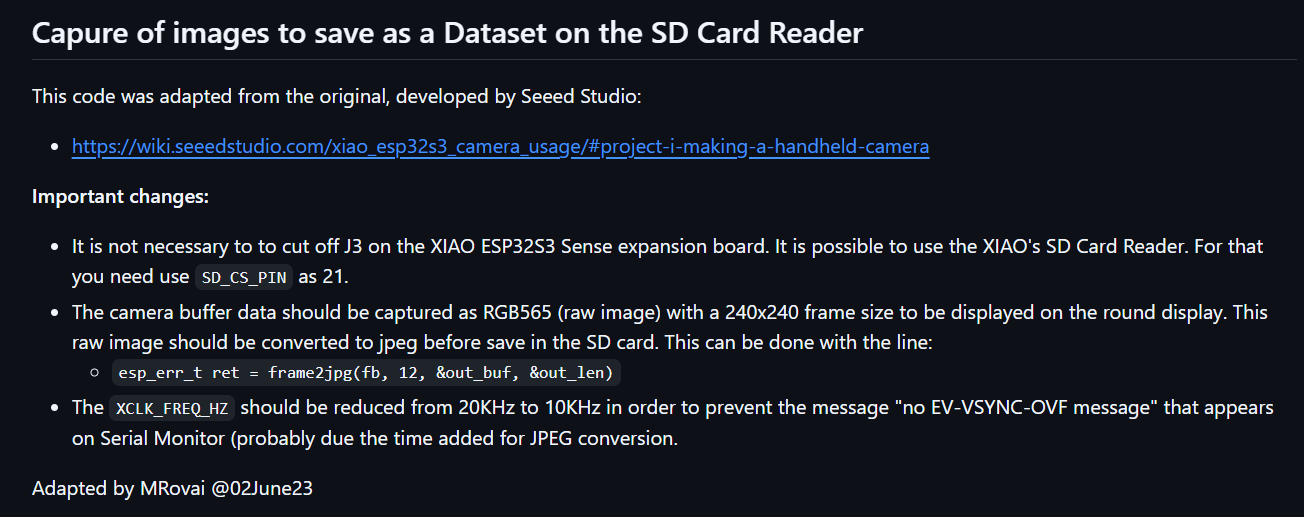
The code works fine and displays the camera output initially, but the board crashes when shutter is pressed. As per the seeedstudio website both the SD card and TFT display share the same SPI pins (GPIO9 for MOSI, GPIO7 for SCLK) and that other SPI functions (TFT display in my case) cannot be used simultaneously with the SD card. The website also points to another github page by MjRovai which states that the SPI conflict can be resolved by defining SD_CS_PIN 21 in the code.

I did that, but the code still doesn’t work.

I have confirmed that the rest of my code works properly by commenting out the initDisplay() in setup() and pushScaledFrame() in loop() to completely turn off the display. Then the image is captured and saved to SD card without any issue when the shutter button is pressed.

I am new to programming with microcontrollers and could really use some help.

TIA.

Hi there,

And Welcome here…

So sounds like your close, You’ll get it. It does work.
What output do you get /or See when you run the UserSelect_Setup.ino in the tools for the TFT_eSPI lib.
Run that code and verify via the Serial output “that it is set the way you think it is”. (probably not) This is where everyone gets hung up. Run that code and report back.
You can check also some of the Round Display Demo’s I have posted with code and different configs for TFT_eSPI.lib

HTH
GL :slight_smile: PJ :v:

I am thinking a chip select on the spi bus…

Hey! Thanks for the reply.

I didn’t find the exact UserSelect_Setup.ino that you mentioned but instead run another test file:
Arduino\libraries\TFT_eSPI\examples\Test and diagnostics\Read_User_Setup\Read_User_Setup.ino

This is the serial output:

TFT_eSPI ver = 2.5.43
Processor    = ESP32
Frequency    = 240MHz
Transactions = Yes
Interface    = SPI
Display driver = 7789
Display width  = 135
Display height = 240

R0 x offset = 52
R0 y offset = 40
MOSI    = GPIO 9
SCK     = GPIO 7
TFT_CS   = GPIO 2
TFT_DC   = GPIO 4
TFT_RST  = GPIO 1

Font GLCD   loaded
Font 2      loaded
Font 4      loaded
Font 6      loaded
Font 7      loaded
Font 8      loaded
Smooth font enabled

Display SPI frequency = 40.00

Please let me know if this if this is correct.

chip select is here

according to the XIAO standard the SD chip select is 2

Hi there,

Yep, Excellent , I must be losing it…With the Setup Select ,LOL
You ran the correct one.
I see it says the driver is the correct config.
The pins would be next, there are caveats when using the Round display with TFT_eSPI.lib, Seeed has also the Round_Display.lib that does some of it behind the scene.
easiest may be to switch the shutter button io pin. There are jumpers to remove or bridge to cut if you want a custom setup.

I see you commented out some portion to run , what about trying it with the round display lib ? and display it on the round screen first.
I feel like the SD pin should be left as it is though, and work out the display part seperatly, maybe read captured image from the SD you saved and display it
only as a display only test?

HTH
GL :slight_smile: PJ :v:

For the xiao-esp32-s3-sense module, the SD chip select is actually on GPIO3.

However, I have assigned SD_CS_PIN to GPIO21 as per this solution:

Hi there,

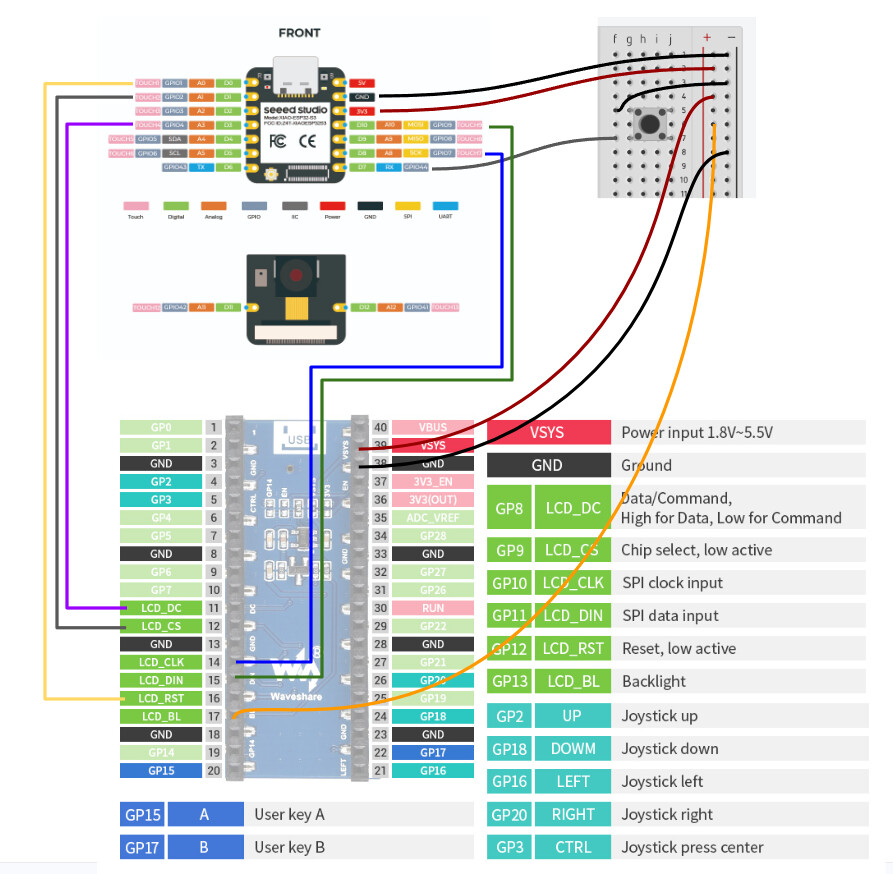
can you post up a picture how it’s connected ?

GL :slight_smile: PJ :v:

FYI , there is 2 SD drives , one on the round display and another on the Sense camera daughter board … so two CS’s … talk about nutty.

1 Like

always remember we are talking about XIAO pins=2

Hey, I am not using the Round display. I have a Waveshare 240x135 rectangular display.

This is how everything is wired up currently.

Hi, if you are talking about the digital pin notation, I have left the D2 pin unoccupied. Please check the wiring diagram which I just posted.

Hi there,

Ok, So that should work but which BSP are you using on the ESP32S3
(first 2 lines compiler output)
Which Package?

HTH
GL :slight_smile: PJ :v:

Also could you post the code and use the code tags “</>” paste it in there.

it this unit.

You may need to init something like this one?
YMMV

#include <SPI.h>
#include <Adafruit_GFX.h>
#include <Adafruit_ST7789.h>

// GPIOs based on your wiring
#define TFT_RST 1
#define TFT_DC 4
#define TFT_CS 2
#define TFT_MOSI 9  // Data out
#define TFT_SCLK 7  // Clock out

Adafruit_ST7789 tft = Adafruit_ST7789(&SPI, TFT_CS, TFT_DC, TFT_RST);

void setup() {
  SPI.begin(TFT_SCLK, TFT_RST, TFT_MOSI, TFT_CS);
  //Serial.begin(115200);
  tft.init(240, 280);

  delay(1000);
  tft.setSPISpeed(10000000);  // 10 MHz max
  tft.setRotation(1);
  tft.fillScreen(ST77XX_BLACK);
  tft.setTextColor(ST77XX_WHITE);
  tft.setTextSize(2);
  tft.setCursor(10, 10);
  tft.println("Hello NV3030B");
}

void loop() {}

:v:

Hi,

Yes that is the display unit which I have.

First few lines of the compiler output are as follows,

FQBN: esp32:esp32:XIAO_ESP32S3:PSRAM=opi
Using board ‘XIAO_ESP32S3’ from platform in folder: C:\Users\witz\AppData\Local\Arduino15\packages\esp32\hardware\esp32\3.0.7
Using core ‘esp32’ from platform in folder: C:\Users\witz\AppData\Local\Arduino15\packages\esp32\hardware\esp32\3.0.7

. 
.
.
.

Serial port COM5
Connecting…
Chip is ESP32-S3 (revision v0.2)
Features: WiFi, BLE
Crystal is 40MHz
.
.
.
.

My full code:

//  Seeedstudio XIAO-ESP32-S3-Sense + Waveshare Pico 240x135 ST7789 display

//------------------------------------------------
// ******** User Setup file for TFT_eSPI *********

// #define ST7789_DRIVER

// #define TFT_WIDTH  135
// #define TFT_HEIGHT 240

// #define TFT_MISO -1
// #define TFT_MOSI  9     
// #define TFT_SCLK  7    
// #define TFT_CS    2     
// #define TFT_DC    4     
// #define TFT_RST   1        
// #define TFT_BACKLIGHT_ON HIGH

// #define SPI_FREQUENCY  40000000

// #define USE_HSPI_PORT

// #define LOAD_GLCD
// #define LOAD_FONT2
// #define LOAD_FONT4
// #define LOAD_FONT6
// #define LOAD_FONT7
// #define LOAD_FONT8
// #define LOAD_GFXFF
// #define SMOOTH_FONT
//-------------------------------------------


#include <esp_camera.h>
#include <SD.h>
#include <TFT_eSPI.h>
#include <img_converters.h>


//-----------------------------------------------------------------------
//defining camera pins for CAMERA_MODEL_XIAO_ESP32S3
#define PWDN_GPIO_NUM     -1
#define RESET_GPIO_NUM    -1
#define XCLK_GPIO_NUM     10
#define SIOD_GPIO_NUM     40
#define SIOC_GPIO_NUM     39

#define Y9_GPIO_NUM       48
#define Y8_GPIO_NUM       11
#define Y7_GPIO_NUM       12
#define Y6_GPIO_NUM       14
#define Y5_GPIO_NUM       16
#define Y4_GPIO_NUM       18
#define Y3_GPIO_NUM       17
#define Y2_GPIO_NUM       15
#define VSYNC_GPIO_NUM    38
#define HREF_GPIO_NUM     47
#define PCLK_GPIO_NUM     13

#define LED_GPIO_NUM      21


//-----------------------------------------------------------------------
//defining SD chip select pin for SD card
#define SD_CS_PIN 21


//-----------------------------------------------------------------------
//  code to initialize camera
void initCamera(){
  camera_config_t config;
  config.ledc_channel = LEDC_CHANNEL_0;
  config.ledc_timer = LEDC_TIMER_0;
  config.pin_d0 = Y2_GPIO_NUM;
  config.pin_d1 = Y3_GPIO_NUM;
  config.pin_d2 = Y4_GPIO_NUM;
  config.pin_d3 = Y5_GPIO_NUM;
  config.pin_d4 = Y6_GPIO_NUM;
  config.pin_d5 = Y7_GPIO_NUM;
  config.pin_d6 = Y8_GPIO_NUM;
  config.pin_d7 = Y9_GPIO_NUM;
  config.pin_xclk = XCLK_GPIO_NUM;
  config.pin_pclk = PCLK_GPIO_NUM;
  config.pin_vsync = VSYNC_GPIO_NUM;
  config.pin_href = HREF_GPIO_NUM;
  config.pin_sccb_sda = SIOD_GPIO_NUM;
  config.pin_sccb_scl = SIOC_GPIO_NUM;
  config.pin_pwdn = PWDN_GPIO_NUM;
  config.pin_reset = RESET_GPIO_NUM;
  config.xclk_freq_hz = 20000000;
  config.frame_size = FRAMESIZE_QVGA;
  // config.pixel_format = PIXFORMAT_JPEG;
  config.pixel_format = PIXFORMAT_RGB565;
  config.grab_mode = CAMERA_GRAB_WHEN_EMPTY;
  config.fb_location = CAMERA_FB_IN_PSRAM;
  config.jpeg_quality = 12;
  config.fb_count = 1;

  // camera initialization and error handling
  esp_err_t err = esp_camera_init(&config);
  if (err != ESP_OK) {
    Serial.printf("Camera init failed with error 0x%x", err);
    return;
  }

  //getting sensor details
  sensor_t *s = esp_camera_sensor_get();
  Serial.println("Camera Started. PID is");
  Serial.println(s->id.PID, HEX);
}


//-----------------------------------------------------------------------
//  code to initialize SD card
int photoIndex = 0;

void initSD() {
  if (SD.begin(SD_CS_PIN)) {
    uint64_t cardSize = SD.cardSize() / (1024 * 1024);
    Serial.printf("SD mounted. Size: %lluMB\n", cardSize);
  } else {
    Serial.println("SD not found");
  }

  if (!SD.exists("/photos")) {
    SD.mkdir("/photos");
    Serial.println("/photos created.");
  }

  // Find next available index
  while (true) {
    char path[32];
    sprintf(path, "/photos/img_%04d.jpg", photoIndex);
    if (!SD.exists(path)) break;
    photoIndex++;
  }
  Serial.printf("Next photo index: %d\n", photoIndex);

}


//-----------------------------------------------------------------------
//  code to initialize TFT display
TFT_eSPI tft = TFT_eSPI();

void initDisplay() {
  tft.init();
  tft.setRotation(1);
  tft.fillScreen(TFT_BLACK);
  tft.setTextColor(TFT_WHITE);
  tft.setTextSize(2);
  tft.setCursor(65, 50);
  tft.print("Display OK");
  delay(2000);
}


//-----------------------------------------------------------------------
//  code to scale the QVGA frame and send to TFT display
#define DISPLAY_W  240
#define DISPLAY_H  135
#define SRC_W      320 //QVGA frame width
#define SRC_H      240 //QVGA frame height
#define SCALED_W   180
#define SCALED_H   135
#define OFFSET_X   30
#define OFFSET_Y   0
static uint16_t lineBuf[SCALED_W];

void pushScaledFrame(uint16_t *buf) {
  tft.startWrite();
  for (int y = 0; y < SCALED_H; y++) {
    int srcY = (y * SRC_H) / SCALED_H;
    for (int x = 0; x < SCALED_W; x++) {
      int srcX = (x * SRC_W) / SCALED_W;
      lineBuf[x] = buf[srcY * SRC_W + srcX];
    }
    tft.pushImage(OFFSET_X, y, SCALED_W, 1, lineBuf);
  }
  tft.endWrite();
}


//-----------------------------------------------------------------------
//  code to convert RGB565 frame to JPG and save to SD card
#define SHUTTER_PIN 44

void captureAndSave(camera_fb_t *fb) {
  uint8_t *jpegBuf = NULL;
  size_t   jpegLen = 0;

  // Convert RGB565 → JPEG
  bool ok = frame2jpg(fb, 90, &jpegBuf, &jpegLen);
  esp_camera_fb_return(fb);

  if (!ok || !jpegBuf) {
    Serial.println("JPEG conversion failed.");
    return;
  }

  char path[32];
  sprintf(path, "/photos/img_%04d.jpg", photoIndex);
  File file = SD.open(path, FILE_WRITE);
  if (!file) {
    free(jpegBuf);
    return;
  }
  file.write(jpegBuf, jpegLen);
  file.close();
  free(jpegBuf);

  Serial.printf("Saved: %s (%d bytes)\n", path, jpegLen);
  photoIndex++;
}


//-----------------------------------------------------------------------
//-----------------------------------------------------------------------
void setup() {
  Serial.begin(115200);

  initCamera();

  initSD();

  initDisplay();

  pinMode(SHUTTER_PIN, INPUT_PULLUP);

}


//-----------------------------------------------------------------------
//-----------------------------------------------------------------------
void loop() {


  camera_fb_t *fb = esp_camera_fb_get();  //get frame from camera buffer

  if (!fb) {
    Serial.println("Frame capture failed");
    delay(100);
    return;

  }else {
    pushScaledFrame((uint16_t *)fb->buf); //display the frame on screen
  
    if(digitalRead(SHUTTER_PIN) == LOW){ //capture when shutter button is pressed
      Serial.println("Shutter Pressed");
      captureAndSave(fb);

      while(digitalRead(SHUTTER_PIN) == LOW); //while loop ends when button is released
    }

    esp_camera_fb_return(fb); //return frame to camera buffer and continue the loop
  }

}

Also, just so that we are on the same page, the initDisplay() on my code works fine. It shows Display OK on the TFT display at the start, holds for two seconds and switches to the camera stream (which is called in the loop).

Hi there,

Ok, SO good to know.
Looks like you are returning the same frame buffer twice when the shutter is pressed.

In captureAndSave():
and again in the Loop ? 'esp_camera_fb_return(fb)`;

Fix that it should work, but also
Do not use GPIO21 for LED control while the SD card is mounted, because that pin is the SD card CS on XIAO ESP32S3 Sense. AFAIK :crossed_fingers:

HTH

GL :slight_smile: PJ :v:

You appear to be clobbering the frame buffer ?
I’d also make the SPI setup explicit before initializing either device:

SPI.begin(7, 8, 9, -1);

SPI bus contention could be problem #2 that will set it.
Then:

  • initialize TFT
  • initialize SD with SD.begin(21)
    let loop() be the only place that returns the frame.

GO :grin:

Hi, thanks for pointing out my mistake with the frame buffer. I have changed that to only return once in the loop.

I also removed #define LED_GPIO_NUM 21

Further I included the <SPI.h> library and modified the setup() to:

void setup() {
  Serial.begin(115200);

  SPI.begin(7, 8, 9, -1);

  initCamera();

  initDisplay();
  
  initSD();

  pinMode(SHUTTER_PIN, INPUT_PULLUP);

}

Now the serial output is
Camera Started. PID is
26

And then Display OK is shown on the TFT display.

Next thing that should ideally be printed in the serial monitor is either the output of:

Serial.printf(“SD mounted. Size: %lluMB\n”, cardSize);

or

Serial.println(“SD not found”);

but it just doesn’t print anything in my case, meaning that it crashes right after the first line of initSD() which is: if (SD.begin(SD_CS_PIN))