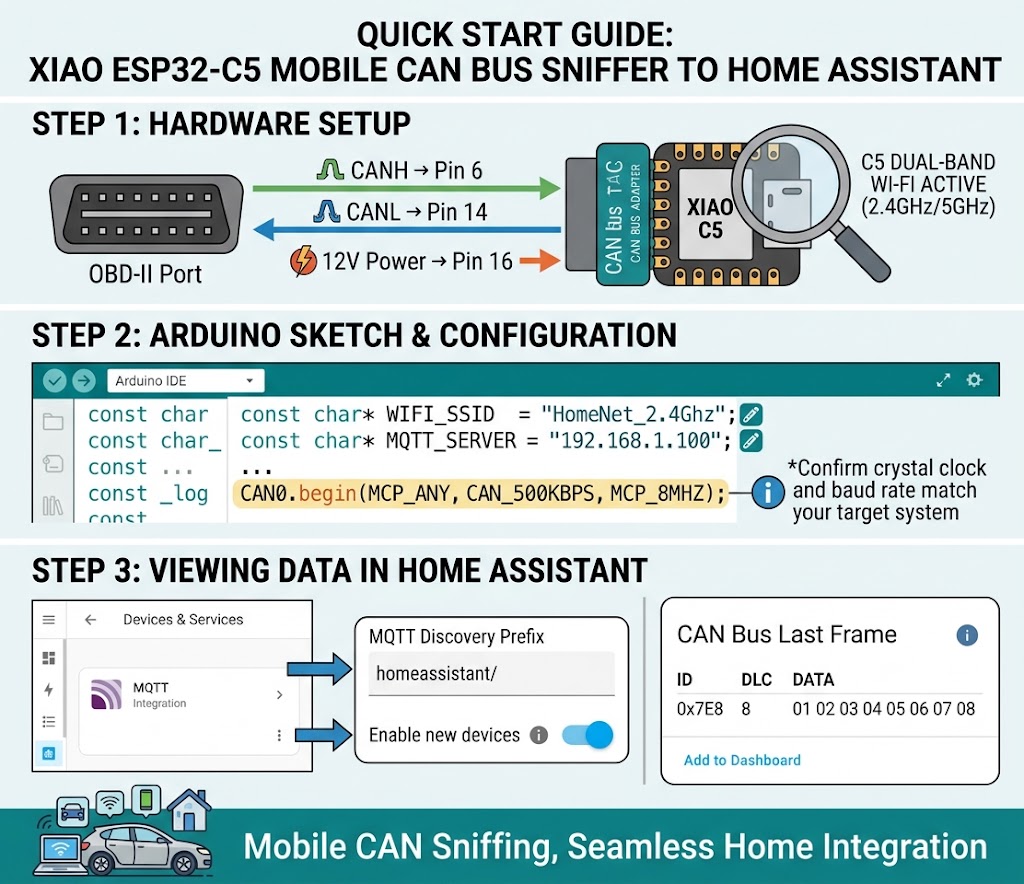
Hi there,
So,
Asked if I could make a Xiao Can-sniffer wireless…

Shure… 
Turns out Home Assistant in the Garage is a THING!
You can choose to use MQTT, or HA -API…
Looks like this; with C5 5Ghz. WIFI.
This Arduino sketch reads raw CAN bus frames via the MCP2515 SPI controller and publishes them directly to Home Assistant over MQTT using standard JSON payloads. It also publishes Home Assistant MQTT Discovery configs on boot, so sensor entities appear automatically in your dashboard.
Required Libraries
mcp_can (by Cory J. Fowler / Seeed)
PubSubClient (by Nick O’Leary)
ArduinoJson (by Benoît Blanchon)
WiFi (built into ESP32 board package)
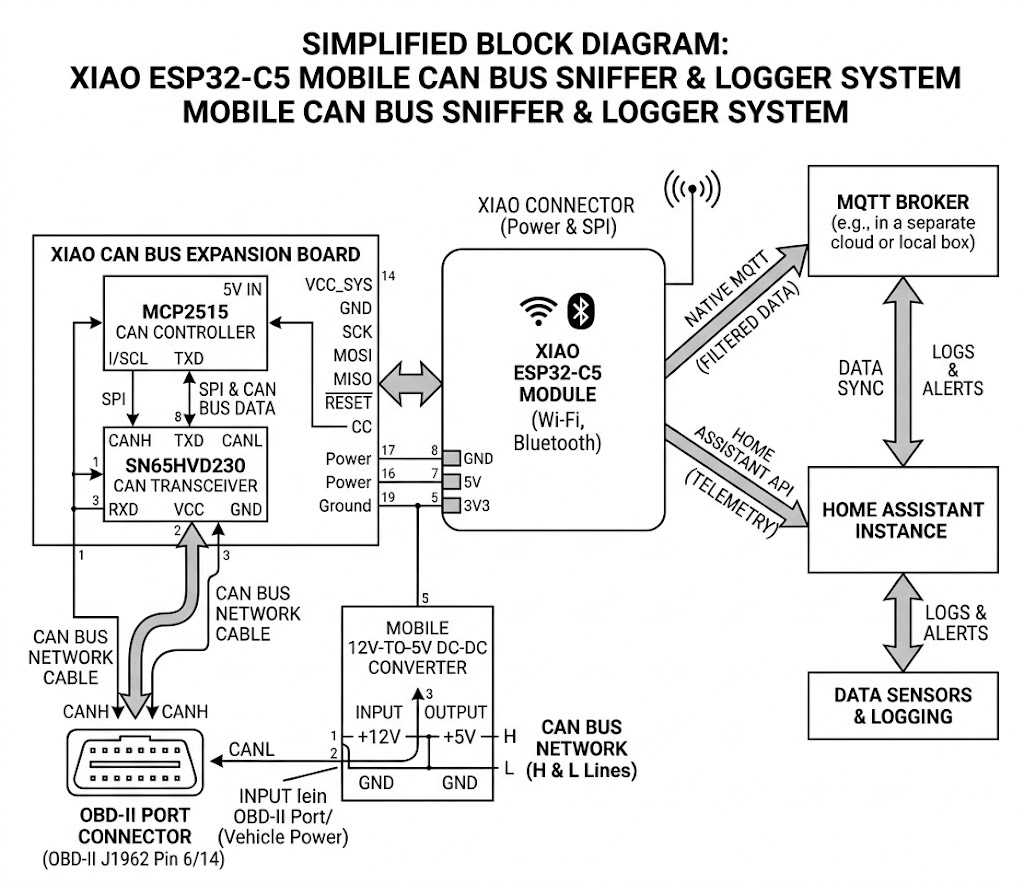
Here is the hardware, minus a cable and Power supply..

Here is the code…
/* =========================================================================================
 * Project:        XIAO_CAN_SNIFF - Mobile CAN Bus Sniffer & HA Gateway
 * Platform:       Seeed Studio XIAO ESP32-C5 (Dual-Band 2.4/5GHz Wi-Fi)
 * Module:         Seeed Studio XIAO CAN Bus Expansion Board (MCP2515 + SN65HVD230)
 *
 * Author:         PJGlasso (The22v10)
 * Co-Author/AI:   Gemini (Google AI)
 * Generated with: Google Gemini (Code Generation & Documentation)
 *
 * Description:
 *  - Intercepts and parses high-speed raw CAN frames (500 kbps / 8MHz crystal clock).
 *  - Connects via dual-band Wi-Fi to a local Home Assistant MQTT Broker.
 *  - Automatically registers sensor entities on boot via Home Assistant MQTT Auto-Discovery.
 *  - Streams formatted JSON telemetry payloads to 'homeassistant/sensor/xiao_can/state'.
 *
 * Hardware Wiring / Pin Mapping:
 *  - SPI MOSI / MISO / SCK : XIAO Default SPI Bus
 *  - MCP2515 CS Pin        : D1
 *  - MCP2515 INT Pin       : D2
 *  - CAN H / CAN L         : Connect to OBD-II Pins 6 & 14 (or CAN High / Low lines)
 *  - Power Input           : 12V OBD-II VCC (Pin 16) -> 5V Step-Down -> XIAO 5V Pin
 *
 * Dependencies:
 *  - mcp_can (Cory J. Fowler / Seeed Studio)
 *  - PubSubClient (Nick O'Leary)
 *  - ArduinoJson (Benoît Blanchon)
 *  - WiFi (ESP32 Board Core)
 * ========================================================================================= */
#include <WiFi.h>
#include <PubSubClient.h>
#include <SPI.h>
#include <mcp_can.h>
#include <ArduinoJson.h>

// --- Network & MQTT Settings ---
const char* WIFI_SSID     = "YOUR_WIFI_SSID";
const char* WIFI_PASSWORD = "YOUR_WIFI_PASSWORD";
const char* MQTT_SERVER   = "192.168.1.100"; // Home Assistant / Mosquitto IP
const int   MQTT_PORT     = 1883;
const char* MQTT_USER     = "mqtt_user";
const char* MQTT_PASSWORD = "mqtt_password";

// --- Hardware Pins (XIAO Standard SPI) ---
const int CAN_CS_PIN  = D1; // Chip Select for MCP2515
const int CAN_INT_PIN = D2; // Interrupt Pin

MCP_CAN CAN0(CAN_CS_PIN);
WiFiClient espClient;
PubSubClient client(espClient);

// Buffer for CAN data
unsigned long rxId;
byte len = 0;
byte rxBuf[8];

void publishHADiscovery() {
  // Discovery config for a CAN Sniffer sensor in Home Assistant
  StaticJsonDocument<300> doc;
  doc["name"] = "CAN Bus Last Frame";
  doc["state_topic"] = "homeassistant/sensor/xiao_can/state";
  doc["value_template"] = "{{ value_json.id_hex }} [{{ value_json.data }}]";
  doc["unique_id"] = "xiao_esp32c5_can_last_frame";
  doc["icon"] = "mdi:car-connected";

  JsonObject dev = doc.createNestedObject("device");
  dev["identifiers"][0] = "xiao_esp32c5_can_bridge";
  dev["name"] = "XIAO C5 CAN Bridge";
  dev["model"] = "XIAO ESP32-C5 CAN Sniffer";
  dev["manufacturer"] = "Seeed Studio";

  char payload[350];
  serializeJson(doc, payload);
  client.publish("homeassistant/sensor/xiao_can/config", payload, true);
}

void setupWifi() {
  Serial.print("Connecting to Wi-Fi...");
  WiFi.begin(WIFI_SSID, WIFI_PASSWORD);
  while (WiFi.status() != WL_CONNECTED) {
    delay(500);
    Serial.print(".");
  }
  Serial.println("\nWi-Fi Connected!");
}

void reconnectMqtt() {
  while (!client.connected()) {
    Serial.print("Connecting to MQTT...");
    if (client.connect("XiaoESP32C5_CAN", MQTT_USER, MQTT_PASSWORD)) {
      Serial.println("connected.");
      publishHADiscovery();
    } else {
      Serial.print("failed, rc=");
      Serial.print(client.state());
      delay(2000);
    }
  }
}

void setup() {
  Serial.begin(115200);
  pinMode(CAN_INT_PIN, INPUT);

  setupWifi();
  client.setServer(MQTT_SERVER, MQTT_PORT);

  // Initialize MCP2515: 500kbps / 8MHz crystal (adjust crystal clock to match your board: 8MHz or 16MHz)
  if (CAN0.begin(MCP_ANY, CAN_500KBPS, MCP_8MHZ) == CAN_OK) {
    Serial.println("MCP2515 Initialized Successfully!");
  } else {
    Serial.println("Error Initializing MCP2515...");
  }

  CAN0.setMode(MCP_NORMAL); // Set to MCP_LISTENONLY if you want a passive sniffer
}

void loop() {
  if (!client.connected()) {
    reconnectMqtt();
  }
  client.loop();

  // Check if CAN frame received
  if (!digitalRead(CAN_INT_PIN)) {
    CAN0.readMsgBuf(&rxId, &len, rxBuf);

    char idStr[10];
    snprintf(idStr, sizeof(idStr), "0x%03lX", (rxId & 0x1FFFFFFF));

    String dataHex = "";
    for (byte i = 0; i < len; i++) {
      char byteBuf[4];
      snprintf(byteBuf, sizeof(byteBuf), "%02X ", rxBuf[i]);
      dataHex += byteBuf;
    }
    dataHex.trim();

    // Package into JSON for Home Assistant
    StaticJsonDocument<200> jsonDoc;
    jsonDoc["id_hex"] = idStr;
    jsonDoc["dlc"] = len;
    jsonDoc["data"] = dataHex;

    char output[200];
    serializeJson(jsonDoc, output);

    client.publish("homeassistant/sensor/xiao_can/state", output);

    // Optional: parse specific PIDs/IDs directly (e.g., standard OBD RPM/Speed or Custom Broadcasts)
    /*
    if (rxId == 0x7E8 && rxBuf[2] == 0x0D) { // Example OBD-II Speed Response
      int speed_kmh = rxBuf[3];
      client.publish("homeassistant/sensor/vehicle_speed/state", String(speed_kmh).c_str());
    }
    */
  }
}
HTH
GL  PJ
PJ 
You can add stuff like the SD logging that’s a WIP now, but RPM, TEMPS, engine load etc, go NUTZ 
| PID | Metric | Formula | Output Unit |
|---|---|---|---|
| 0x04 | Engine Load | A * 100 / 255 |
% |
| 0x05 | Coolant Temp | A - 40 |
°C |
| 0x0C | Engine RPM | ((A * 256) + B) / 4 |
RPM |
| 0x0D | Speed | A |
km/h |
| 0x11 | Throttle Position | A * 100 / 255 |
% |
| 0x2F | Fuel Tank Level | A * 100 / 255 |
% |
Don’t forget the DAM 120 ohm resistor (P1), you may need it, Don’t ask ..