WM1302 - issue with GPS signal

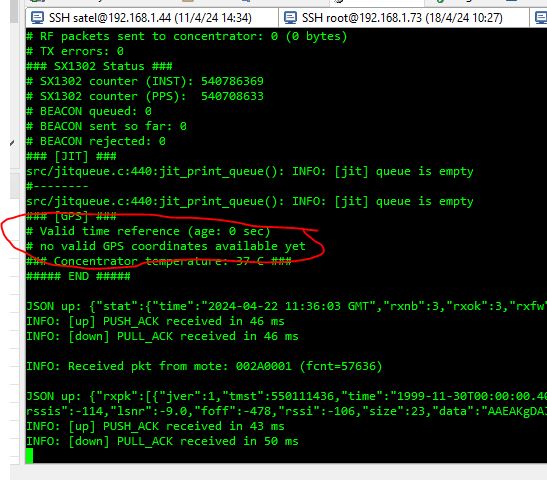
I have a Raspberri Pi with Pi HAT & WM1302. And doesn’t work GPS, don’t receive valid GPS coordinates.
I doubt about RF input signal of GPS. I have change type of GPS antenna (ceramic antenna by default) by other one with better resolution and gain.

Anybody know what happend?

I have the same issue.

When I look at what comes in over the serial port I see this when I run sudo cat /dev/ttyS0

$GNGLL,3814.94468,N,08432.27926,W,193003.000,A,A*51

$GNGSA,A,3,01,02,10,12,23,24,25,28,31,32,,,1.1,0.6,1.0,1*3E

$GNGSA,A,3,78,82,77,69,84,83,67,68,,,,,1.1,0.6,1.0,2*37

$GPGSV,3,1,12,01,06,325,32,02,24,309,33,10,79,061,39,12,19,087,23,0*6F

$GPGSV,3,2,12,13,,,34,18,,,32,23,47,118,42,24,13,045,15,0*67

$GPGSV,3,3,12,25,22,125,36,28,40,205,44,31,11,211,41,32,61,304,42,0*69

$GLGSV,3,1,10,78,37,131,38,66,,,35,82,14,203,36,77,35,056,28,0*4B

$GLGSV,3,2,10,76,,,22,69,17,289,35,84,24,319,23,83,40,256,42,0*4C

$GLGSV,3,3,10,67,39,055,27,68,51,336,34,0*7D

$GNRMC,193003.000,A,3814.94468,N,08432.27926,W,0.00,124.36,060826,,,A,V*14

$GNVTG,124.36,T,,M,0.00,N,0.00,K,A*21

$GNZDA,193003.000,06,08,2026,00,00*48

$GPTXT,01,01,01,ANTENNA OK*35

~b              { $GNGGA,193004.000,3814.94467,N,08432.27926,W,1,18,0.6,286.5,M,-34.4,M,,*74

$GNGLL,3814.94467,N,08432.27926,W,193004.000,A,A*59

$GNGSA,A,3,01,02,10,12,23,24,25,28,31,32,,,1.1,0.6,1.0,1*3E

$GNGSA,A,3,78,82,77,69,84,83,67,68,,,,,1.1,0.6,1.0,2*37

$GPGSV,3,1,12,01,06,324,29,02,24,309,32,10,79,061,39,12,19,087,23,0*65

$GPGSV,3,2,12,13,,,34,18,,,33,23,47,118,41,24,13,045,18,0*68

$GPGSV,3,3,12,25,22,125,36,28,40,205,44,31,11,211,41,32,61,304,42,0*69

$GLGSV,3,1,10,78,37,131,38,66,,,35,82,14,203,36,77,35,056,28,0*4B

$GLGSV,3,2,10,76,,,22,69,17,289,35,84,24,319,23,83,40,256,40,0*4E

$GLGSV,3,3,10,67,39,055,26,68,51,336,34,0*7C

$GNRMC,193004.000,A,3814.94467,N,08432.27926,W,0.00,124.36,060826,,,A,V*1C

$GNVTG,124.36,T,,M,0.00,N,0.00,K,A*21

$GNZDA,193004.000,06,08,2026,00,00*4F

$GPTXT,01,01,^X01,ANTENNA OK*35
Hi there,

And Welcome Here…

So Looking at the raw NMEA log posted, the GPS data is actually completely valid and has a full 3D location fix.

Here is what the NMEA sentence breakdown shows:


NMEA Stream Analysis

  • Fix Status ($GNRMC / $GNGLL):

    • $GNRMC,193003.000,A,3814.94468,N,08432.27926,W...

    • The A flag right after the UTC time means Active / Valid Fix. (If it were invalid or searching, it would display V for Void).

  • Position Coordinates:

    • Latitude: 38, 14.94468 N (38.249078)

    • Longitude: 84, 32.27926 W (-84.537987)

    • Altitude ($GNGGA): $286.5 meters above mean sea level.

  • Satellite Tracking ($GNGSA / $GPGSV / $GLGSV):

    • Fix Quality: $GNGSA,A,3,... indicates a 3D fix.

    • Satellites in Use: Tracking 18 satellites total across GPS (US) and GLONASS (Russian) constellations.

    • Dilution of Precision: PDOP 1.1, HDOP 0.6, VDOP 1.0. An HDOP of 0.6 is exceptionally precise (anything under 2.0 is considered ideal for high-accuracy tracking).

  • Hardware Diagnostics ($GPTXT):

    • $GPTXT,01,01,01,ANTENNA OK*35 confirms the GNSS module detects a working active antenna with no short or open circuit.

Your close it’s probably the Lora Side.
:grin:

Why the User Thinks it’s Broken

  1. Raw Serial Garbage Characters (~b { or ^X01):

    • When running sudo cat /dev/ttyS0, baud rate glitches or initial buffer flush bytes often appear as weird characters before the $GNGGA sentence.
  2. Parser Expecting $GPGGA Instead of $GNGGA:

    • Modern multi-constellation GNSS receivers output $GNGGA / $GNRMC (GN = Multi-GNSS) rather than legacy $GPGGA / $GPRMC (GP = GPS only).

    • If the LoRaWAN gateway software (like ChirpStack or packet_forwarder) is configured with a strict legacy regex expecting $GP..., it will ignore the $GN... sentences and report “No GPS Fix”. :backhand_index_pointing_left: :winking_face_with_tongue:

Verdict: The GPS hardware and RF signal are working fine; any issue is purely on the software parser side expecting legacy NMEA prefixes or getting tripped up by initial serial garbage bytes.

The Fix is to Flush the serial port b4 hand and check the global_conf.json and or local_conf.json of your packet forwarder for the GPS speeds, most defualt to 115200, btw :+1:

HTH
GL :slight_smile: PJ :v: