Hi there,
Oh , YEA! well It’s even Better with the Nrf52840 PLUS version , EN05


GL  PJ

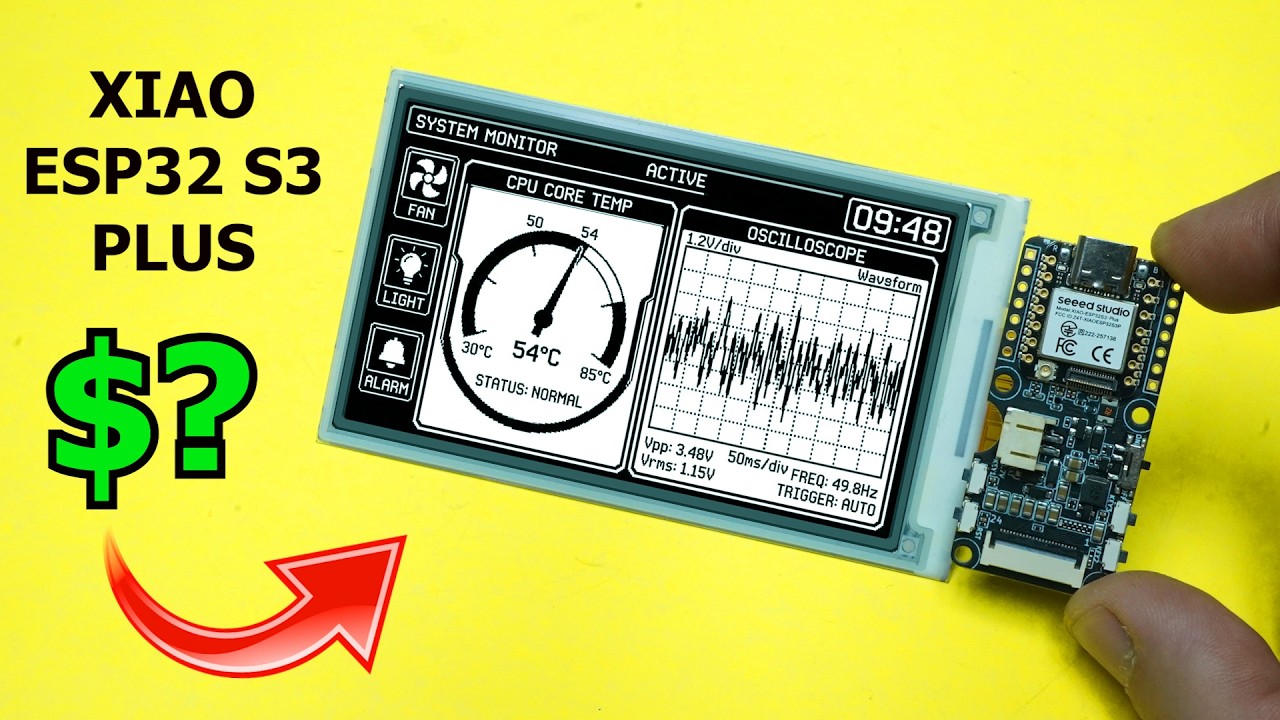
I just thought… the epaper display might be good for the dam pond project
Hi there,
Great for Zero power Local Display requirement is met , But mostly for Signs.
The Dam data is too dynamic IMO, I would have a Sensor node and remote console. Deluxe edition or Basic Version.
Deluxe= SBC (orangePi 3W) remote monitor & control capable. Full scenerio.
Basic= Xiao S3 MCU on Expansion Base , serving a Webpage of basic data. Temp/Flow/Debris levels.
the 'KISS" version.
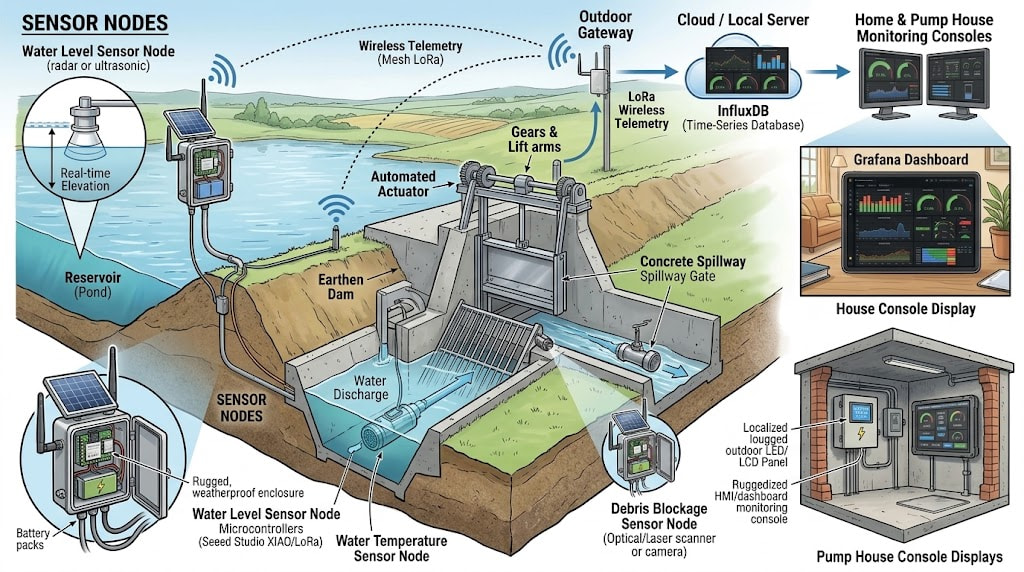
You want this;
System Architecture & Control Loop
1. Sensor Node Array (At the Dam & Spillway)
-
Pond Level (Hydrostatic / Radar): A submersible 4–20 mA pressure transducer inside a slotted PVC stilling well (or non-contact radar aimed at the pond surface) measures true pool elevation, completely immune to floating debris or surface ripples.
-
Spillway Crest & Debris Detection: An ultrasonic/optical distance sensor mounted over the spillway lip monitors crest clearance. If the pond level rises but the spillway depth drops or shows turbulence, the system flags a debris blockage event.
-
Downstream Flow & Water Temp: A Doppler flow meter or flume level sensor downstream verifies whether water is physically exiting when the spillway is supposedly passing water, cross-checked with a submerged DS18B20 or PT100 temperature probe.
-
Wireless Telemetry: A solar-powered field node (e.g., XIAO nRF52840 or ESP32-C6) broadcasts encrypted telemetry packets over LoRa (Sub-GHz) or ESP-NOW back to the facility.
2. Actuation & Local Control (Pump House)
-
Motorized Sluice / Flood Gate: A 12V/24V linear actuator or gearhead motor drives the overflow flood gate with limit switches for positive position feedback (0% to 100% stroke).
-
Pump House Local Controller: An ESP32 / industrial PLC receives the sensor packets, logs local states, and drives motor contactors.
-
Fail-Safe Logic: If communications drop or the spillway debris flag trips while the pond hits flood stage, the controller automatically commands the gate open locally—no cloud dependence required.
3. Data Ingestion & Storage (InfluxDB)
-
Telemetry from the field node and actuator controllers publishes over local MQTT to a lightweight broker (Mosquitto).
-
Telegraf or a simple local Python bridge ingests metrics into a time-series InfluxDB bucket (
pond_level_in,spillway_clearance_in,downstream_flow_gpm,gate_position_pct,water_temp_c).
4. Visualization & Control (Grafana Console)
-
House Console / Pump House Web Display: An active touch panel or browser kiosk runs a real-time Grafana dashboard.
-
Gauges & Trends: Displays real-time water elevation with colored high/low thresholds, flow rate vs. crest height, and historic rainfall accumulation curves.
-
Manual Override & Feedback: Discrete Grafana button panels or Node-RED web widgets send MQTT override commands to open, close, or stop the flood gate directly from the comfort of the house.
and the data ;

Here is the setup we talked about.
Local, NO Internet Required. Batteries NOT included
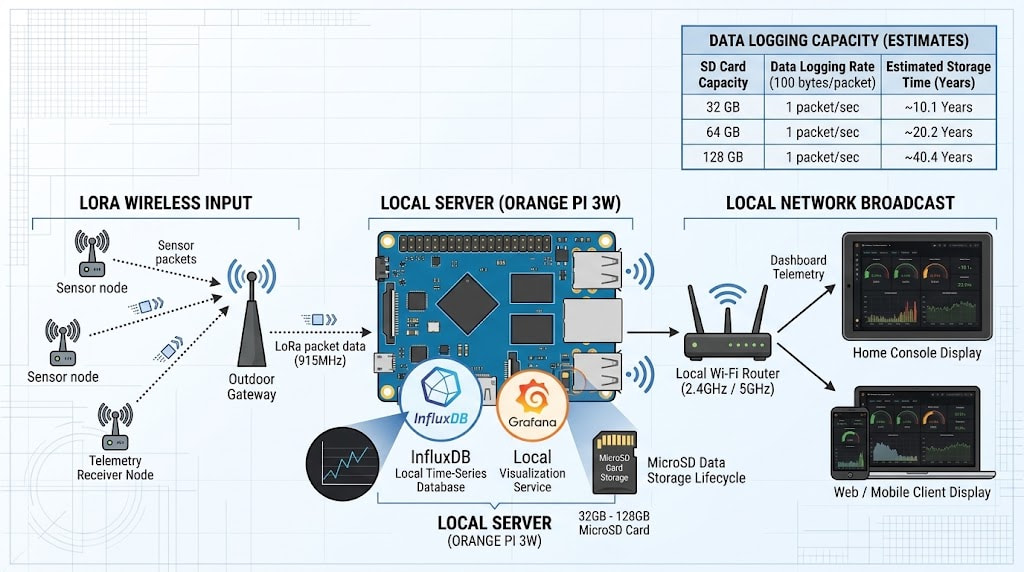
or a complete Seeed solution too.
Like this “KISS” Version;
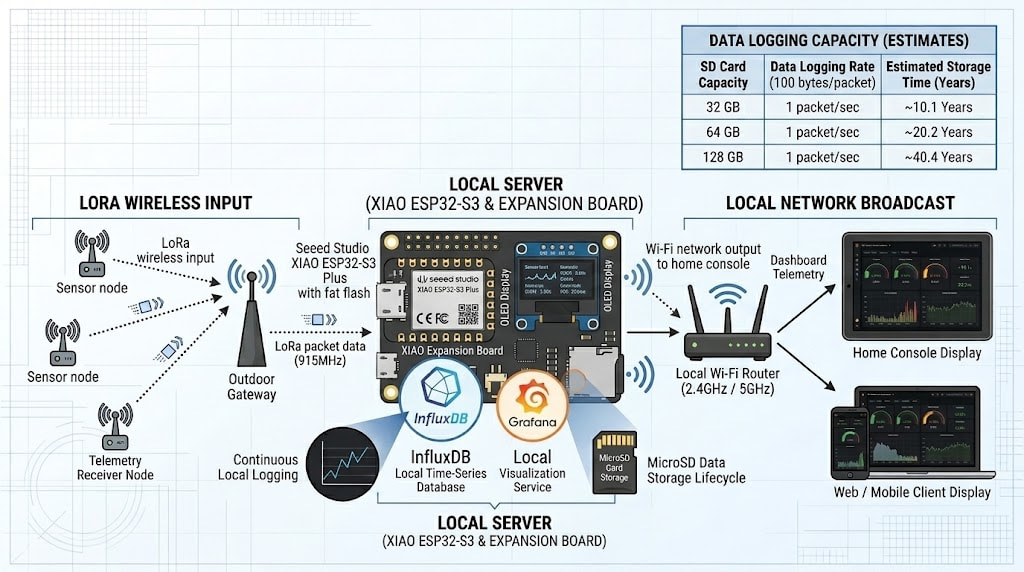
Get busy… should take about a day once all the hardware arrives, Prove the concept.. Test one sensor, even a temp sensor, collect the data to the Xiao expansion board (S3 or +Plus) Host the Web page and make it reachable. (STEP) 1.
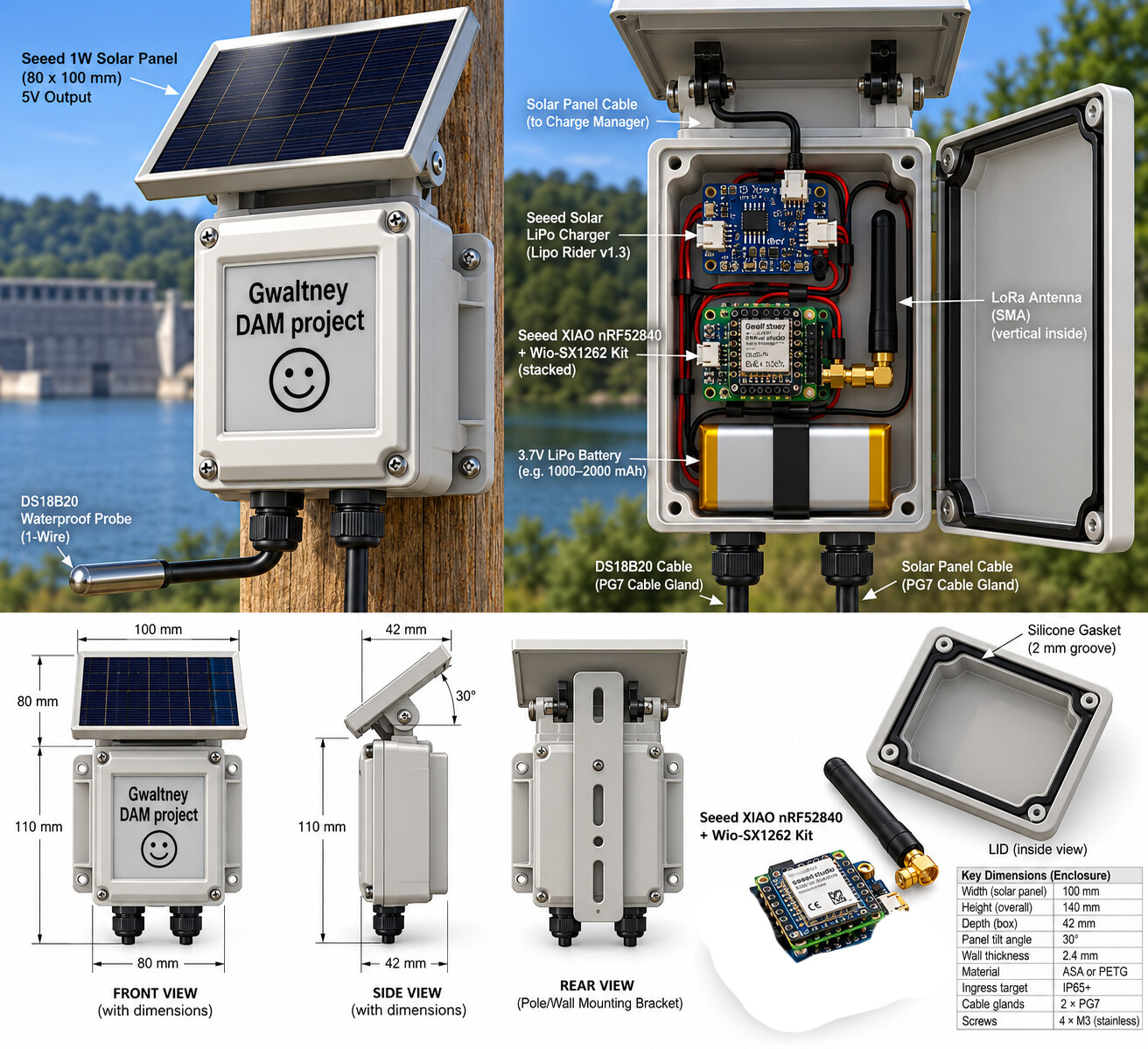
Had they not fumbled the Lora Bag on the All-in-One’s mini-display units.
We could have had one like this 
LOL
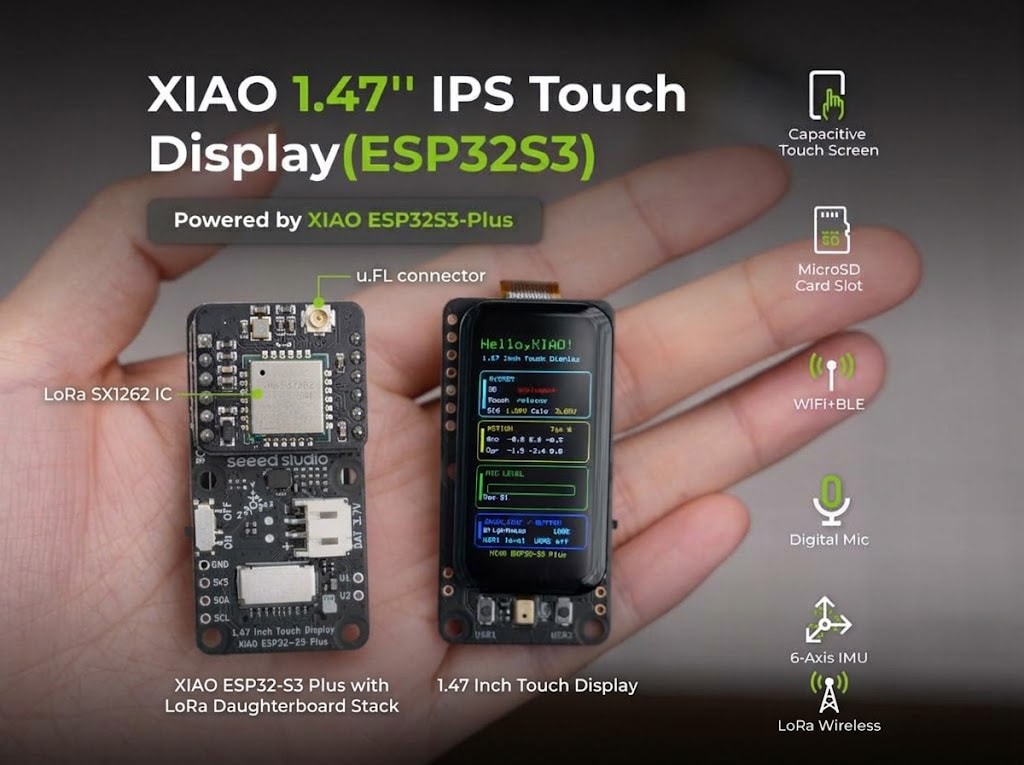
I love AI…
HTH
GL PJ
You got all the hardware probably to do the proof of concept now.
Hi there,
SO, Here is a starting point to show them.
This Page is served by XiaoS3
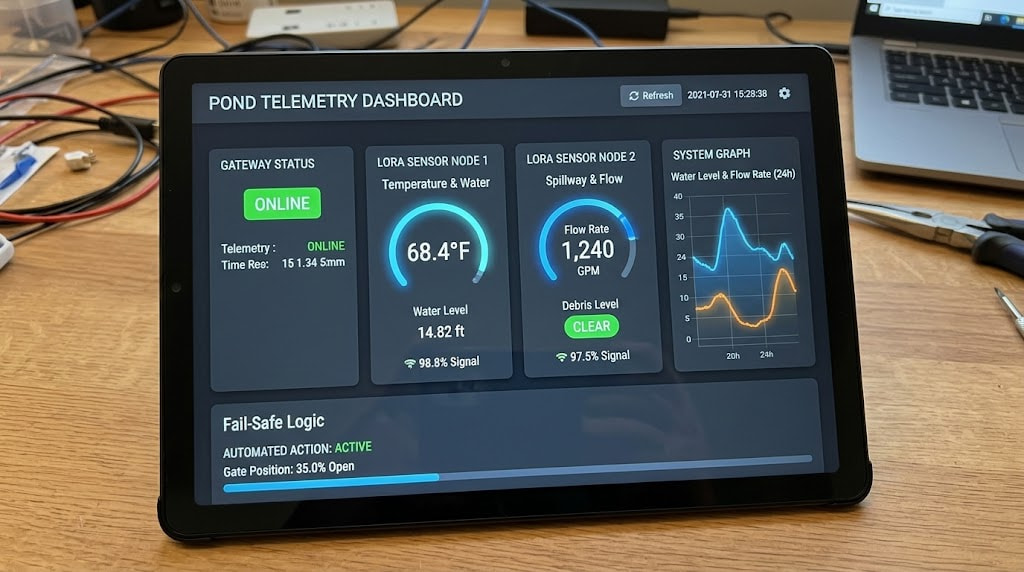
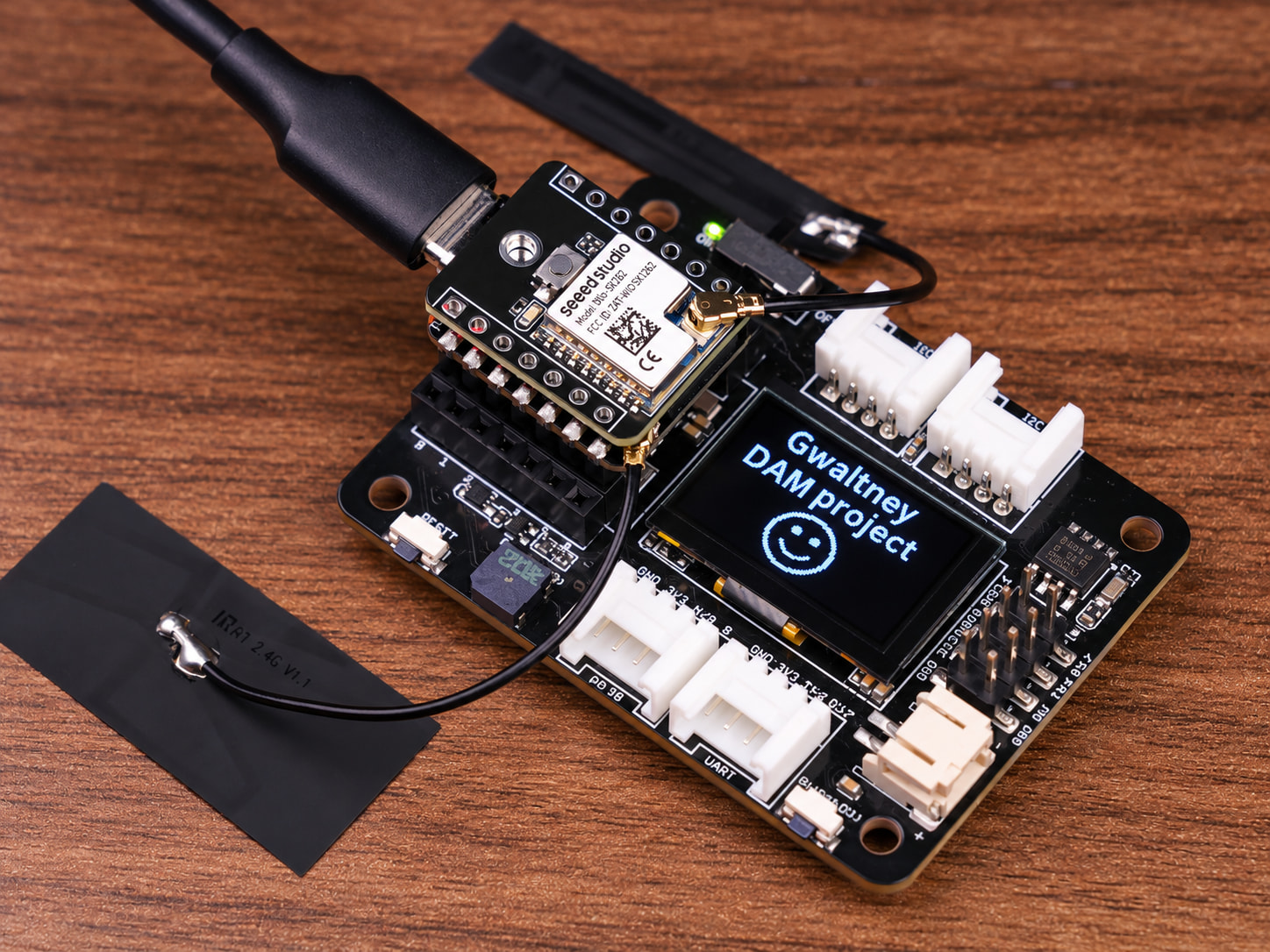
Complete Arduino Sketch (XIAO ESP32-S3 + LoRa + Embedded Web Server)
This sketch handles:
-
Receiving LoRa packets from Node 1 (Water Temp) and Node 2 (Spillway Flow).
-
Storing the latest values, timestamps, and RSSI in RAM.
-
Connecting to local Wi-Fi and running a lightweight asynchronous web server.
-
Serving a clean, mobile-responsive dark dashboard with automatic background fetch updates (
/api/dataJSON endpoint) every 3 seconds—no page reloads required.
// ==============================================================================
// PROJECT: XIAO ESP32-S3 LoRa Receiver & Local Web Server Console
// HARDWARE: Seeed Studio XIAO ESP32-S3 + SX1262 / RFM95 LoRa Module
// LIBRARIES: RadioLib (by Jan Gromes)
// ESPAsyncWebServer & AsyncTCP (or WebServer.h built-in)
// ==============================================================================
#include <WiFi.h>
#include <WebServer.h>
#include <RadioLib.h>
// Wi-Fi Credentials (or set up as SoftAP)
const char* ssid = "YOUR_WIFI_SSID";
const char* password = "YOUR_WIFI_PASS";
// Web Server on Port 80
WebServer server(80);
// Hardware Pin Configuration for SX1262 on XIAO S3
// (Adjust if using different pins on your carrier board)
#define LORA_CS D1
#define LORA_DIO1 D2
#define LORA_RST D3
#define LORA_BUSY D0
SX1262 radio = new Module(LORA_CS, LORA_DIO1, LORA_RST, LORA_BUSY);
// Sensor Data Structs
struct SensorData {
float value;
int rssi;
unsigned long lastSeen;
bool active;
};
SensorData nodeTemp = {0.0, 0, 0, false};
SensorData nodeFlow = {0.0, 0, 0, false};
// HTML / CSS / JS Embedded Dashboard
const char INDEX_HTML[] PROGMEM = R"rawliteral(
<!DOCTYPE html>
<html lang="en">
<head>
<meta charset="UTF-8">
<meta name="viewport" content="width=device-width, initial-scale=1.0">
<title>Pond & Spillway Monitor</title>
<style>
* { box-sizing: border-box; margin: 0; padding: 0; }
body {
font-family: -apple-system, BlinkMacSystemFont, "Segoe UI", Roboto, sans-serif;
background-color: #0d1117;
color: #c9d1d9;
display: flex;
justify-content: center;
padding: 20px;
}
.container { width: 100%; max-width: 600px; }
header { text-align: center; margin-bottom: 25px; }
h1 { color: #58a6ff; font-size: 1.5rem; }
p.sub { font-size: 0.85rem; color: #8b949e; }
.grid { display: grid; grid-template-columns: 1fr 1fr; gap: 15px; }
.card {
background: #161b22;
border: 1px solid #30363d;
border-radius: 12px;
padding: 16px;
text-align: center;
}
.card.full { grid-column: span 2; }
.card-title { font-size: 0.85rem; color: #8b949e; text-transform: uppercase; letter-spacing: 0.05em; }
.value { font-size: 2.2rem; font-weight: bold; margin: 12px 0 6px 0; color: #f0f6fc; }
.unit { font-size: 1rem; color: #8b949e; font-weight: normal; }
.status { font-size: 0.75rem; color: #3fb950; display: inline-block; padding: 3px 8px; border-radius: 10px; background: rgba(63, 185, 80, 0.15); }
.rssi { font-size: 0.75rem; color: #8b949e; margin-top: 8px; }
.footer { text-align: center; font-size: 0.75rem; color: #484f58; margin-top: 30px; }
</style>
</head>
<body>
<div class="container">
<header>
<h1>POND & SPILLWAY MONITOR</h1>
<p class="sub">XIAO ESP32-S3 LoRa Gateway Console</p>
</header>
<div class="grid">
<!-- Water Temperature Card -->
<div class="card">
<div class="card-title">Node 1: Water Temp</div>
<div class="value"><span id="temp">--</span><span class="unit"> °F</span></div>
<div id="temp-status" class="status">Waiting...</div>
<div id="temp-rssi" class="rssi">RSSI: -- dBm</div>
</div>
<!-- Spillway Flow Card -->
<div class="card">
<div class="card-title">Node 2: Spillway Flow</div>
<div class="value"><span id="flow">--</span><span class="unit"> GPM</span></div>
<div id="flow-status" class="status">Waiting...</div>
<div id="flow-rssi" class="rssi">RSSI: -- dBm</div>
</div>
<!-- Gateway Telemetry -->
<div class="card full">
<div class="card-title">Local Server Health</div>
<p style="margin-top: 8px; font-size: 0.85rem;">Free Heap: <span id="heap">--</span> KB | Uptime: <span id="uptime">--</span>s</p>
</div>
</div>
<div class="footer">Local-First Telemetry • No Cloud Required</div>
</div>
<script>
async function fetchData() {
try {
const res = await fetch('/api/data');
const d = await res.json();
document.getElementById('temp').innerText = d.temp.val.toFixed(1);
document.getElementById('temp-rssi').innerText = 'RSSI: ' + d.temp.rssi + ' dBm';
document.getElementById('temp-status').innerText = d.temp.online ? 'ONLINE' : 'STALE';
document.getElementById('flow').innerText = d.flow.val.toFixed(0);
document.getElementById('flow-rssi').innerText = 'RSSI: ' + d.flow.rssi + ' dBm';
document.getElementById('flow-status').innerText = d.flow.online ? 'ONLINE' : 'STALE';
document.getElementById('heap').innerText = d.heap;
document.getElementById('uptime').innerText = d.uptime;
} catch (e) {
console.error("Fetch error:", e);
}
}
setInterval(fetchData, 3000);
fetchData();
</script>
</body>
</html>
)rawliteral";
// Web API Route: Return JSON
void handleDataApi() {
unsigned long now = millis();
bool tempOnline = (now - nodeTemp.lastSeen < 60000) && nodeTemp.active;
bool flowOnline = (now - nodeFlow.lastSeen < 60000) && nodeFlow.active;
String json = "{";
json += "\"temp\":{\"val\":" + String(nodeTemp.value) + ",\"rssi\":" + String(nodeTemp.rssi) + ",\"online\":" + (tempOnline ? "true" : "false") + "},";
json += "\"flow\":{\"val\":" + String(nodeFlow.value) + ",\"rssi\":" + String(nodeFlow.rssi) + ",\"online\":" + (flowOnline ? "true" : "false") + "},";
json += "\"heap\":" + String(ESP.getFreeHeap() / 1024) + ",";
json += "\"uptime\":" + String(millis() / 1000);
json += "}";
server.send(200, "application/json", json);
}
void setup() {
Serial.begin(115200);
delay(1000);
// 1. Initialize LoRa Radio
Serial.print(F("[LoRa] Initializing SX1262... "));
int state = radio.begin(915.0, 125.0, 9, 7, 0x12, 10, 8);
if (state == RADIOLIB_ERR_NONE) {
Serial.println(F("Success!"));
} else {
Serial.printf("Failed, code: %d\n", state);
}
// 2. Connect Wi-Fi
WiFi.mode(WIFI_STA);
WiFi.begin(ssid, password);
Serial.print(F("[Wi-Fi] Connecting"));
while (WiFi.status() != WL_CONNECTED && millis() < 10000) {
delay(500);
Serial.print(".");
}
if (WiFi.status() == WL_CONNECTED) {
Serial.printf("\n[Wi-Fi] Connected! IP: %s\n", WiFi.localIP().toString().c_str());
} else {
Serial.println(F("\n[Wi-Fi] Failed to connect, starting Fallback AP..."));
WiFi.mode(WIFI_AP);
WiFi.softAP("Pond-Monitor", "12345678");
Serial.printf("[Wi-Fi] AP IP: %s\n", WiFi.softAPIP().toString().c_str());
}
// 3. Configure Web Server Endpoints
server.on("/", HTTP_GET, []() {
server.send(200, "text/html", INDEX_HTML);
});
server.on("/api/data", HTTP_GET, handleDataApi);
server.begin();
Serial.println(F("[HTTP] Web server active."));
}
void loop() {
server.handleClient();
// Non-blocking LoRa poll
String str;
int state = radio.receive(str);
if (state == RADIOLIB_ERR_NONE) {
int rssi = radio.getRSSI();
// Expected Packet Format:
// "N1:<temp_f>" e.g., "N1:68.4"
// "N2:<gpm_flow>" e.g., "N2:1240"
if (str.startsWith("N1:")) {
nodeTemp.value = str.substring(3).toFloat();
nodeTemp.rssi = rssi;
nodeTemp.lastSeen = millis();
nodeTemp.active = true;
} else if (str.startsWith("N2:")) {
nodeFlow.value = str.substring(3).toFloat();
nodeFlow.rssi = rssi;
nodeFlow.lastSeen = millis();
nodeFlow.active = true;
}
}
}
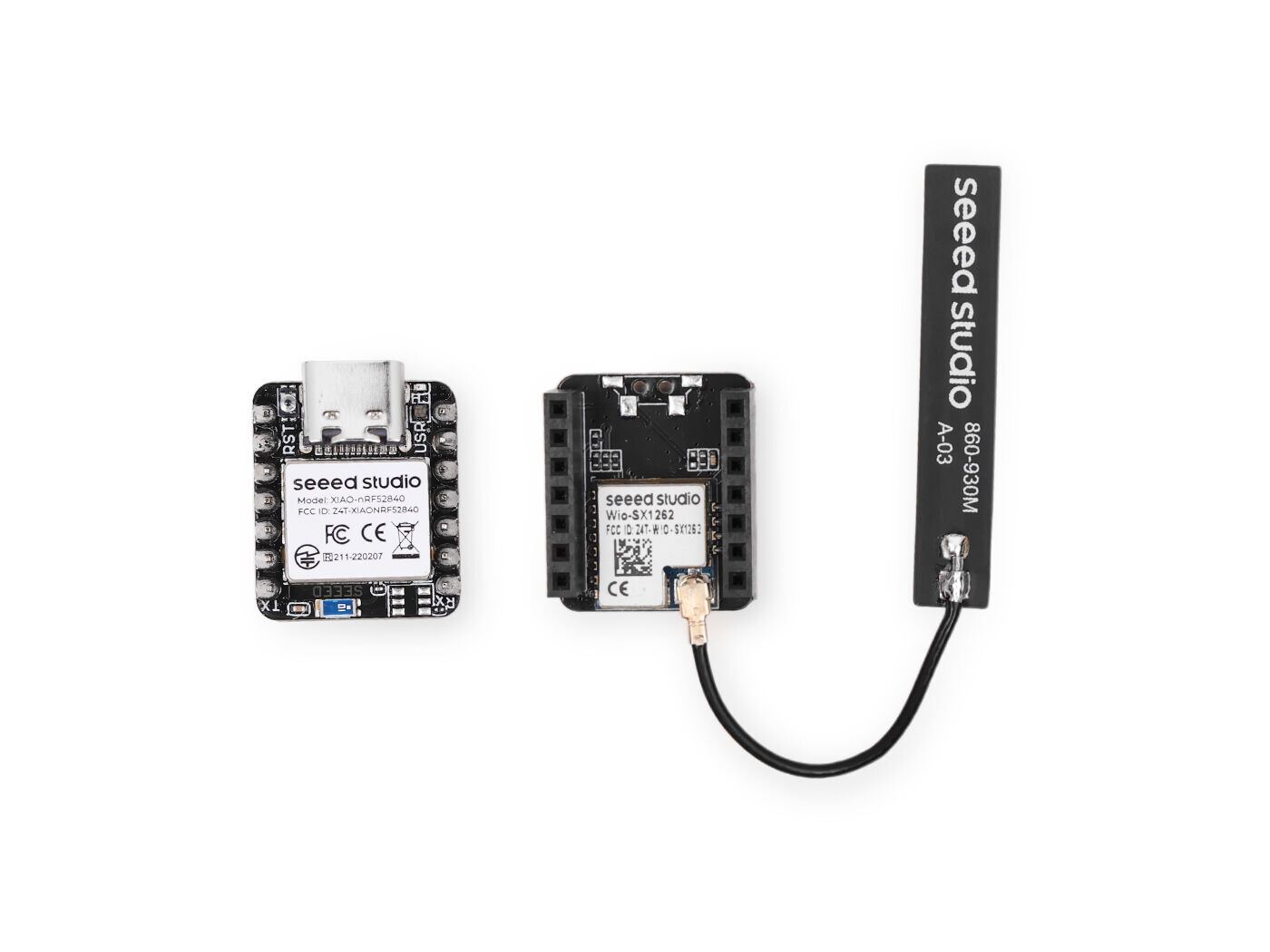
Here is the SensorNode End below.
I use this same code in parts of the Xmas video demo posted 2 years ago,
Similar setup , local display scrolling temp. no lora though. Just add the SX-1262 board to the top.
// ==============================================================================
//  PROJECT:   XIAO nRF52840 Solar LoRa Sensor Node (Water Temperature)
//  HARDWARE:  Seeed Studio XIAO nRF52840 + SX1262 LoRa Daughterboard
//             DS18B20 Waterproof 1-Wire Temperature Sensor on Pin D4
//  LIBRARIES: RadioLib (by Jan Gromes), OneWire, DallasTemperature
// ==============================================================================

#include <RadioLib.h>
#include <OneWire.h>
#include <DallasTemperature.h>

// --- Pin Definitions for XIAO nRF52840 + SX1262 LoRa Daughterboard ---
#define LORA_CS    D1
#define LORA_DIO1  D2
#define LORA_RST   D3
#define LORA_BUSY  D0

// --- 1-Wire Temperature Sensor Pin ---
#define ONE_WIRE_BUS D4

SX1262 radio = new Module(LORA_CS, LORA_DIO1, LORA_RST, LORA_BUSY);
OneWire oneWire(ONE_WIRE_BUS);
DallasTemperature sensors(&oneWire);

// Node ID Configuration (Node 1 = Water Temp)
const char* NODE_ID = "N1";

void setup() {
  // Initialize serial for debugging if connected to USB
  Serial.begin(115200);
  delay(2000);

  // Initialize 1-Wire temperature sensor
  sensors.begin();

  // Initialize LoRa Radio (915 MHz, standard parameters)
  Serial.print(F("[LoRa] Initializing SX1262... "));
  int state = radio.begin(915.0, 125.0, 9, 7, 0x12, 10, 8);
  if (state == RADIOLIB_ERR_NONE) {
    Serial.println(F("Success!"));
  } else {
    Serial.printf("Failed, code: %d\n", state);
    while (true); // Halt if radio fails
  }
}

void loop() {
  // 1. Read Water Temperature
  sensors.requestTemperatures();
  float tempC = sensors.getTempCByIndex(0);

  // Validate sensor reading
  if (tempC == DEVICE_DISCONNECTED_C) {
    Serial.println(F("[Sensor Error] DS18B20 disconnected!"));
    tempC = 0.0;
  }
  float tempF = (tempC * 9.0 / 5.0) + 32.0;

  // 2. Format Payload Packet e.g., "N1:68.4"
  char packet[32];
  snprintf(packet, sizeof(packet), "%s:%.1f", NODE_ID, tempF);

  // 3. Transmit via LoRa
  Serial.printf("[LoRa] Transmitting: %s\n", packet);
  int state = radio.transmit(packet);

  if (state == RADIOLIB_ERR_NONE) {
    Serial.println(F("[LoRa] Transmission completed successfully."));
  } else {
    Serial.printf("[LoRa] Transmission failed, code: %d\n", state);
  }

  // 4. Low-Power Sleep Interval
  // Sleep for 60 seconds between telemetry bursts to preserve battery / solar life.
  // (Note: For ultra-low power 1.5uA deep sleep, replace delay with nRF52 sleep functions)
  Serial.println(F("[Power] Entering low-power delay...\n"));
  delay(60000);
}
something close to this, but doesn’t have to be that massive… but it can generate the DXF or STP file to start with and modify. cuts chair time in half
( I’m working on a video showing the process AI-prompt to python script, you drop into FreeCad and then Export to Slicer and Print… Unbelievable) 
" If you are NOT using AI- tools , you are SLIPPING"
“if You own a business and your employees don’t use AI-tools, you are SLIPPING”
“Mark Cuban”
As You were,

GL PJ
FYI , code compiles and runs, video @eleven…
1 Like
… yep that is pretty close to it… yes the epaper display idea was for in the field for something that could display with hopefully more weather proof and high contrast visibility… it i very close to the master system i am invisioning! Thanks!