I‘m using SAADC with DMA for high frequency sampling.
At a nominal sampling rate of 100 kHz with a buffer size of 1024 samples, we see both missing samples within each acquisition frame and dead time between consecutive frames, resulting in visible gaps and phase jumps in the reconstructed waveform.
I want to know whether this data loss can be avoided by adjusting the code.
attached arduino code and its waveform collected via PC.
Short answer Yes. However You break one of the Basic coding tennants (Interrupts ISR’s ) need to be short and sweet, set a flag and leave. You restart the sample in the INT. ISR and that blows up the Timing and the Buffer,NO-NO-NO… So yes: their “dead time between frames” is caused by re-STARTing once per buffer.
The SAADC itself can handle 100 ksps – that’s below the 200 ksps max for nRF52840, even with TACQ=5 µs. The gaps and phase jumps you’re seeing are mostly due to how the SAADC and Serial output are set up, not because 100 kHz is too fast.
SAADC is being re-STARTed every buffer.
In your SAADC_IRQHandler you call NRF_SAADC->TASKS_START = 1; after EVENTS_END. Once MAXCNT is reached, further SAMPLE triggers are ignored until you START again, so there is inherently dead time between buffers.
Fix: call TASKS_STARTonce in setupSAADC() and remove it from the IRQ. Just flip RESULT.PTR between bufferA/bufferB on each EVENTS_END.
Serial output is far too slow for 100 ksps.
Each 1024-sample frame represents ~10 ms of real-time data, but you’re printing tens of kilobytes of ASCII per frame at 921600 bps. That takes ~0.2 s per frame to transmit, so any waveform you reconstruct on the PC will have big gaps by design. The ADC + DMA keep running in the background, but your logging cannot keep up.
Fix: either lower the sample rate, log only a subset of samples (e.g., one frame every N frames), or store raw data to RAM/SD instead of printing every sample.
With those two changes (no re-START in IRQ + much lighter logging) you should be able to get continuous, gap-free acquisition at 100 ksps and then run your FFT on buffers without the visible phase jumps.
Try this one…
Call NRF_SAADC->TASKS_START = 1;once in setupSAADC().
Never call START again in the IRQ.
Just use EVENTS_END to flip RESULT.PTR between bufferA and bufferB.
Ok , so progress nonetheless, I see this What’s going on
In your current setup:
Timer → PPI → NRF_SAADC->TASKS_SAMPLE
NRF_SAADC->TASKS_START is ONLY being called inside SAADC_IRQHandler on EVENTS_END.
So the sequence per buffer is:
You set RESULT.PTR and MAXCNT.
You do NRF_SAADC->TASKS_START = 1;
Timer via PPI keeps triggering TASKS_SAMPLE at 100 kHz until MAXCNT samples are taken.
When buffer is full: EVENTS_END fires, IRQ runs, and you:
Flip buffers
Set new RESULT.PTR
Call TASKS_START again → this re-arms the SAADC for the next block
If you removeNRF_SAADC->TASKS_START = 1; from the IRQ and don’t add anything else, then:
SAADC runs once (fills the first buffer)
Hits EVENTS_END
Swaps the buffer pointer…
…but never actually starts the next conversion sequence, so PPI SAMPLE events are ignored and both buffers stay frozen.
“no data update to bufferA or bufferB.”
…is exactly what you’d expect. You took away the only restart mechanism and didn’t replace it with a continuous-mode setup.
Right now your SAADC only runs again because you explicitly call NRF_SAADC->TASKS_START = 1; in the SAADC_IRQHandler when EVENTS_END fires.
If you remove that line and don’t add an alternative mechanism, the SAADC will:
Fill the first buffer
Assert EVENTS_END once
Then never restart and never accept new SAMPLE triggers from the timer/PPI.
That’s why your buffers stop updating after the first frame.
To reduce gaps / dead time between blocks, you need to change the structure, not just remove TASKS_START. Some options:
NRF_SAADC->EVENTS_END = 0;
// swap RESULT.PTR between bufferA / bufferB
NRF_SAADC->RESULT.PTR = (uint32_t)nextBuffer;
NRF_SAADC->RESULT.MAXCNT = BUF_SIZE;
NRF_SAADC->TASKS_START = 1;   // SAADC will auto-SAMPLE because of the SHORT
That at least makes the restart tighter and avoids you manually poking SAMPLE.
Lower sample rate or buffer size
At 100 kHz and 1024 samples you’re asking the SAADC + CPU + IRQ + Serial to run very hard. Even with double-buffering, some dead time between frames is expected at that rate if you’re also doing FFT + printing.
Move heavy work out of the ISR and don’t block
Your processFFT() plus printing thousands of lines at 921600 baud will absolutely cause gaps. Let the ISR do the minimum (swap buffers, restart SAADC) and handle FFT/Serial in loop() only when a buffer_ready flag is set.
Just deleting TASKS_START doesn’t magically make it “continuous”; it just stops after the first buffer.
To truly avoid visible gaps in the waveform, you’ll likely need to either:
Drop the sample rate (e.g., 50 kHz or 20 kHz), or
Reduce BUF_SIZE, or
Stop printing full buffers every frame at high baud while sampling.
I try to use continuous sampling mode in SAADC, as the datasheet it should be triggered by PPI, but seems not work only in first frame.
when I add NRF_SAADC->TASKS_START = 1; in the IRQ, it will continue run, still some data loss.
if NRF_SAADC->TASKS_START = 1; deleted, just first frame printed.
At 100 kHz, your SAADC setup drops samples and creates gaps. This happens because your buffer swap and restart happen inside the interrupt. That blocks continuous DMA. Serial printing also slows everything down. You cannot print 1024 raw samples at 921600 baud in real time. To fix this, enable true ping‑pong DMA without restarting SAADC in the ISR. Only set a flag in the interrupt. Process buffers later in loop() or defer to another task. Use a faster data path instead of Serial for raw samples. For example, external ADC designs with USB streaming, like this custom DAQ project (https://www.pcbway.com/project/shareproject/ADS1256_RP2040_Custom_DAQ_7a442a9e.html), show how to handle continuous high‑rate sampling. Alternatively, reduce buffer size and minimize processing while sampling. In essence, avoid blocking code during high‑rate acquisition and let DMA run independently to prevent phase jumps and missing samples.
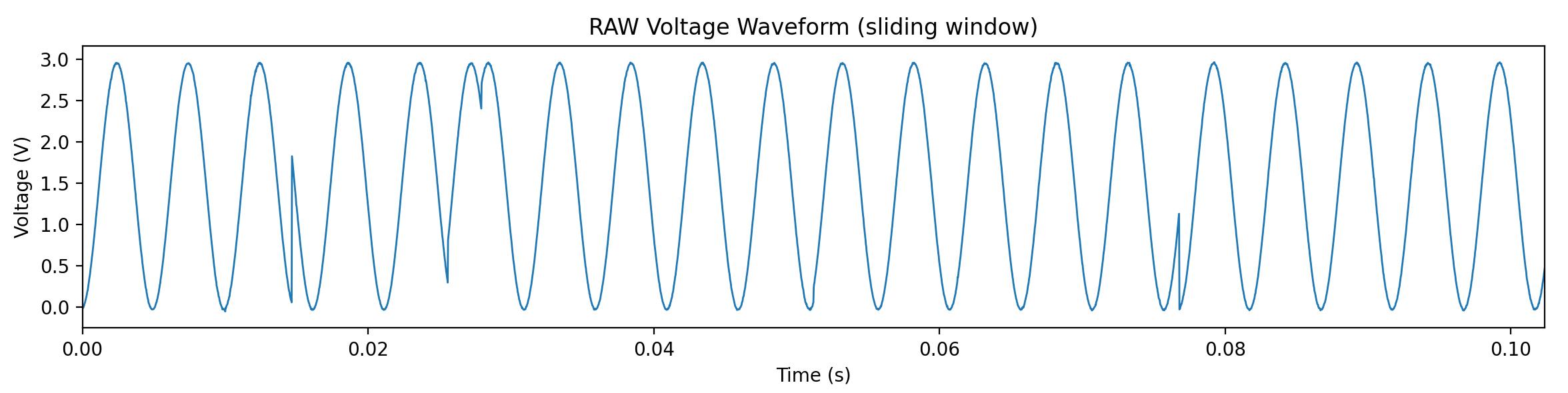

 So yes: their “dead time between frames” is caused by re-STARTing once per buffer.
 PJ
PJ 


