Hello
I have been “playing” (fighting describes it better  ) with the Grove AI Vision V2 dev board, that has the WE2 processor. (Himax WiseEye2 AI processor)
I’m at a state where I can build and flash the Grove Vision AI V2 dev board according to the Seeed_Grove_Vision_AI_Module_V2 repository.
Then I downloaded the allon_sensor_tflm_s_only uVision zip so I have some form of an IDE after spending quite a while in vim+grep while trying to make sense of the source code.
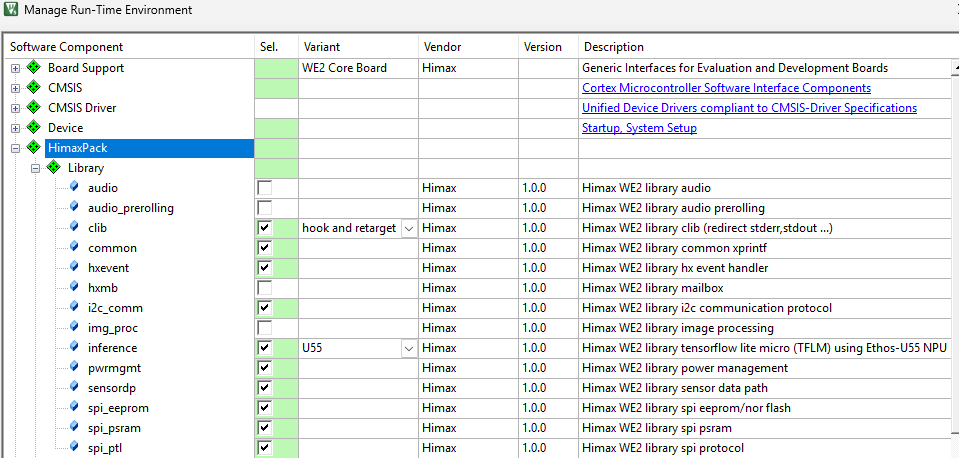
I ended up with the project in uVision, and finding my way to manage my runtime environment and enable i2c_comm, as shown in the image.
Next, plugging the esp32s3 on top of the Grove AI V2, I am reading the available I2C slaves with the example i2c scanner program Arduino Playground - I2cScanner. It reads:
I2C device found at address 0x28
I2C device found at address 0x79
Only during flashing of the Grove Vision AI V2 dev board, I additionally get:
I2C device found at address 0x28
I2C device found at address 0x62
I2C device found at address 0x79
(The same output appears when I load a sample from the SenseCraft website)
But I want to create an own slave, how do I do that? (Is there a documentation I am not aware of?) My “best guess” after trying various things (e.g. using ARM’s I2C itself, which caused linker errors…) are the sample codes provided within hx_drv_iic.h, which comes with the zip I mentioned above, which is also found in the GitHub repository. Basically this: (not shown everything…)
* <pre>
*    Sample code: I2C master 0 pin mux configuration and initialization
*      /// The output pin of I2C Master 0 is defined by the user application.
*      hx_drv_scu_set_PB7_pinmux(SCU_PB7_PINMUX_I2C_M_SCL);
*      hx_drv_scu_set_PB8_pinmux(SCU_PB8_PINMUX_I2C_M_SDA);
*
*      /// initializes the I2C Master 0 with SCL speed of 400 KHz
*      hx_drv_i2cm_init(USE_DW_IIC_0, HX_I2C_HOST_MST_0_BASE, DW_IIC_SPEED_FAST);
*
*    Usage-1: Transmit data using interrupt mode with I2C master 0
*      void i2cm_0_tx_cb()
*      {
*          xprintf("[%s] \n", __FUNCTION__);
*      }
*
*      uint8_t wbuffer[32] = {0};
*      uint32_t i, data_size = 32;
*      for(i = 0; i < data_size; i++)
*      {
*          wbuffer[i] = i;
*          xprintf("wbuffer[%d]:0x%02x \n", i, wbuffer[i]);
*      }
*
*      hx_drv_i2cm_interrupt_write(USE_DW_IIC_0, 0x24, wbuffer, data_size, i2cm_0_tx_cb);
*
*
*    Usage-2: Receive data using interrupt mode with I2C master 0
*      uint8_t rbuffer[32] = {0};
*      uint32_t i, data_size = 32;
*      volatile uint32_t i2c_mst_rx_done = 0;
*      uint32_t retry = 10;
*
*      void i2cm_0_rx_cb()
*      {
*          i2c_mst_rx_done = 1;
*          xprintf("[%s] \n", __FUNCTION__);
*      }
*
*      hx_drv_i2cm_interrupt_read(USE_DW_IIC_0, 0x24, rbuffer, data_size, i2cm_0_rx_cb);
*
*      while(i2c_mst_rx_done == 0){
*          if(retry){
*              hx_drv_timer_delay_ms(TIMER_ID_0, 100, TIMER_STATE_DC);
*              retry--;
*          }else{
*              break;
*          }
*      }
*
*      if(i2c_mst_rx_done){
*          for(i = 0; i < data_size; i++){
*              xprintf("[%d]: 0x%02x \n", i, rbuffer[i]);
*          }
*      }
*
So I tried example 2 and plopped it 1:1 into the app_main function. However, nothing changes on the i2c scanner. Then example 1, and also nothing changed. I tried various other functions, e.g. hx_drv_i2cs_interrupt_read (i2cs) or the things from i2c_comm.h - without success.
Did anyone else run into this problem and give me pointers to what I am supposed to do?
Thanks

 . When it boots into Your own Himax firmware, you’re almost certainly not enabling the I²C slave peripheral at all, so from the ESP32-S3’s point of view, there is no device at that address.
 PJ
PJ 
