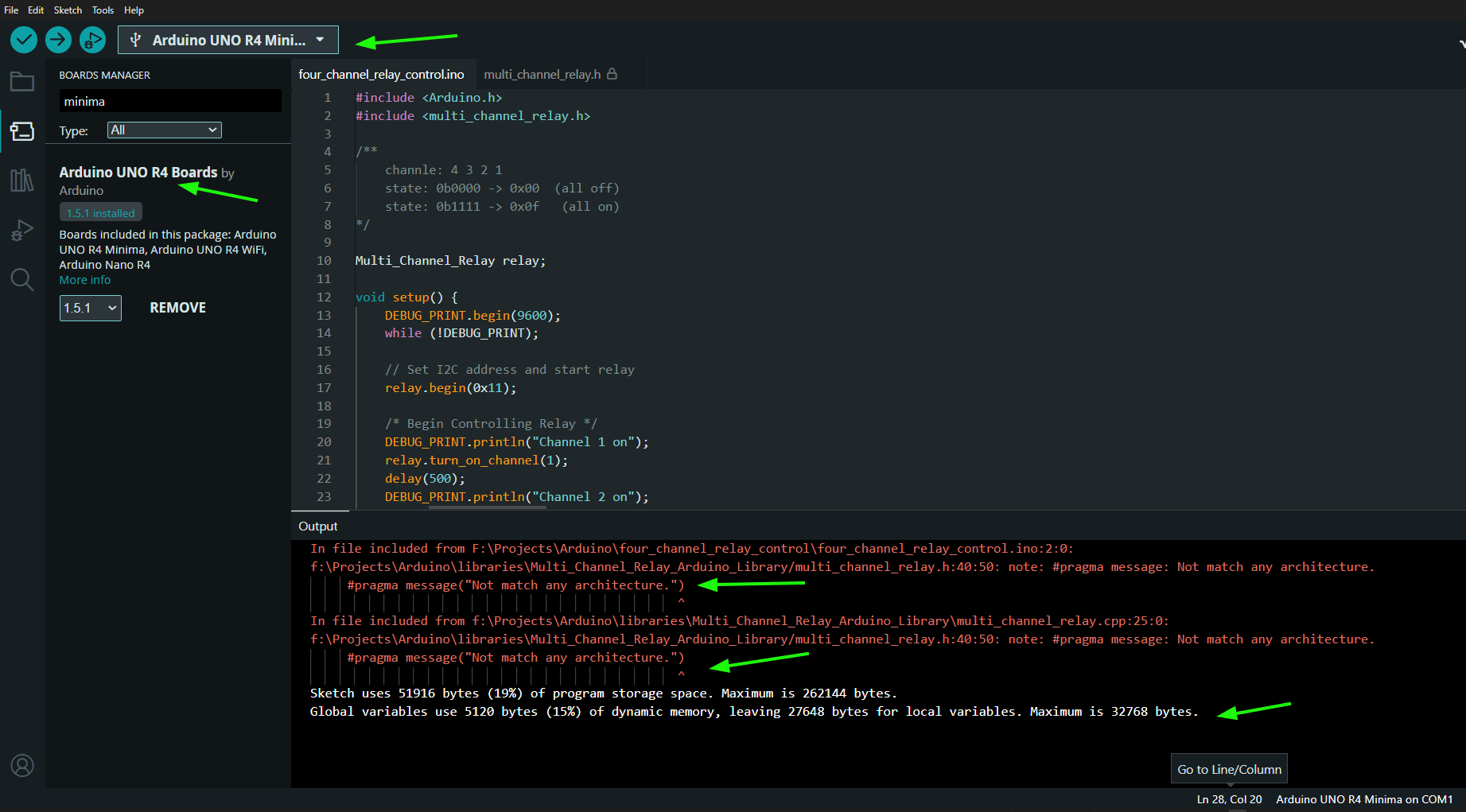
I am trying to upload a very simple program to the UNO R4 Minima. I am using a Grove - 4-Channel Solid State Relay. This worked fine on Windows 10 machine but not that I switched to Windows 11 the Library will not pass “Verify” .
The error - In file included from C:\Users\Documents\Arduino\libraries\Multi_Channel_Relay_Arduino_Library\multi_channel_relay.cpp:25:0:
C:\Users\Arduino\libraries\Multi_Channel_Relay_Arduino_Library/multi_channel_relay.h:40:50: note: #pragma message: Not match any architecture. #pragma message(“Not match any architecture.”)
Good idea. I am trying to make an encoder simulator for my next project and need to simulate A B channels at about 1200 Hz. Is there some type of ‘relay’ to switch the DC signal (2 of them A B) that fast? I will post this in the forum as a new question also.
/*
  Arduino Sketch for Simulating a Rotary Encoder
  This code simulates a rotary encoder with a 2-channel output. The output
  frequency is set to 1200Hz. The position and rate can be adjusted via the
  Serial interface.
*/

const int channelA = 8; // Pin for channel A output
const int channelB = 9; // Pin for channel B output
const int outputFrequency = 1200; // Frequency in Hz
volatile int position = 0; // Encoder position
int rate = 1; // Rate of position change

void setup() {
  pinMode(channelA, OUTPUT);
  pinMode(channelB, OUTPUT);
  Serial.begin(9600);
  Serial.println("Rotary Encoder Simulator");
}

void loop() {
  static unsigned long lastToggleTime = 0;
  unsigned long currentTime = micros();
  unsigned long interval = 1000000 / outputFrequency;

  if (currentTime - lastToggleTime >= interval) {
    lastToggleTime = currentTime;
    position += rate;
    digitalWrite(channelA, (position & 0x01) ? HIGH : LOW);
    digitalWrite(channelB, (position & 0x02) ? HIGH : LOW);
  }

  if (Serial.available() > 0) {
    char command = Serial.read();
    if (command == 'p') {
      Serial.print("Position: ");
      Serial.println(position);
    } else if (command == 'r') {
      Serial.print("Rate: ");
      Serial.println(rate);
    } else if (command == '+') {
      rate++;
      Serial.print("Rate increased to: ");
      Serial.println(rate);
    } else if (command == '-') {
      rate--;
      Serial.print("Rate decreased to: ");
      Serial.println(rate);
    }
  }
}
What loads do you want to switch? G3MB has limits, and require AC.
A simple motor driver should be able to switch as your frequencies.