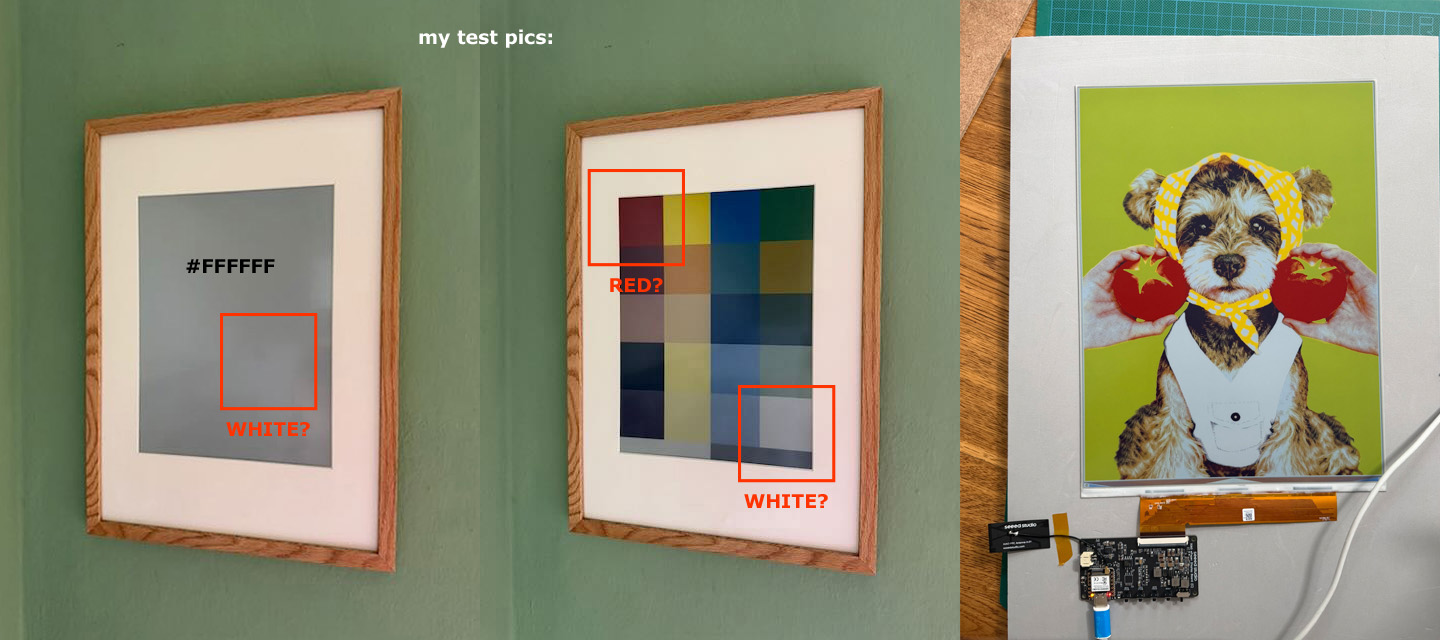
I had some time now playing with my EE02 13.3" Spectra6 screen but I am still unsure how to prepare some test images to address the correct colours or specifically the WHITE. As a graphic designer I tend to use photoshop to export PNG or SAVE FOR WEB with indexed colours of the 6-colour-palette. No transparencies, no dithering. But when I transfer those pics via sensecraft to the device the impression of WHITE (#FFFFFF) looks as grey like the inactive screencolor.
There is that welcome screen with that dog and two tomatoes that briefly appears when refreshing the device. On this picture the doggies white vest appears to be whiter than the inactive grey, right?
So, I’m liking the Spectra series, slow full refresh is the trick…
Achieving a bright white pixel comes down to several factors:
The Native White State vs. #FFFFFF: The physical white microcapsules in a Spectra 6 electrophoretic display inherently reflect ambient light with a slight greyish or cream undertone compared to backlit LCDs. However, the boot/welcome screen can achieve higher perceived brightness because it triggers a full-panel global refresh (Vcom flash) that drives all six pigment particles (Black, White, Red, Yellow, Green, Blue) through their maximum saturation and clearing voltage pulses.
Driving Waveform Limitations via Web Portals: When sending images through quick web tools or apps (like SenseCraft), the platform’s internal image processor often applies automated color-quantization and dithering routines that map #FFFFFF to the nearest palette index without executing the heavy, multi-stage particle-clearing waveform needed to fully eject dark pigments from the local pixel micro-cups.
Optimizing White in Photoshop & Custom Code:
Pure White Thresholding: Ensure your indexed palette maps pure white (#FFFFFF) explicitly to the panel’s native white register rather than a dithered grey mix.
Forcing a Full Refresh Waveform: If you are rendering via custom code or adjusting the firmware pipeline, make sure your update command calls a full-refresh waveform (often designated as a INIT or GC16/full update mode) rather than a partial or fast refresh, which leaves residual pigment particles behind and makes whites look muddy grey.
HTH
GL PJ
even the Big 10.3 " does well with a full refresh.
 PJ
