I am trying to set up esp-hosted with xiao board and luckfox pico mini.
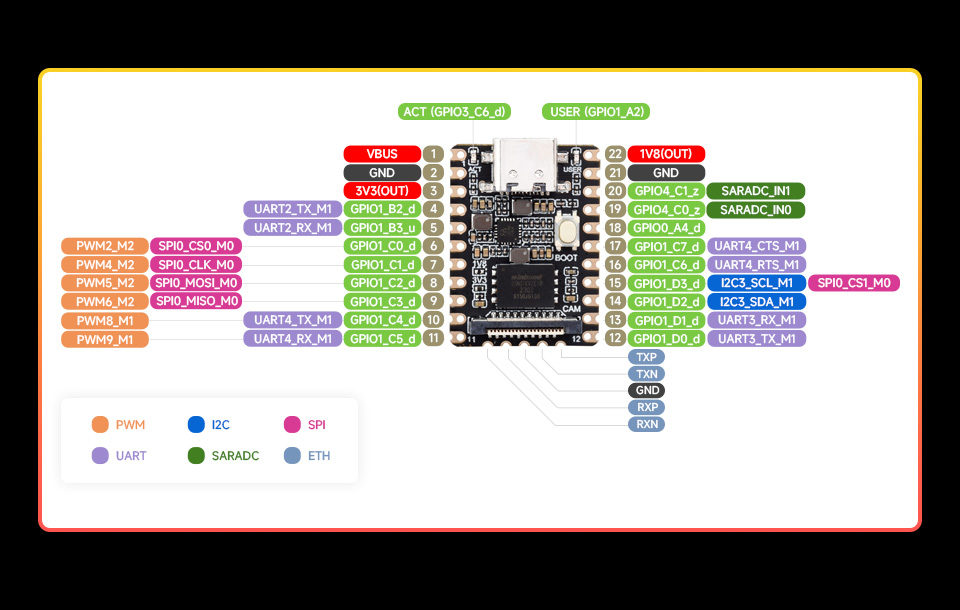
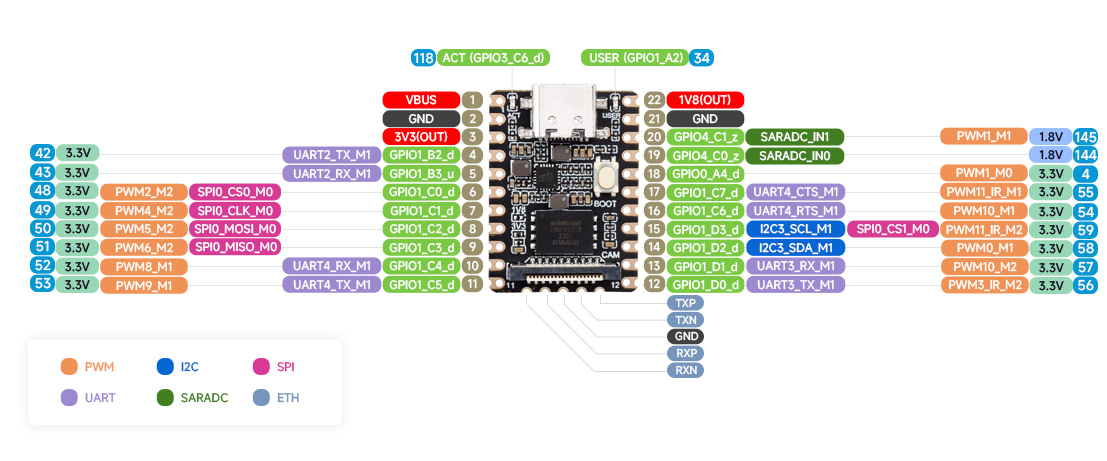
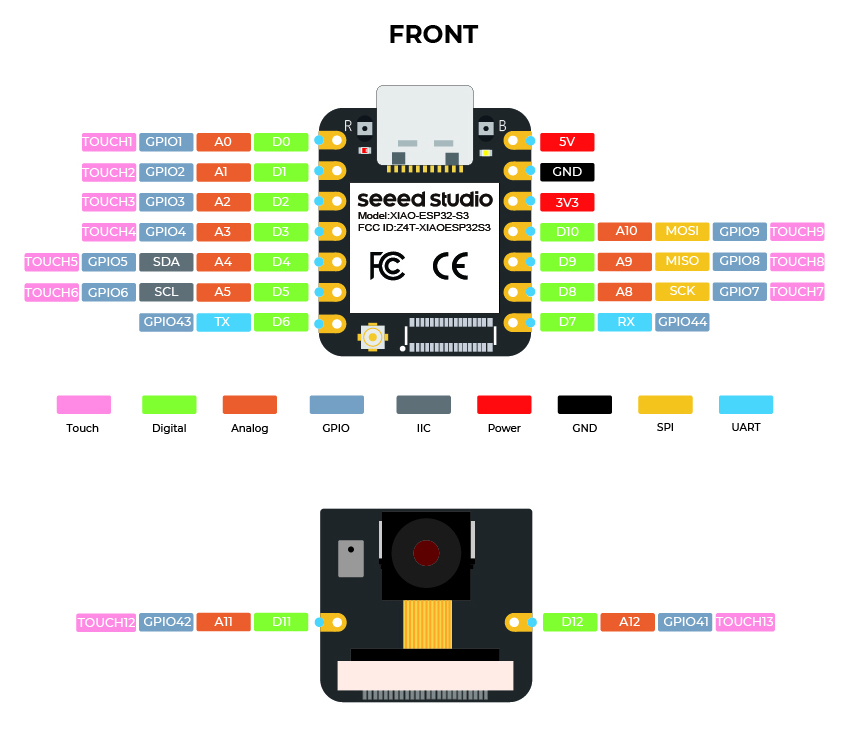
my connection diagram as follows:
function → ESP → Pico
cs0 → D2 → 54
sclk → D8 → 7
miso → D9 → 9
mosi → D10 → 8
handshake → D3 → 55
data ready → D4 → 4
reset → D1 → 54
I seem to get proper logs from esp when it is not connected to pico:
I (432) FW_MAIN: Supported features are:
I (435) FW_MAIN: - WLAN over SPI
I (438) FW_BT: - BT/BLE
I (440) FW_BT:    - HCI Over SPI
I (443) FW_BT:    - BLE only
I (446) FW_MAIN: Capabilities: 0xe8
pp rom version: e7ae62f
net80211 rom version: e7ae62f
I (457) wifi:wifi driver task: 3fcec878, prio:23, stack:6656, core=0
I (461) wifi:wifi firmware version: d34ae1d
I (464) wifi:wifi certification version: v7.0
I (468) wifi:config NVS flash: disabled
I (472) wifi:config nano formatting: disabled
I (476) wifi:Init data frame dynamic rx buffer num: 64
I (481) wifi:Init static rx mgmt buffer num: 5
I (485) wifi:Init management short buffer num: 32
I (489) wifi:Init dynamic tx buffer num: 64
I (493) wifi:Init static tx FG buffer num: 2
I (497) wifi:Init static rx buffer size: 1600
I (501) wifi:Init static rx buffer num: 16
I (505) wifi:Init dynamic rx buffer num: 64
I (510) wifi_init: rx ba win: 32
I (512) wifi_init: accept mbox: 6
I (515) wifi_init: tcpip mbox: 32
I (518) wifi_init: udp mbox: 6
I (521) wifi_init: tcp mbox: 6
I (523) wifi_init: tcp tx win: 5760
I (527) wifi_init: tcp rx win: 5760
I (530) wifi_init: tcp mss: 1440
I (533) wifi_init: WiFi IRAM OP enabled
I (536) wifi_init: WiFi RX IRAM OP enabled
I (541) BLE_INIT: BT controller compile version [2edb0b0]
I (545) BLE_INIT: Using main XTAL as clock source
I (550) BLE_INIT: Feature Config, ADV:1, BLE_50:1, DTM:1, SCAN:1, CCA:0, SMP:1, CONNECT:1
I (558) BLE_INIT: Bluetooth MAC: d0:cf:13:26:5d:22
I (563) phy_init: phy_version 701,f4f1da3a,Mar  3 2025,15:50:10
I (602) phy_init: Saving new calibration data due to checksum failure or outdated calibration data, mode(0)
I (613) FW_MAIN: ESP Bluetooth MAC addr: d0-cf-13-26-5d-22

I (614) FW_SPI: Using SPI interface
I (614) FW_SPI: Using SPI MODE 3
I (614) FW_SPI: SPI Ctrl:1 mode: 3, GPIOs: MOSI: 9, MISO: 8, CS: 3, CLK: 7 HS: 4 DR: 5

I (622) FW_SPI: Hosted SPI queue size: Tx:20 Rx:20
I (1629) FW_MAIN: Initial set up done
I (1629) main_task: Returned from app_main()
however, once it is, it pulls pico’s handshake and data ready to hight and seems frozen:
[ 39.725105] esp32_spi: spi_dev_init: Using SPI MODE 3 [ 39.725687] esp32_spi: spi_dev_init: Config - SPI GPIOs: Handshake[55] Dataready[4] [ 39.725729] esp32_spi: spi_dev_init: Config - SPI clock[30MHz] bus[0] cs[0] mode[3]
cat /sys/kernel/debug/gpio | grep -E "54|55|4"
gpio-4 ( |SPI_DATA_READY_PIN ) in hi
gpio-54 ( |sysfs ) in lo
gpio-55 ( |SPI_HANDSHAKE_PIN ) in hi
Any help will be appreciated
 PJ
PJ