I recently purchased the Sipeed Longan Nano - RISC-V GD32VF103CBT6 Development Board from Mouser (mouser no. 713-102991302). I followed the steps from this page to get started with a blinky (see https://longan.sipeed.com/en/get_started/blink.html)
To flash the board, I apply chapter 4.3 USB DFU download - without success. I’ll describe in detail what I tried and where it fails.
Note: I’m working on a 64-bit Windows 10 computer.
1. Preparatory steps
I first installed VSCode and the PlatformIO plugin as requested in the tutorial.
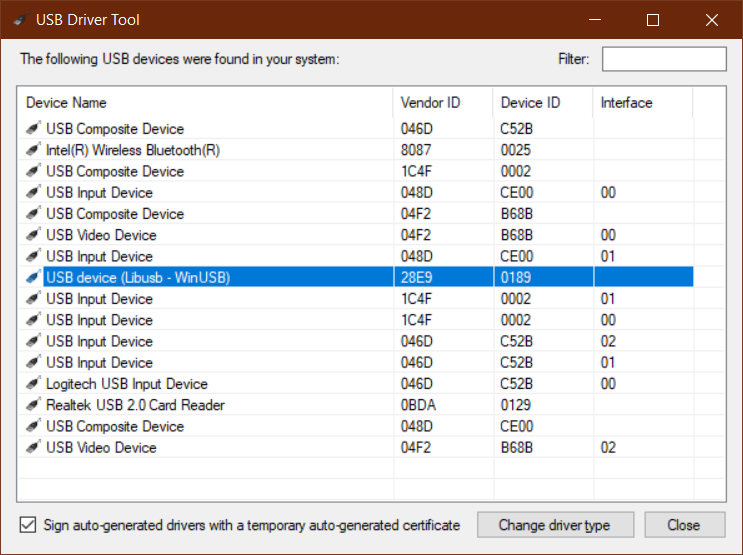
To install the driver for the Longan Nano, I couldn’t use Zadig. The entry "GD32 Device in DFU Mode" simply didn’t appear in the dropdown menu. So I used UsbDriverTool, which you can download here: https://visualgdb.com/UsbDriverTool/
I changed the driver type into 'Libusb-WinUSB', which resulted in:
2. First firmware upload trial
After building the blinky project, I hold down the BOOT button while pressing the RESET button. Then I release the BOOT button and I hear the typical Windows sound that a new USB device is discovered. I press the upload button in the VSCode bottom toolbar and I see this (--verbose mode is on):
C:\Users\Kristof\.platformio\packages\tool-dfuutil\bin\dfu-util -d 28e9:0189 -a 0 --dfuse-address 0x08000000:leave -D "C:\Users\Kristof\Documents\PlatformIO\Projects\201212-110018-arduino-blink\.pio\build\sipeed-longan-nano\firmware.bin"
dfu-util 0.9

Copyright 2005-2009 Weston Schmidt, Harald Welte and OpenMoko Inc.
Copyright 2010-2020 Tormod Volden and Stefan Schmidt
This program is Free Software and has ABSOLUTELY NO WARRANTY
Please report bugs to http://sourceforge.net/p/dfu-util/tickets/

Opening DFU capable USB device...
ID 28e9:0189
Run-time device DFU version 011a
Claiming USB DFU Interface...
Setting Alternate Setting #0 ...
Determining device status: state = dfuIDLE, status = 0
dfuIDLE, continuing
DFU mode device DFU version 011a
Device returned transfer size 2048
DfuSe interface name: "Internal Flash  "
Found GD32VF103, which reports a bad page size and count for its internal memory.
Fixed layout based on part number: page size 1024, count 128.
Downloading to address = 0x08000000, size = 8268

Erase           [                         ]   0%            0 bytes
Erase           [======                   ]  24%         2048 bytes
Erase           [============             ]  49%         4096 bytes
Erase           [==================       ]  74%         6144 bytes
Erase           [======================== ]  99%         8192 bytes
Download        [                         ]   0%            0 bytes
Download        [======                   ]  24%         2048 bytes
Download        [============             ]  49%         4096 bytes
Download        [==================       ]  74%         6144 bytes
Download        [======================== ]  99%         8192 bytes
Download        [=========================] 100%         8268 bytes
Download done.
File downloaded successfully
Error during download get_status
*** [upload] Error 74
==================================================================== [FAILED] Took 2.56 seconds ====================================================================
The terminal process "C:\Users\Kristof\.platformio\penv\Scripts\pio.exe 'run', '--target', 'upload'" terminated with exit code: 1.
As you can see, the firmware seems to upload just fine at first, until suddenly this error appears:
Error during download get_status
3. Second firmware upload trial
After a long search, I finally found this discussion on GitHub (see Unable to flash with dfu-util · Issue #5 · riscv-rust/longan-nano · GitHub)
I conclude from this discussion that there are two kinds of RISC-V microcontrollers out there on the Longan Nano boards:
GD32VF103C8GD32VF103CB
I have the one ending in a B, which apparently suffers from a buggy bootloader. The solution they suggest is to use the most recent dfu-util software. So I navigated to the dfu-util project to download the latest binaries:
I downloaded the dfu-util-0.10-binaries.tar.xz file which contains binaries for both Windows and Linux. The tar-file is modified/uploaded at 2020-11-21, so it’s less than one month old.
I find the Windows-64 binaries in:
C:\Users\Kristof\Downloads\dfu-util-0.10-binaries.tar\dfu-util-0.10-binaries\win64
PlatformIO keeps its dfu-util tool at:
C:\Users\Kristof\.platformio\packages\tool-dfuutil\bin
So here is what I did: I cleaned the folder C:\Users\Kristof\.platformio\packages\tool-dfuutil\bin and transfered all the binaries from C:\Users\Kristof\Downloads\dfu-util-0.10-binaries.tar\dfu-util-0.10-binaries\win64 there. In other words, PlatformIO will now use the latest dfu-util tool.
Time for the next firmware upload trial. I hold down the BOOT button and press the RESET button on the Longan Nano board to enter the flash modus. I click the upload button in PlatformIO and get the following output:
> Executing task in folder 201212-110018-arduino-blink: C:\Users\Kristof\.platformio\penv\Scripts\pio.exe run --target upload <

Processing sipeed-longan-nano (platform: gd32v; framework: arduino; board: sipeed-longan-nano)
---------------------------------------------------------------------------------------------------------------------------------------------------------------------
CONFIGURATION: https://docs.platformio.org/page/boards/gd32v/sipeed-longan-nano.html
PLATFORM: GigaDevice GD32V (1.2.0) > Sipeed Longan Nano
HARDWARE: GD32VF103CBT6 108MHz, 32KB RAM, 128KB Flash
DEBUG: Current (jlink) External (altera-usb-blaster, gd-link, jlink, rv-link, sipeed-rv-debugger, um232h)
PACKAGES:
 - framework-arduino-gd32v 0.1.1
 - tool-dfuutil 1.9.200310
 - tool-gd32vflash 0.1.0
 - tool-openocd-gd32v 0.1.1
 - toolchain-gd32v 9.2.0
LDF: Library Dependency Finder -> http://bit.ly/configure-pio-ldf
LDF Modes: Finder ~ chain, Compatibility ~ soft
Found 0 compatible libraries
Scanning dependencies...
No dependencies
Building in release mode
MethodWrapper(["checkprogsize"], [".pio\build\sipeed-longan-nano\firmware.elf"])
Advanced Memory Usage is available via "PlatformIO Home > Project Inspect"
RAM:   [=         ]   7.2% (used 2358 bytes from 32768 bytes)
Flash: [=         ]   6.3% (used 8250 bytes from 131072 bytes)
text       data     bss     dec     hex filename

   8090     160    2198   10448    28d0 .pio\build\sipeed-longan-nano\firmware.elf
<lambda>(["upload"], [".pio\build\sipeed-longan-nano\firmware.bin"])
AVAILABLE: altera-usb-blaster, dfu, gd-link, jlink, rv-link, serial, sipeed-rv-debugger, um232h
CURRENT: upload_protocol = dfu
C:\Users\Kristof\.platformio\packages\tool-dfuutil\bin\dfu-util -d 28e9:0189 -a 0 --dfuse-address 0x08000000:leave -D "C:\Users\Kristof\Documents\PlatformIO\Projects\201212-110018-arduino-blink\.pio\build\sipeed-longan-nano\firmware.bin"
dfu-util 0.10

Copyright 2005-2009 Weston Schmidt, Harald Welte and OpenMoko Inc.
Copyright 2010-2020 Tormod Volden and Stefan Schmidt
This program is Free Software and has ABSOLUTELY NO WARRANTY
Please report bugs to http://sourceforge.net/p/dfu-util/tickets/

Opening DFU capable USB device...
ID 28e9:0189
Run-time device DFU version 011a
Claiming USB DFU Interface...
Error: File ID fdcb:0189 does not match device (28e9:0189 or 28e9:0189)
Setting Alternate Setting #0 ...
Determining device status: state = dfuIDLE, status = 0
dfuIDLE, continuing
DFU mode device DFU version 011a
Device returned transfer size 2048
*** [upload] Error 74
==================================================================== [FAILED] Took 1.03 seconds ====================================================================
The terminal process "C:\Users\Kristof\.platformio\penv\Scripts\pio.exe 'run', '--target', 'upload'" terminated with exit code: 1.
I’m out of options now. What should I do to get the dfu-util to work properly with my Longan Nano board?