i love the clip! … extra words to trick the man… bla bla… what da?
Hi there,
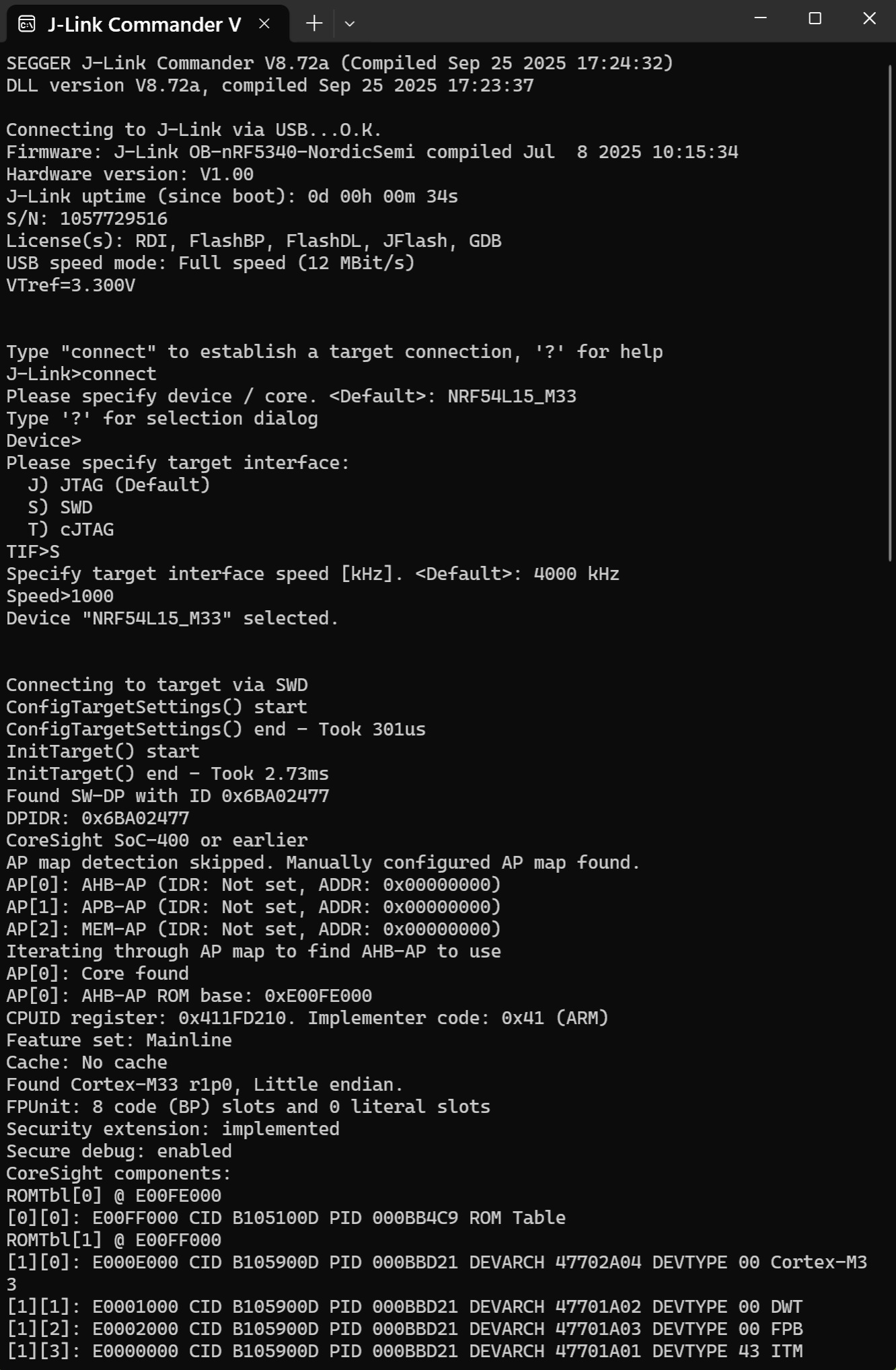
So , And for those JLink Jockey’s out there. Just connect under reset at speed = 1000 or less I used at 500hz on a very stubborn one I was I2S messing with in the Round Display and did not want to halt or erase… after a low speed strafing run it cracked it open like an egg. Able erase , write(loadfile) AOK. (keep the leads REAL short)
connect
device type
SWD
Speed- 1000k (defualts to 4000k) if it works but won’t verify, drop it to 500K and " Roberto’ is your Uncle"
Halt
Erase
Loadfile c:\Your\good\stuff.hex
(optional)…
Regs (cpu registers print out)
Go (after a halt, sanity check it’s alive and working)
EXIT … Your work is done here, Enjoy the Restored Xiao 
HTH
GL  PJ
PJ 
Looks like this,
Hi! Thanks for posting this solution.
I had a custom board with built-in cmsis debugger and it turns out that, every chip out of the factory is enabled with access port protection and requires j-link to flash. I was able to erase the chip and flash it with the cmsis.
I was very close to buying the J-link / DK 
Mass erase support in OpenOCD has already been added in the latest SDK. It now checks the lock status and automatically unlocks the device before flashing.
Would you mind linking the source repo, instructions, and version number that was updated? Just want to make sure as of 2/2026 I don’t have to hunt down the latest between Nordic and Seeed.
I would be ever so grateful 
I somehow bricked one and I can’t even get it to show up as a usb device anymore. 
I was just messing around with making a usb gamepad over ble and it just stopped randomly after testing my controls were working. I can see the device still runs for a little bit then crashes (red led turns off)
Hello guys, I just had the same problem and searched around how to revive my bricked hardware (happened twice already today), it’s also a SeeedStudio nRF54L15. Could’t get the latest SDK working with Chocolatey and stuff… I just updated a github repo, so you can use it too, it reads out the specific hardware ID so it should just erase the whole memory and make it usable again without a lock, no guarantee for other device, worked with nrf54. Use a .venv for this operation and let me know if this helped you:
You can search the GitHub Repo, just clone into: MikeProStudio/nRF-Unlocker
Hey yea, my issue is kinda different. I believe I bricked the co-processer somehow so it won’t even show up in device manager or anything. Not sure if the firmware for that is public or not as it should be easy enough to do it through the bottom pads. I ended up just grabbing a few of the nrf52s as those are just a single processor setup that has the usb stack running on the nrf chip itself and is easy to reflash manually through the bottom pads if needed.
Thanks though!
I am thinking Jtag
PJ found this for me today
Not exactly but may put you onto an idea…
i have purchase a xiao nrf54l15 board and facing issue in uart communication tx is working but not getting on rx. i am trying to communicate with ttl i have tried this
/*
* uart_loopback_test.c — Seeed XIAO nRF54L15, NCS v3.1.1
*
* THREE TEST MODES — change TEST_MODE to switch:
*
* MODE 0 — Hardware loopback (no TTL adapter needed)
* Physically connect D6 (TX, P2.8) to D7 (RX, P2.7) with a wire.
* Board sends "PING" and should receive it back immediately.
* If this works → UART hardware is 100% fine.
*
* MODE 1 — TTL adapter echo test (RealTerm: check "Echo Port" in Port tab)
* Open RealTerm → Port tab → check "Echo Port" → Open port.
* Board sends "PING\r\n", TTL echoes it back, board prints RX bytes.
* No typing needed — removes human error from RealTerm send.
*
* MODE 2 — Manual send test (type in RealTerm Send tab, NOT the main window)
* RealTerm → Send tab → type text → click "+CR+LF" button.
* The main RealTerm window is a receive display only, not input.
*/
#include <zephyr/kernel.h>
#include <zephyr/device.h>
#include <zephyr/drivers/uart.h>
/* ── CHANGE THIS TO SELECT TEST MODE ───────────────────── */
#define TEST_MODE 0
/* ────────────────────────────────────────────────────────── */
static const struct device *uart_dev;
static volatile uint32_t rx_count;
static void uart_cb(const struct device *dev, void *user_data)
{
ARG_UNUSED(user_data);
if (!uart_irq_update(dev)) return;
if (!uart_irq_rx_ready(dev)) return;
uint8_t c;
while (uart_fifo_read(dev, &c, 1) == 1) {
rx_count++;
printk("RX[%u]: 0x%02X '%c'\n", rx_count, c,
(c >= 0x20 && c < 0x7F) ? c : '.');
}
}
static void uart_send_str(const char *s)
{
while (*s) {
uart_poll_out(uart_dev, (uint8_t)*s++);
}
}
int main(void)
{
uart_dev = DEVICE_DT_GET(DT_ALIAS(ipc_uart));
if (!device_is_ready(uart_dev)) {
printk("UART not ready!\n");
return -ENODEV;
}
uart_irq_callback_user_data_set(uart_dev, uart_cb, NULL);
uart_irq_rx_enable(uart_dev);
printk("========================================\n");
printk("UART RX Debug — XIAO nRF54L15\n");
printk("TX = P2.8 (D6) RX = P2.7 (D7)\n");
#if TEST_MODE == 0
printk("Mode 0: HARDWARE LOOPBACK\n");
printk("Wire D6 (TX) directly to D7 (RX) now.\n");
printk("If RX bytes appear below, UART HW is good.\n");
printk("========================================\n");
uint32_t ping = 0;
while (1) {
uint32_t before = rx_count;
printk("[TX] PING %u\n", ping);
uart_send_str("PING\r\n");
k_sleep(K_MSEC(200)); /* wait for echo */
if (rx_count > before) {
printk("^^^ Loopback OK — received %u bytes back\n",
rx_count - before);
} else {
printk("^^^ NO RX — loopback wire missing or UART HW fault\n");
}
ping++;
k_sleep(K_SECONDS(2));
}
#elif TEST_MODE == 1
printk("Mode 1: TTL ECHO TEST\n");
printk("In RealTerm: Port tab -> check 'Echo Port' -> Open.\n");
printk("Board sends PING, TTL echoes it back automatically.\n");
printk("If RX bytes appear below, your wiring is correct.\n");
printk("========================================\n");
uint32_t ping = 0;
while (1) {
uint32_t before = rx_count;
printk("[TX] PING %u\n", ping);
uart_send_str("PING\r\n");
k_sleep(K_MSEC(500)); /* wait for TTL echo */
if (rx_count > before) {
printk("^^^ TTL echo OK — wiring and voltage confirmed good\n");
} else {
printk("^^^ NO RX — check wiring or TTL adapter TX output\n");
}
ping++;
k_sleep(K_SECONDS(2));
}
#else /* TEST_MODE == 2 */
printk("Mode 2: MANUAL SEND\n");
printk("In RealTerm: Send tab -> type text -> click +CR+LF button.\n");
printk("Do NOT type in the main RealTerm window (that is RX display only).\n");
printk("========================================\n");
while (1) {
/* Just keep transmitting so TTL is active */
uart_send_str("WAITING FOR RX...\r\n");
k_sleep(K_SECONDS(2));
}
#endif
return 0;
}
loopback is working for both ttl and nrf54l15 but unable to receive anything on nrf54l15 from ttl also on terminal getting one garbage value with data and some time one or two bytes of data is missing
Hi there,.
And Welcome Here.
could you edit your post and use the code TAGS above “</>” Paste it in there.
Leave out the quote marks too.
You will get better quality help and it makes it easier to read and understand. 
You may also be better off to open a new Thread since the subject matter is different.
(to make a new thread , you need to build forum cred by reading a few posts and commenting or Introducing yourself and asking a question related to your topic.)
HTH
GL  PJ
PJ 
Hi there,
Yea, So you forgot to INIT the com port Baud rate , Data bits, parity , stop bits, ETC… IT’s a UART the receiver won’t know what?
HTH
GL PJ
Hi PJ_Glasso,
Thanks for the reply. After adding “nrfx_power_constlat_mode_request();” in main, the UART TX and RX issue was resolved. Now I can get two-way communication
i want to enable dfu in this board hplease help me what are the configurations i need to enable when i do
CONFIG_NCS_SAMPLE_MCUMGR_BT_OTA_DFU=y
i am getting this on terminal
*** Booting MCUboot v2.1.0-dev-9b4ae4cbc9e2 ***
*** Using nRF Connect SDK v3.1.1-e2a97fe2578a ***
*** Using Zephyr OS v4.1.99-ff8f0c579eeb ***
I: Starting bootloader
I: Primary image: magic=unset, swap_type=0x1, copy_done=0x3, image_ok=0x3
I: Secondary image: magic=unset, swap_type=0x1, copy_done=0x3, image_ok=0x3
I: Boot source: none
I: Image index: 0, Swap type: none
E: Image in the primary slot is not valid!
E: Unable to find bootable image
Hi there,
it was a good Idea to start another Thread ie, " Build for XIAO & DFU "
Generic enough to cover all the Areas…
I posted my answer there.
GL PJ