Yes, both the Puppet and Lovelace Kindle Screensavers images load in a web browser. I have even downloaded one of the images and used the image (not online image) component to load the file manually which works. So the issue seems to be with accessing or processing the image, not displaying it.
I would love to use this setup, I configured everything the same but in the log it tells me:
[16:47:01][I][online_image:109]: Updating image (myllink)/lovelace/Epaper/0?viewport=800x480&eink=1
[16:47:01][D][http_request.arduino:134]: Received response header, name: etag, value:
[16:47:01][D][http_request.arduino:134]: Received response header, name: last-modified, value:
[16:47:01][D][http_request.arduino:140]: Content-Length: 50179
[16:47:01][D][online_image:175]: Starting download
[16:47:01][D][online_image:194]: Allocating PNG decoder
[16:47:01][I][online_image:212]: Downloading image (Size: 50179)
[16:47:01][D][online_image:089]: Allocating new buffer of 48000 bytes
[16:47:01][E][online_image:092]: allocation of 48000 bytes failed. Biggest block in heap: 22516 Bytes
[16:47:01][E][online_image.png:086]: Error decoding image: Incorrect PNG signature
[16:47:01][E][online_image:250]: Error when decoding image…
Why doesn’t it work?
Got it to work! I switched to bmp. Now it all works. Which is weird because I would say bmp is bigger than png…
Just add &format=bmp to your url and change format: BMP
Created an account to say thank you for mentioning the bmp solution. I was getting frustrated and now it just works. On to making a ridiculously awesome dashboard! 
Sorry for the newb question, but I just got my TRMNL OG kit. I was able to use the guide on the Wiki and I can get the HA dashboard to work while I am at home. Does anyone know how I can get it to work if I want put this at my desk at work (different network than my house)? I’m looking to use a dashboard to have weather/forecast, time/date, state of some sensors that I can monitor while I am at work. TIA.
Are you able to use HA from work (is it exposed to the internet)? If so, it’s just a URL and WIFI change. If not, that’s a much bigger task than this thread can support.
Easiest path is to get a Home Assistant Cloud subscription, but you can also do it yourself with some work.
Sorry I was not clear. I have duckdns set up for me to access my HA via web browser from any computer (and yes, I am able to access it from work). But for the ESP32 board, what code do I change to access the duckdns URL? Can you use your YAML code from your original post to show me where I can use the duckdns URL? Thanks.
You’ll need to open up port 10000 (or whatever port you have set in Puppet) to access Puppet, but I’d be careful doing that. Puppet is currently wide open with no security.
Then you should be able to change the “url:” below
http://192.168.1.101:10000/dashboard-robin/display
online_image:
  - id: dashboard_image
    format: PNG
    type: BINARY
    buffer_size: 30000
    url: http://192.168.1.101:10000/dashboard-robin/display?viewport=800x480&eink=2&invert #change this link to your screenshot link
    update_interval: 20s
    on_download_finished:
      - delay: 0ms
      - component.update: main_display
Is there a way to do this without using Puppet? For instance, right now I am using a simple temperature forecast and time display. I am making calls to entity_id, for example:
text_sensor:
 -platform: homeassistant
  entity_id: weather.home
  id: myWeather

display:
  - platform: waveshare_epaper
    id: epaper_display
    model: 7.50inv2
    cs_pin: GPIO44
    dc_pin: GPIO10
    reset_pin: GPIO38
    busy_pin:
      number: GPIO4
      inverted: true
    update_interval: never
    lambda: |-
       // 1. Display the title "Weather"
        it.printf(left_center_x, 110, id(mid_font),
TextAlign::TOP_CENTER, "Weather");

        // 2. Get the weather condition and select the corresponding icon
        std::string weather_condition = id(myWeather).state;
        std::string weather_icon = "\U000F0599"; // Default icon
(sunny), as a fallback for unknown states

        if (weather_condition == "partlycloudy") {
          weather_icon = "\U000F0595"; // weather-partly-cloudy
        } else if (weather_condition == "cloudy") {
          weather_icon = "\U000F0F2F"; // weather-cloudy
        } else if (weather_condition == "rainy") {
          weather_icon = "\U000F0597"; // weather-rainy
        } else if (weather_condition == "snowy") {
          weather_icon = "\U000F0598"; // weather-snowy
        } else if (weather_condition == "windy") {
          weather_icon = "\U000F059B"; // weather-windy
        } else if (weather_condition == "fog") {
          weather_icon = "\U000F0594"; // weather-fog
        } else if (weather_condition == "lightning") {
          weather_icon = "\U000F0596"; // weather-lightning
        }
        // Display the weather icon
        it.printf(left_center_x, 240, id(weather_icon_font),
TextAlign::CENTER, "%s", weather_icon.c_str());
code credit to Seeed Studio Wiki
I didn’t go down that path, so I can’t answer that. It was way too tedious to try to create a decent dashboard using just the ESP YAML.
Maybe someone else can answer?
I got a reTerminal E1002 Color eink display and redid some of my dashboard (I’ll post it in a new thread). I ported some of those changes to the XIAO 7.5" BW and also changed it so that it goes to sleep after the refreshing the display (waits 30 seconds). Below is the new YAML for both.
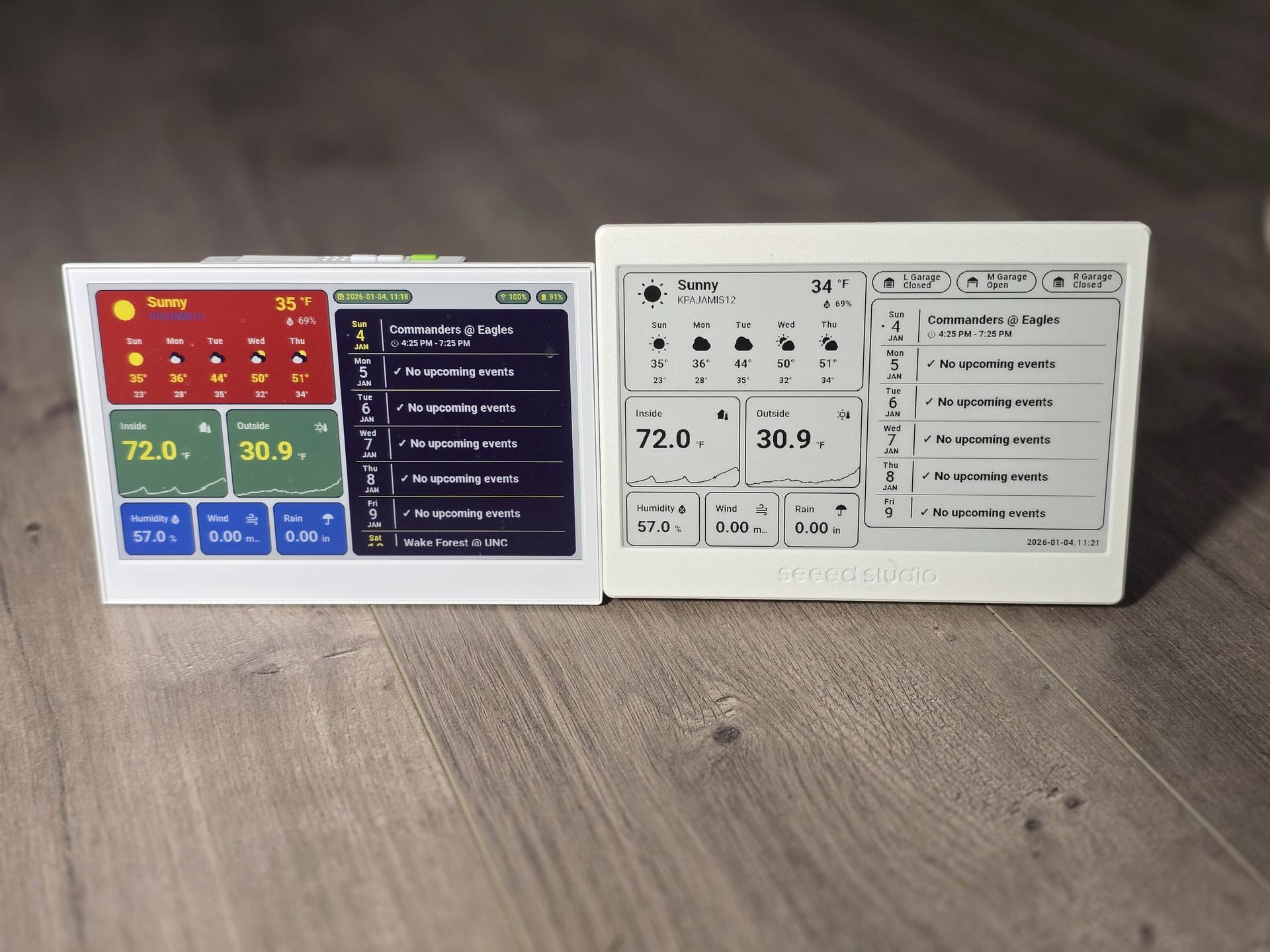
ESPHome Builder YAML
esphome:
  name: "xiao75epaperpanel"
  friendly_name: BWeInkDisplay
  on_boot:
    - priority: -100
      then:
        - logger.log: "*** Device woke up from deep sleep ***"
        - delay: 1s
        - logger.log: "*** Starting application ***"

esp32:
  board: esp32-c3-devkitm-1
  framework:
#    type: arduino
    type: esp-idf
# Enable logging
logger:

# Enable Home Assistant API
api:
  encryption:
    key: "<Your API Key>"
  on_client_connected:
    - logger.log:
        format: "*** Client %s connected to API with IP %s ***"
        args: ["client_info.c_str()", "client_address.c_str()"]

ota:
  - platform: esphome
    password: "<Your OTA Password>"

wifi:
  ssid: !secret wifi_ssid
  password: !secret wifi_password
  min_auth_mode: WPA2
  on_connect:
    then:
      - lambda: |-
          id(wifi_status) = 1;
      - logger.log: "*** WiFi Connected Successfully! ***"
      - delay: 1s
      - component.update: dashboard_image
  on_disconnect:
    then:
      - lambda: |-
          id(wifi_status) = 0;
      - logger.log: "*** WiFi Disconnected ***"
  ap:
    ssid: "BWeInkDisplayFallbackHotspot"
    password: "<Your Fall Back PW>"


captive_portal:

globals:
  - id: wifi_status
    type: int
    restore_value: no
    initial_value: "0"
  - id: recorded_display_refresh
    type: int
    restore_value: yes
    initial_value: '0'

# Here is deep sleep part
deep_sleep:
  id: deep_sleep_1
  run_duration: 120min  # Device wake up and run 60s (enough to pull data and update) - This shouldn't execute
  sleep_duration: 30min  # deep sleep for 30m

http_request:
  verify_ssl: false
  timeout: 20s
  watchdog_timeout: 25s

online_image:
  - id: dashboard_image
    format: BMP
    type: BINARY
    buffer_size: 48000
    url: http://192.168.1.101:10000/dashboard-robin/display-bw?viewport=800x480&eink=2&invert&format=bmp #change this link to your screenshot link
#    update_interval: 20s #Not needed now
    on_download_finished:
      - component.update: main_display
      - delay: 30s  #Change to the delay you want
      - deep_sleep.enter: deep_sleep_1
    on_error:
      - delay: 30s
      - deep_sleep.enter: deep_sleep_1

spi:
  clk_pin: GPIO8
  mosi_pin: GPIO10

display:
  - platform: waveshare_epaper
    id: main_display
    cs_pin: GPIO3
    dc_pin: GPIO5
    busy_pin:
      number: GPIO4
      inverted: true
    reset_pin: GPIO2
    model: 7.50inv2
    update_interval: never
    lambda: |-
      it.image(0, 0, id(dashboard_image));

time:
  - platform: homeassistant
    id: homeassistant_time

sensor:
  - platform: wifi_signal # Reports the WiFi signal strength/RSSI in dB
    update_interval: 60s
    name: "WiFi Signal dB"
    id: wifi_signal_db
    entity_category: "diagnostic"
  - platform: copy # Reports the WiFi signal strength in %
    source_id: wifi_signal_db
    name: "WiFi Signal Percent"
    id: wifi_signal_percent
    filters:
      - lambda: return min(max(2 * (x + 100.0), 0.0), 100.0);
    unit_of_measurement: "Signal %"
    entity_category: "diagnostic"
  - platform: uptime
    update_interval: 60s
    name: Uptime
  - platform: internal_temperature
    update_interval: 60s
    name: "Internal Temperature"
  - platform: template
    update_interval: 60s
    name: "Display Last Update"
    device_class: timestamp
    entity_category: "diagnostic"
    id: display_last_update
    lambda: 'return id(homeassistant_time).now().timestamp;'
  - platform: template
    name: "Display Refresh Count"
    accuracy_decimals: 0
    unit_of_measurement: "Refreshes"
    state_class: "total_increasing"
    entity_category: "diagnostic"
    lambda: 'return id(recorded_display_refresh) += 1;'
Dashboard YAML
type: masonry
path: display-bw
title: Display-BW
cards:
- type: vertical-stack
cards:
- show_current: true
show_forecast: true
type: weather-forecast
entity: weather.kpajamis12
forecast_type: daily
secondary_info_attribute: humidity
card_mod:
style: |
:host {
--weather-icon-clear-night: url("/local/community/weather-card-pics/icons8-moon-and-stars-100.png");
--weather-icon-cloudy: url("/local/community/weather-card-pics/icons8-cloud-100.png");
--weather-icon-fog: url("/local/community/weather-card-pics/icons8-fog-100.png");
--weather-icon-lightning: url("/local/community/weather-card-pics/icons8-cloud-lightning-100.png");
--weather-icon-lightning-rainy: url("/local/community/weather-card-pics/icons8-stormy-weather-100.png");
--weather-icon-partlycloudy: url("/local/community/weather-card-pics/icons8-partly-cloudy-day-100.png");
--weather-icon-pouring: url("/local/community/weather-card-pics/icons8-torrential-rain-100.png");
--weather-icon-rainy: url("/local/community/weather-card-pics/icons8-rain-100.png");
--weather-icon-hail: url("/local/community/weather-card-pics/icons8-snow-storm-100.png");
--weather-icon-snowy: url("/local/community/weather-card-pics/icons8-snow-100.png");
--weather-icon-snowy-rainy: url("/local/community/weather-card-pics/icons8-snow-100.png");
--weather-icon-sunny: url("/local/community/weather-card-pics/icons8-sun-100.png");
--weather-icon-windy: url("/local/community/weather-card-pics/icons8-wind-100.png");
--weather-icon-windy-variant: url("/local/community/weather-card-pics/icons8-wind-100.png");
--weather-icon-exceptional: url("/local/community/weather-card-pics/icons8-rainbow-100.png");
}
ha-card {
border: 2px solid black;
padding: 5px !important;
background: white;
}
.name-state .name {
color: black;
font-size: 16px;
}
.name-state .state {
color: black;
font-weight: bold;
font-size: 10px;
}
.temp-attribute .temp {
color: black;
font-weight: bold;
font-size: 30px !important;
}
.temp-attribute .temp span {
color: black;
font-weight: bold;
font-size: 20px !important;
}
.temp-attribute .attribute {
color: black;
font-weight: bold;
}
.forecast .temp {
color: black;
}
.forecast .templow {
color: black;
font-weight: bold;
font-size: 14px;
}
.forecast div {
font-weight: bold;
color: black;
}
ha-card div.forecast div.temp {
font-size: 14pt;
}
- type: horizontal-stack
cards:
- graph: line
type: sensor
detail: 2
entity: sensor.home_thermostat_air_temperature
name: Inside
icon: mdi:home-thermometer
hours_to_show: 12
card_mod:
style: |
.header .icon {
color: black;
}
ha-card {
border: 2px solid black;
--primary-text-color: black;
font-weight: bold;
--secondary-text-color: black;
background: white;
--accent-color: black;
--ha-font-size-3xl: 46px;
}
- graph: line
type: sensor
detail: 2
name: Outside
icon: mdi:sun-thermometer-outline
hours_to_show: 12
entity: sensor.back_deck_temp_temperature
card_mod:
style: |
.header .icon {
color: black;
}
ha-card {
border: 2px solid black;
--primary-text-color: black;
font-weight: bold;
--secondary-text-color: black;
background: white;
--accent-color: black;
--ha-font-size-3xl: 46px;
}
- type: horizontal-stack
cards:
- graph: none
type: sensor
detail: 2
icon: ""
hours_to_show: 12
entity: sensor.back_deck_temp_humidity
name: Humidity
card_mod:
style: |
.header .icon {
color: black;
}
ha-card {
border: 2px solid black;
--primary-text-color: black;
font-weight: bold;
--secondary-text-color: black;
background: white;
--accent-color: black;
}
- graph: none
type: sensor
detail: 2
entity: sensor.topwindspeedhr
name: Wind
icon: mdi:weather-windy
hours_to_show: 12
card_mod:
style: |
.header .icon {
color: black;
}
ha-card {
border: 2px solid black;
--primary-text-color: black;
font-weight: bold;
--secondary-text-color: black;
background: white;
--accent-color: black;
}
- graph: none
type: sensor
detail: 2
name: Rain
icon: ""
hours_to_show: 24
entity: sensor.kpajamis12_precipitation_today
card_mod:
style: |
.header .icon {
color: black;
}
ha-card {
border: 2px solid black;
--secondary-text-color: black;
font-weight: bold;
--primary-text-color: black;
background: white;
--accent-color: black;
}
- type: vertical-stack
cards:
- type: horizontal-stack
cards:
- type: custom:mod-card
card:
type: custom:mushroom-template-badge
content: "{{states('cover.ratgdov25i_1bdf3a_door') | capitalize }}"
icon: |
{% if is_state('cover.ratgdov25i_1bdf3a_door', 'closed') %}
mdi:garage
{% else %}
mdi:garage-open
{% endif %}
color: black
entity: cover.ratgdov25i_1bdf3a_door
label: L Garage
tap_action:
action: more-info
card_mod:
style:
mushroom-template-badge:
$: |
.badge {
--divider-color: black;
--ha-card-border-width: 2px;
--mdc-icon-size: 28px !important;
.info {
.label {
font-size: 14px;
font-weight: bold;
--secondary-text-color: black;
}
.content {
font-size: 14px;
font-weight: bold;
}
}
.: |
ha-card {
background: none;
border: none;
}
- type: custom:mod-card
card:
type: custom:mushroom-template-badge
content: "{{states('cover.ratgdov25i_1ba3c0_door') | capitalize }}"
icon: |
{% if is_state('cover.ratgdov25i_1ba3c0_door', 'closed') %}
mdi:garage
{% else %}
mdi:garage-open
{% endif %}
color: black
entity: cover.ratgdov25i_1ba3c0_door
label: M Garage
tap_action:
action: more-info
card_mod:
style:
mushroom-template-badge:
$: |
.badge {
--divider-color: black;
--ha-card-border-width: 2px;
--mdc-icon-size: 28px !important;
.info {
.label {
font-size: 14px;
font-weight: bold;
--secondary-text-color: black;
}
.content {
font-size: 14px;
font-weight: bold;
}
}
.: |
ha-card {
background: none;
border: none;
}
- type: custom:mod-card
card:
type: custom:mushroom-template-badge
content: "{{states('cover.ratgdov25i_1ba3c8_door') | capitalize }}"
icon: |
{% if is_state('cover.ratgdov25i_1ba3c8_door', 'closed') %}
mdi:garage
{% else %}
mdi:garage-open
{% endif %}
color: black
entity: cover.ratgdov25i_1ba3c8_door
label: R Garage
tap_action:
action: more-info
card_mod:
style:
mushroom-template-badge:
$: |
.badge {
--divider-color: black;
--ha-card-border-width: 2px;
--mdc-icon-size: 28px !important;
.info {
.label {
font-size: 14px;
font-weight: bold;
--secondary-text-color: black;
}
.content {
font-size: 14px;
font-weight: bold;
}
}
.: |
ha-card {
background: none;
border: none;
}
- entities:
- entity: calendar.birthdays
show_time: true
color: black
accent_color: black
- entity: calendar.philadelphia_phillies
show_time: true
color: black
accent_color: black
- entity: calendar.carolina_panthers
show_time: true
color: black
accent_color: black
- entity: calendar.holidays_in_united_states
show_time: true
split_multiday_events: false
color: black
accent_color: black
- entity: calendar.north_carolina_tar_heels_men_s_basketball
show_time: true
color: black
accent_color: black
- entity: calendar.philadelphia_eagles
show_time: true
color: black
accent_color: black
- entity: calendar.john_w_waters_gmail_com
show_time: true
color: black
accent_color: black
days_to_show: 7
show_empty_days: true
filter_duplicates: true
title: ""
title_color: ""
background_color: white
accent_color: black
day_spacing: 4px
event_spacing: 2px
height: 350px
day_separator_width: 1px
day_separator_color: black
today_indicator: dot
today_indicator_color: black
weekday_color: black
day_color: black
month_color: black
weekend_weekday_color: black
weekend_day_color: black
weekend_month_color: black
today_weekday_color: ""
today_day_color: ""
today_month_color: ""
show_past_events: true
event_font_size: 20px
event_color: black
empty_day_color: black
time_font_size: 14px
time_color: black
show_location: false
weather:
position: none
date:
show_conditions: true
show_high_temp: true
show_low_temp: false
icon_size: 14px
font_size: 12px
color: black
event:
show_conditions: true
show_temp: true
icon_size: 14px
font_size: 12px
color: black
entity: weather.kpajamis12
type: custom:calendar-card-pro
card_mod:
style: |
ha-card {
border: 2px solid black;
font-weight: bold !important;
}
.day-table.today .past-event .event-content {
opacity: 1;
}
.day-table.today .event-title {
font-weight: bold !important;
}
.day-table.tomorrow .event-title {
font-weight: bold !important;
}
.day-table.future-day .event-title {
font-weight: bold !important;
}
div.time {
font-weight: bold !important;
}
- type: heading
badges:
- type: entity
show_state: true
show_icon: false
entity: sensor.date_time
color: black
heading_style: title
card_mod:
style:
.badges hui-entity-heading-badge $: |
state-display {
color: black;
font-size: 14;
font-weight: bold;
}
badges: []
Hey all! I just got the reTerminal e1001 and got it displaying a dashboard from Puppet. I’d like to hook up the green refresh button to be able to pull a fresh dashboard on demand. Anyone try something like this yet?
Take a look at my thread for the E1002.
I have the green button mapped to wake up the device which causes a refresh and it goes back to sleep. There’s also commented out code for mapping the button to do something else.
Here’s my working ESPHome Yaml
# Enable Home Assistant API
api:
  encryption:
    key: <REDACTED>
ota:
  - platform: esphome
    password: <REDACTED>
# Enable logging
logger:

esp32:
  board: seeed_xiao_esp32s3
  framework:
    type: esp-idf

substitutions:
  name: bedroom-reterminal
  friendly_name: Bedroom reTerminal

esphome:
  name: ${name}
  friendly_name: ${friendly_name}
  on_boot:
    - priority: 600
      then:
        # - output.turn_on: bsp_sd_enable
        - output.turn_on: bsp_battery_enable
        - delay: 200ms
        - component.update: battery_voltage
        - component.update: battery_level
    - priority: -100
      then:
        - logger.log: "*** Device woke up from deep sleep ***"
        - light.turn_on: onboard_led
        - delay: 1s
        - logger.log: "*** Starting application ***"

output:
  - platform: gpio
    pin: GPIO6
    id: bsp_led
    inverted: true
  - platform: gpio
    pin: GPIO21
    id: bsp_battery_enable

light:
  - platform: binary
    name: "Onboard LED"
    output: bsp_led
    id: onboard_led
    internal: true

wifi:
  ssid: !secret wifi_ssid
  password: !secret wifi_password
  domain: <REDACTED>
  fast_connect: True
  on_connect:
    then:
      - lambda: |-
          id(wifi_status) = 1;
      - logger.log: "*** WiFi Connected Successfully! ***"
      - delay: 1s
      - component.update: dashboard_image
  on_disconnect:
    then:
      - lambda: |-
          id(wifi_status) = 0;
      - logger.log: "*** WiFi Disconnected ***"

# Eink display image from dashboard

globals:
  - id: sleep_counter
    type: int
    restore_value: yes  # Use RTC storage to maintain counter during sleep
    initial_value: '0'
  - id: battery_glyph
    type: std::string
    restore_value: no
    initial_value: "\"\\U000F0079\""   # default full battery
  - id: wifi_status
    type: int
    restore_value: no
    initial_value: "0"
  - id: recorded_display_refresh
    type: int
    restore_value: yes
    initial_value: '0'

## Get time from Home Assistant
time:
  - platform: homeassistant
    id: ha_time
    timezone: "America/New_York"  # Change to your timezone

# Deep-sleep, wake by GPIO3
deep_sleep:
  id: deep_sleep_1
  run_duration: 120s  # Device wake up and run 120s. This should not run for 120s because of other code
  sleep_duration: 30min  # deep sleep for 30m
  wakeup_pin: GPIO3          # Green button
  wakeup_pin_mode: INVERT_WAKEUP

http_request:
  verify_ssl: false
  timeout: 10s
  watchdog_timeout: 15s

online_image:
  - id: dashboard_image
    format: BMP
    type: BINARY
    buffer_size: 30000
    url: http://192.168.2.219:10000/dashboard-eink/0?viewport=800x480&format=bmp&theme=Graphite+E-ink+Dark&lang=en&bmp_mode=binary
    update_interval: 60s
    on_download_finished:
      - delay: 100ms
      - component.update: main_display
      - delay: 30s # Time to allow display to refresh
      - deep_sleep.enter: deep_sleep_1
    on_error:
      - delay: 30s
      - deep_sleep.enter: deep_sleep_1

# SPI bus for display
spi:
  clk_pin: GPIO7
  mosi_pin: GPIO9
# I2C bus for temperature and humidity sensor
i2c:
  scl: GPIO20
  sda: GPIO19

display:
  - platform: waveshare_epaper
    id: main_display
    model: 7.50inv2 # You can use 7.50inv2alt when you draw complex info and it display not good.
    cs_pin: GPIO10
    dc_pin: GPIO11
    reset_pin:
      number: GPIO12
      inverted: false
    busy_pin:
      number: GPIO13
      inverted: true
    update_interval: never
    lambda: |-
      it.image(0, 0, id(dashboard_image));

# Button configuration
binary_sensor:

#  - platform: gpio
#    pin:
#      number: GPIO3         # Green button, commented out because I'm using it for wakeup
#      mode: INPUT_PULLUP
#      inverted: true
#    id: button_1
#    name: "Green Button"
#    on_press:
#      then:
#        - logger.log: "*** Green Button (GPIO3) Pressed ***"

  - platform: gpio
    pin:
      number: GPIO4          # Right white button
      mode: INPUT_PULLUP
      inverted: true
    id: button_2
    name: "Right Button"
    on_press:
      then:
        - logger.log: "*** Right Button (GPIO4) Pressed ***"

  - platform: gpio
    pin:
      number: GPIO5           # Left white button
      mode: INPUT_PULLUP
      inverted: true
    id: button_3
    name: "Left Button"
    on_press:
      then:
        - logger.log: "*** Left Button (GPIO5) Pressed ***"

# Diagnostic Sensors
text_sensor:
  - platform: version
    hide_timestamp: true
    name: "${friendly_name} ESPHome Version"
    entity_category: diagnostic
  - platform: wifi_info
    ip_address:
      name: "${friendly_name} IP Address"
      icon: mdi:wifi
      entity_category: diagnostic
      id: sensorip
      # update_interval: never
    ssid:
      name: "${friendly_name} Connected SSID"
      icon: mdi:wifi-strength-2
      entity_category: diagnostic
      id: sensorssid
      # update_interval: never

sensor:
  - platform: internal_temperature
    update_interval: 60s
    name: "Internal Temperature"
  - platform: template
    update_interval: 60s
    name: "Display Last Update"
    device_class: timestamp
    entity_category: "diagnostic"
    id: display_last_update
    lambda: 'return id(ha_time).now().timestamp;'
  - platform: template
    name: "Display Refresh Count"
    accuracy_decimals: 0
    unit_of_measurement: "Refreshes"
    state_class: "total_increasing"
    entity_category: "diagnostic"
    lambda: 'return id(recorded_display_refresh) += 1;'
  - platform: uptime
    name: "${friendly_name} Uptime"
    entity_category: diagnostic
    id: sensoruptime
    update_interval: 60s
  - platform: sht4x
    update_interval: 60s
    temperature:
      name: "Temperature"
      id: temp_sensor
    humidity:
      name: "Relative Humidity"
      id: hum_sensor
  - platform: adc
    pin: GPIO1
    name: "Battery Voltage"
    id: battery_voltage
    update_interval: 90s
    attenuation: 12db
    filters:
      - multiply: 2.0
    on_value:
      then:
        - component.update: battery_level
  - platform: template
    name: "Battery Level"
    id: battery_level
    unit_of_measurement: "%"
    icon: "mdi:battery"
    device_class: battery
    state_class: measurement
    lambda: 'return id(battery_voltage).state;'
    update_interval: 60s
    on_value:
      then:
        - lambda: |-
            int pct = int(x);
            if (pct <= 10)      id(battery_glyph) = "\U000F007A";
            else if (pct <= 20) id(battery_glyph) = "\U000F007B";
            else if (pct <= 30) id(battery_glyph) = "\U000F007C";
            else if (pct <= 40) id(battery_glyph) = "\U000F007D";
            else if (pct <= 50) id(battery_glyph) = "\U000F007E";
            else if (pct <= 60) id(battery_glyph) = "\U000F007F";
            else if (pct <= 70) id(battery_glyph) = "\U000F0080";
            else if (pct <= 80) id(battery_glyph) = "\U000F0081";
            else if (pct <= 90) id(battery_glyph) = "\U000F0082";
            else                id(battery_glyph) = "\U000F0079";
    filters:
      - calibrate_linear:
          - 4.15 -> 100.0
          - 3.96 -> 90.0
          - 3.91 -> 80.0
          - 3.85 -> 70.0
          - 3.80 -> 60.0
          - 3.75 -> 50.0
          - 3.68 -> 40.0
          - 3.58 -> 30.0
          - 3.49 -> 20.0
          - 3.41 -> 10.0
          - 3.30 -> 5.0
          - 3.27 -> 0.0
      - clamp:
          min_value: 0
          max_value: 100
I also bought the ePaper Panel.. but am looking to do some other integration…
I’ve worked with other esp32 boards and other TFT displays and other ePaper displays… but I’m stumped…
I tried to use the examples Seeed_GFX-master library… at the top of the Bitmap_07inch50 example I have tried many combinations of: #include “TFT_eSPI.h”
#include “my_progmem_unsigned_char.h”
#include <../my_setups/Setup17_ePaper.h>
#define BOARD_SCREEN_COMBO 502 // 7.5 inch monochrome ePaper Screen (UC8179)
#define USE_XIAO_EPAPER_DRIVER_BOARD
#if defined(USE_XIAO_EPAPER_DRIVER_BOARD)
#define TFT_SCLK D8
#define TFT_MISO D9
#define TFT_MOSI D10
#define TFT_CS D1
#define TFT_DC D3
#define TFT_BUSY D2
#define TFT_RST D0
#endif
I can upload a sketch to the board. When I upload the examples>Test and diagnostics>Read_User_Setup the serial montior reports: Display SPI frequency = 40.00
[/code]
[code]
TFT_eSPI ver = 2.5.43
Processor = ESP32
Frequency = 160MHz
Transactions = Yes
Interface = SPI
Display driver = 9341
Display width = 240
Display height = 320
MOSI = GPIO 10
MISO = GPIO 9
SCK = GPIO 8
TFT_CS = GPIO 3
TFT_DC = GPIO 5
TFT_RST = GPIO 2
Font GLCD loaded
Font 2 loaded
Font 4 loaded
but the Serial.println ( or Serial.print ) does not work in the ePaper examples and the ePaper does not respond ( not even to HelloWorld ) . Do I have a user_setup.h problem ? Maybe a stale setup from another project ? Sorry this is bit off topic.. but same product… Thanks in advance.
Hi there and Welcome here…
So checkout a thread i have on here for a smaller 4.3 panel Set the config correctly , those setting won’t work, edit the user setup select file.
you want e-paper selected, not the LCD driver 9341. 
HTH
GL  PJ
PJ 