Hi there,
So there is NO such thing as a Stupid Question when it comes to this Tech, Lot’s to unpack here, But let’s start with an Understanding of the two key questions.
What is a Bootloader and Soft Device present on The Xiao Nrf52840 , What they are and what they do.
The bootloader and SoftDevice are two key components in the firmware architecture of the Xiao nRF52840, and they each serve distinct purposes:
Bootloader
- What It Is:
A bootloader is a small, dedicated piece of firmware that runs immediately after the device powers on or resets. It’s stored in a protected area of flash memory. - What It Does:
- Firmware Update: It manages the process of updating the main application firmware (often through DFU—Device Firmware Update). This means you can upgrade your firmware over USB, BLE, or other supported interfaces without needing a hardware programmer.
- Safety Checks: The bootloader can verify the integrity of the main firmware before handing control over. This helps prevent booting from corrupted or invalid code.
- Boot Management: It decides whether to launch the existing application or enter a DFU mode based on conditions (like a special pin state, command from a computer, etc.).
- On the Xiao nRF52840:
The bootloader on the Xiao is pre-installed and configured to support safe firmware updates. It ensures that if something goes wrong during an update, the device can still be recovered.
SoftDevice
- What It Is:
The SoftDevice is Nordic Semiconductor’s proprietary, precompiled, and pre-verified protocol stack. It is essentially a “binary blob” that implements wireless protocols like Bluetooth Low Energy (BLE), ANT, or proprietary 2.4 GHz protocols. - What It Does:
- Radio Protocol Management: It handles all the low-level radio communications, timing, and protocol-specific tasks. For example, in BLE applications, the SoftDevice manages advertising, connection events, data transfers, etc.
- Resource Management: It allows the application to use high-level APIs to interact with wireless functionalities, without having to manage the intricacies of the radio hardware.
- Real-Time Performance: Because it’s highly optimized and runs at a high priority, it ensures that critical wireless communication tasks are performed reliably.
- On the Xiao nRF52840:
The SoftDevice runs in a designated area of flash memory, and your application (the “user firmware”) interacts with it through a well-defined API. This separation means that while you develop your application, you leverage Nordic’s robust, tested wireless stack without having to build your own from scratch.
How They Work Together
- Power-Up:
When the Xiao nRF52840 is powered on, the bootloader starts first. It checks if there’s a request to update the firmware or if it should launch the existing application. - Application Launch:
Once everything is verified, the bootloader hands control over to your application. - Wireless Operations:
If your application needs wireless communication (like BLE), it makes API calls to the SoftDevice, which then handles all the timing and radio operations.
These are the BASIC principles, having a good understanding will help navigate the SDK build environment.
Given that understanding, then next is a Pretty standard set of offsets.
When you see an application start address of 0x27000 on a Nordic device like the Xiao nRF52840, it’s telling you that the application firmware is built to reside above the SoftDevice. In a typical Nordic memory layout, the flash is partitioned roughly like this:
- SoftDevice:
- Location: Always starts at address 0x0000.
- Size: Its size is fixed by the version you use.
- Example: If your application starts at 0x27000, that implies the SoftDevice occupies the flash range from 0x0000 up to 0x26FFF (which is 0x27000 bytes in size).
- Application:
- Location: Begins at 0x27000 and continues up to where the Bootloader area begins.
- Your linker script is configured so that your firmware’s vector table is relocated to 0x27000.
- Bootloader:
-
Location: The bootloader is typically placed at the very end of the flash memory.
-
Example Calculation:
- Suppose the nRF52840 has 1 MB (0x100000 bytes) of flash, and your bootloader is built to be, say, 0x20000 (128 KB) in size.
- Then the bootloader would start at: Bootloader Start=0x100000−0x20000=0xE0000\text{Bootloader Start} = 0x100000 - 0x20000 = 0xE0000Bootloader Start=0x100000−0x20000=0xE0000
- So the bootloader would occupy the address range from 0xE0000 to 0xFFFFF.
-
The application must fit in the region between the end of the SoftDevice (0x27000) and the beginning of the bootloader (0xE0000 in this example).
Key Points -
SoftDevice Region:
From 0x0000 to 0x26FFF (since 0x27000 is the app start).
Its size is determined by the particular SoftDevice version you’re using. -
Application Region:
From 0x27000 up to the start of the bootloader.
The linker script for your application must be configured with this start address so that it doesn’t overlap the SoftDevice. -
Bootloader Region:
Typically located at the end of flash.
For example, on a 1 MB device with a 128 KB bootloader, the bootloader might be from 0xE0000 to 0xFFFFF.
The actual numbers depend on:
- The exact SoftDevice version (and its size).
- The size of your bootloader.
- The total flash available on your device.
When you build your firmware using the nRF SDK (or another Nordic toolchain), you must supply the correct memory layout via your linker scripts and configuration files. This way, the build “knows” that the SoftDevice is at the bottom of flash, the application starts at 0x27000, and the bootloader occupies a reserved area (typically at the top).
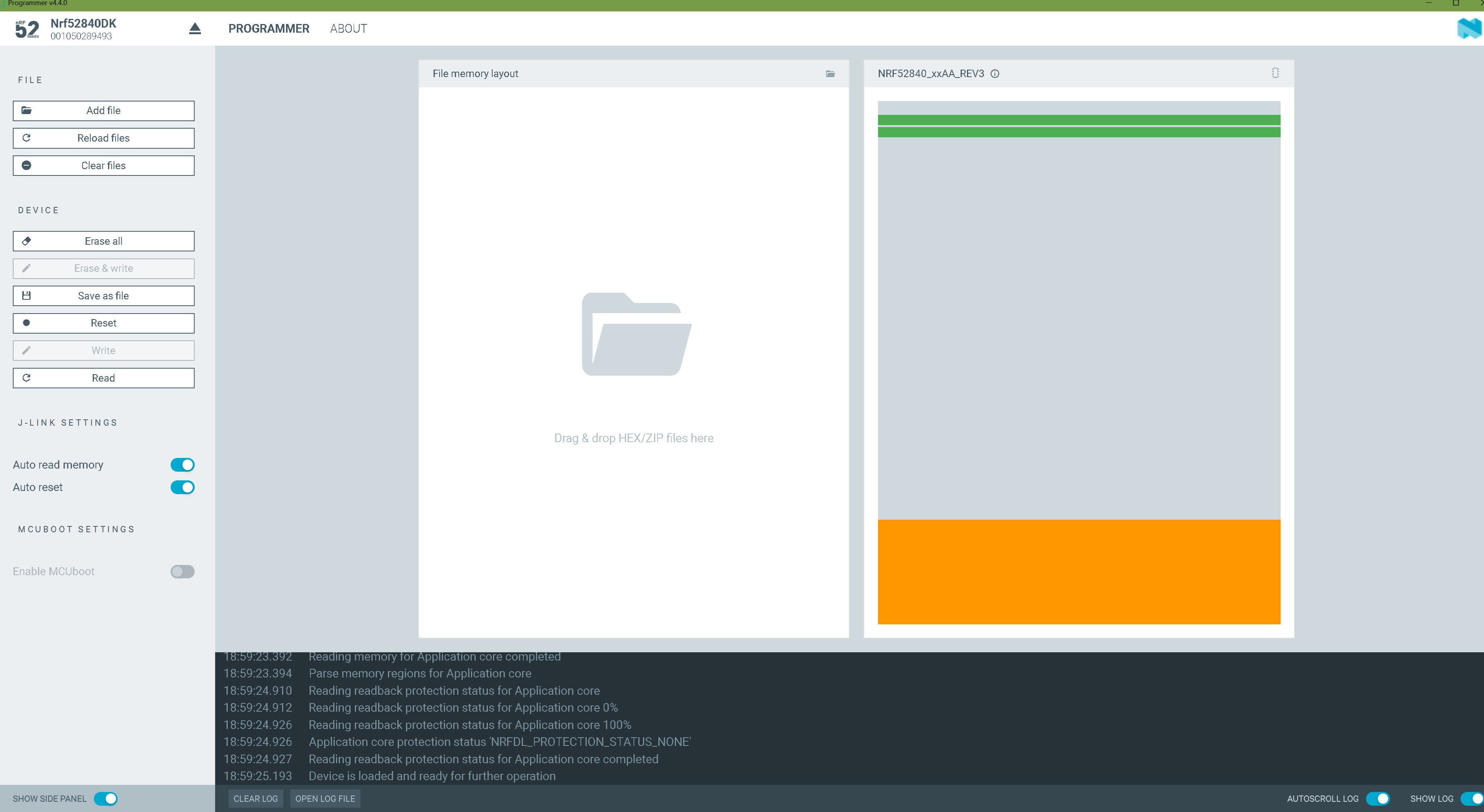
How you built it, and easy to see if you have the programmer , jlink device you can get a visual on the memory Map like this in NRF_connect for Desktops.
disregard some arrows(pic from another thread)

You built this…no softdevice or no bootloader included. = app crash
In Summary
- Bootloader:
- Ensures safe startup and firmware updates.
- Acts as the gatekeeper for running valid application firmware.
- SoftDevice:
- Provides a robust, pre-made wireless protocol stack (especially for BLE).
- Handles radio communications and ensures real-time performance in wireless tasks.
Both components are integral to the reliability, security, and functionality of the Xiao nRF52840, enabling easy firmware updates and robust wireless connectivity while abstracting the complexity of low-level hardware operations.
HTH
GL  PJ
PJ 
your very close…Keep going and DO ask what ever your not sure about, we can get you squared away. 
Once you get the hang of it and a few good builds under your belt it will all make perfect sense.
ALso the West error You get may be a MAC thing, I can’t say 100%
Try the other UF2’s from the “drag and Drop UF2 files” thread on here. Look at both , Nrf and ESP stuff just to know and see the difference and similarities. Are you using DEV board? or jlink device?
GO!