Hi there,
I have acquired an STM32MP157C board, and my goal is to install Linux on it and establish an Ethernet connection. I downloaded the Linux image file from the official website at the following link: ODYSSEY – STM32MP157C | Seeed Studio Wiki and installed it. However, it appears that the file is quite outdated.
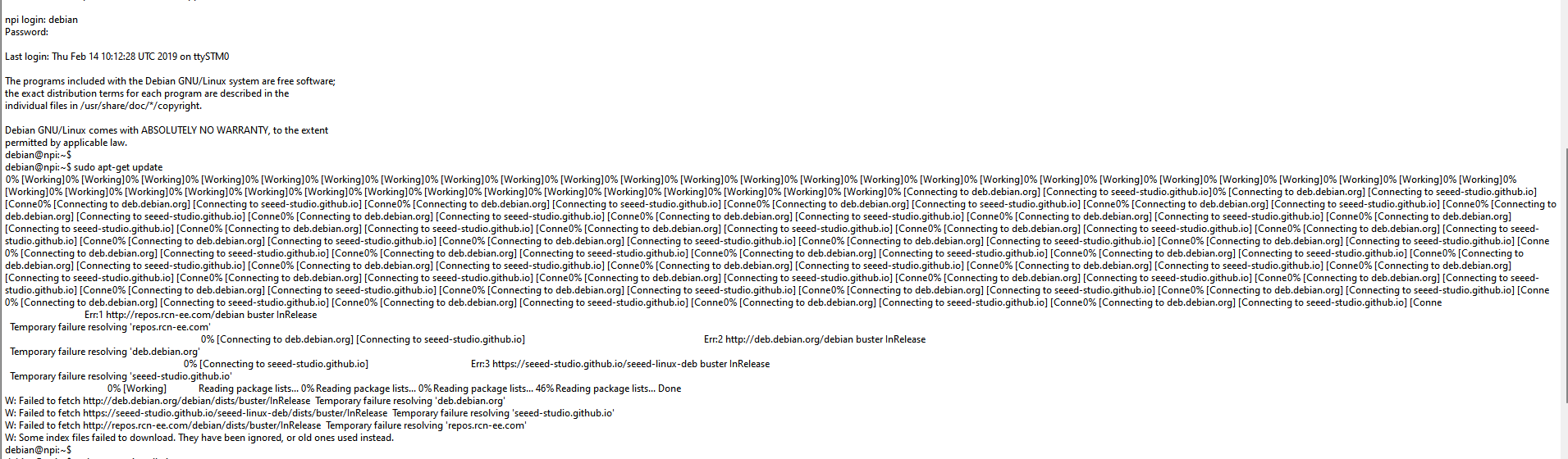
When I run the sudo apt update command or attempt to install any software, such as Git, I encounter errors, making it practically unusable. I have conducted extensive research in an attempt to find another suitable image file, as I am new to Linux and need an image that is compatible with this board, but I have been unable to find an appropriate one.
Can anyone provide me with a reliable image file or offer guidance on how to set up the board and use Ethernet?
I also uploaded a screenshot providing further details regarding my explanation
Thank you in advance for your help
Hi there
And Welcome here…
So I see for this unit we have
Support Lifecycle:
- Standard Support: Ended around August 2022.
- Debian LTS (Long-Term Support): Extended security updates provided by the LTS team until June 30, 2024, for specific architectures (i386, amd64, armhf, arm64).
- Extended LTS (ELTS): Offered commercially by third parties (like Freexian) to provide security support until June 30, 2029.
Current Status:
- Buster is now archived; its repositories are found at
archive.debian.org.
- It is no longer receiving official updates, and users are encouraged to upgrade to newer stable releases (like Bullseye or Bookworm) for current security and features.
Since Debian 10 has reached its EOL, it is recommended that users upgrade to a supported release, such as Debian 11 (“bullseye”) or the current stable version, for continued security and updates. More information can be found on InvGate.
SOME things I did NOT know… 

The current, official Linux software for the STM32MP157C System on Module (SOM) is provided by STMicroelectronics through their OpenSTLinux distribution package. This distribution is based on the Yocto Project/OpenEmbedded build framework, allowing users to create custom, optimized Linux images from source code.
Official STMicroelectronics Approach: OpenSTLinux
STMicroelectronics provides the necessary components to build a current Linux system:
- OpenSTLinux Distribution Package: This is a comprehensive package that includes the Linux BSP (Board Support Package), kernel drivers, a secure OS managed by OP-TEE, and user-space components. It is the primary method for developers to create a highly customized and up-to-date Linux distribution tailored for their specific needs.
-
- Kernel Version: The specific Linux kernel version is regularly updated. Recent ecosystems have used kernels such as
linux-5.10.x. The current stable version should be obtained from the latest ST release.
- Development Ecosystem: ST provides a complete ecosystem of tools and documentation (referred to as STM32MP1Starter, STM32MP1Dev, etc.) to help developers build and flash images.
You can download the starter and developer packages from the official STMicroelectronics website to begin the development process.
While the official approach involves building from source via Yocto, third parties offer ready-to-use binary distributions:
- Debian/Ubuntu/Fedora: Several general-purpose binary distributions offer support for the ARMv7 architecture of the STM32MP157C. Seeed Studio, for the associated ODYSSEY board, has provided Debian images (though the older “buster” version was referenced in earlier documentation).
- Buildroot: This is another build system alternative to Yocto, often considered an easier way to create a basic, customized Linux system.
For the most current and secure image, it is recommended to use the latest OpenSTLinux distribution package from STMicroelectronics and build the image yourself, as third-party binary images may not be actively maintained or recent.
HTH
GL  PJ
PJ