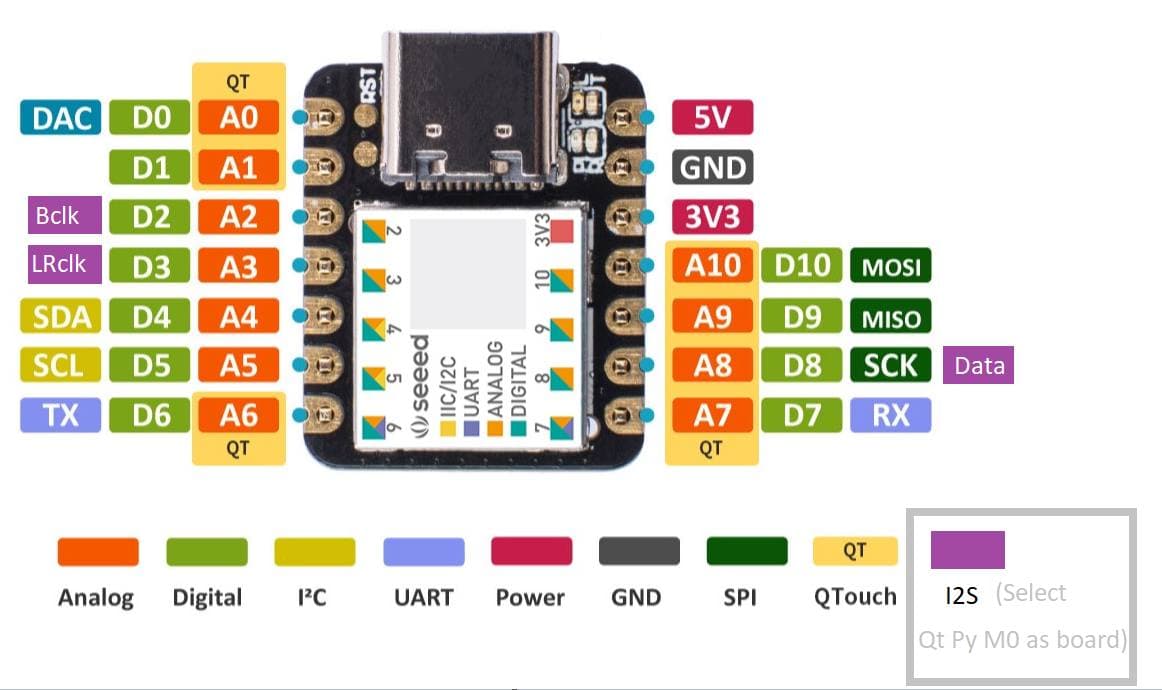
Now if I could just find the board manager files for the Adafruit Itsybitsy M0.
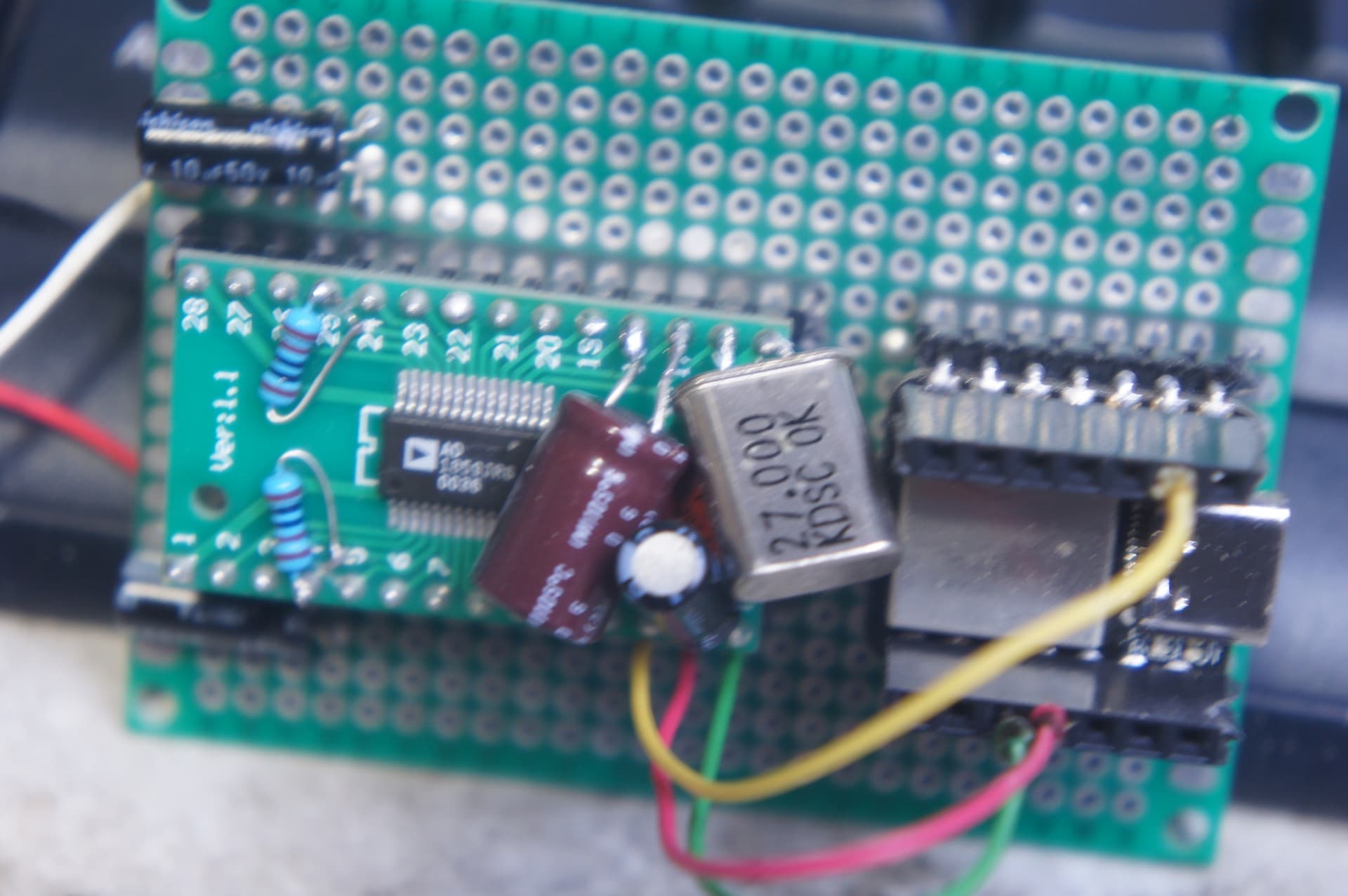
Tried modifying variant.h file… maybe my circuit is just shit.
To get the board manager files for the itsybitsy (and others from adafruit) you have to add an url to your preferences.
explanation: Arduino IDE Setup | Introducing ItsyBitsy M0 Express | Adafruit Learning System
URL: https://adafruit.github.io/arduino-board-index/package_adafruit_index.json
Don’t know where you found the URL; I must be blind. Thank you. I decided to take another look and I may have had the pinout mirror; yellow wire to bottom and other 2 up top. Going to test in a few minutes and see.
This fully-featured UDA1334A I2S Stereo DAC breakout is a perfect match for any I2S-output audio interface. It’s affordable but sounds great! The NXP UDA1334A is a jack-of-all-I2S-trades: you can use 3.3V - 5V logic levels (a rarity) and can process multiple different formats by setting two pins to high or low. The DAC will process data immediately and give you a clear, analog, stereo line-level output. It’s even cool with MCLK-less I2S interfaces such as the Raspberry Pi (which it’s ideal for) - a built-in PLL will generate the proper clock from the bitclock signal.
For inputs, you can use classic I2S (the default) or 16-bit, 20-bit, or 24-bit left justified data. You can set it up to take an input system/controller clock but we default-set it to just generate it for you, so you only need to connect Data In, Word Select (Left/Right Clock), and Bit Clock lines. If you want, there’s a mute pin and a de-emphasis filter you can turn on.
Regards,
Rachel Gomez
Guess I just didn’t do it right the first time (DAC from cable box a while back). Whether I wired it wrong, or just using crystal for DAC’s master clock that Xiao doesn’t reference in anyway, or … whatever.
Been sitting here for like 30 minutes listening to some borderline annoying 8 bit sounding loops because I’m just happy to hear it working.
PCM5102A DAC, $7.
1 pic per post limit… sick.
Hello,
Does anyone know how to connect properly the DAC to xiao esp32s3? Tried two DACs, multiple configurations and still no luck.
I managed to run squeezelite on this chip, but can’t get any sound…
Hi there,
And Welcome here…
So Yes it does work and it takes a good bit of Nuance to get it working Well. 
these are the main caveates with more for sure.
You must explicitly assign I2S pins on the ESP32-S3 — there are no defaults.
Also confirm your DAC is actually I2S (not I2C-only control), that BCLK/LRCLK/DATA are present on a scope or logic analyzer, and that squeezelite is compiled for the correct DAC profile.
Most “no sound” cases on S3 are missing pin assignment or clocking, not bad DACs.
Post the code you are using , Use the Code tags Above “</>” paste it in there, we can look. 
So you know that any audio output requires external hardware, and the ESP32-S3 is However, very picky about how that hardware is connected.
If you “tried two DACs” and got zero sound, that usually means one of three classic mistakes:
And squeezelite will happily run without telling you the audio path is broken.
Unlike older ESP32 boards, the S3 does not magically map I2S pins.
You must explicitly assign them in software, or the DAC will sit there silently like a brick.
Typical external audio DACs (PCM5102, ES9023, WM8960, etc.) expect:
| Signal | Meaning |
|---|---|
| BCLK | Bit clock |
| LRCLK / WS | Left-Right clock |
| DIN | Audio data |
| MCLK | (sometimes optional) |
If any one of these is missing or mis-mapped → silence.
The XIAO doesn’t have “default” I2S pins. You must choose valid GPIOs and bind them like this;
i2s_pin_config_t pin_config = {
    .bck_io_num = 7,
    .ws_io_num  = 6,
    .data_out_num = 8,
    .data_in_num = I2S_PIN_NO_CHANGE
};

i2s_set_pin(I2S_NUM_0, &pin_config);
If this step is missing → no audio, guaranteed.
This alone fixes a lot of “S3 has no sound” reports.
Squeezelite on ESP32 assumes a known-good I2S DAC profile.
If YOU:
…it will run but produce nothing audible.
No crash. No warning. Just silence. 

Classic embedded Linux muscle memory biting microcontroller users.
and Two more “been there” problems:
Many I2S DAC boards output line level, not headphone level. 
Result: “it works, but I hear nothing”.
HTH
GL  PJ
PJ 
It’s in here above somewhere
Hi. Thanks for your extensive answer.
My DACs were Max98357a and Pcm5102. Both are working - I used max before and pcm is brand new. As far as I know, they use the same configuration.
Tried a lot of configurations, as I read on the web there are not preassigned pins and any will do. But apparently not.
My last configuration is:
BCK: gpio4
LSCK:gpio5
DATA:gpio6
I’ve got my squeezelite from here:
What “DAC’s” specifically?
The Arduino “Simple Tone” example in ESP_I2S library works fine for basic testing an I2S based interface.
Ok ,So one has the AMp (MAX) and one is just a DAC.
From the XIAO ESP32-S3 pin mapping (pads):
These are good, simple choices for I2S output.
I have used it and you will see a lot of posts with the Max device
MAX98357A is an I2S amplifier, not just a DAC — it drives a speaker directly.
XIAO → MAX98357A
Speaker
PCM5102 is a DAC it outputs line level (you usually need an amp or powered speakers).
XIAO → PCM5102
Audio out
This generates a 440 Hz sine wave over I2S. If this is silent, your wiring/pins are wrong (or the module power/ground is wrong).
/*
  XIAO ESP32-S3 I2S Tone Test (MAX98357A or PCM5102)
  Pins (XIAO):
    BCLK = D8 (GPIO7)
    LRCLK/WS = D3 (GPIO4)
    DATA = D10 (GPIO9)
*/

#include <Arduino.h>
#include <I2S.h>

static const int PIN_BCLK = D8;
static const int PIN_LRCK = D3;
static const int PIN_DOUT = D10;

static const int SAMPLE_RATE = 44100;
static const int BITS = 16;

void setup() {
  Serial.begin(115200);
  delay(300);

  Serial.println("\nXIAO ESP32-S3 I2S 440Hz tone test");

  // Some Arduino-ESP32 cores expose this API:
  I2S.setPins(PIN_BCLK, PIN_LRCK, PIN_DOUT, -1);

  // Start I2S in Philips/I2S standard mode
  if (!I2S.begin(I2S_PHILIPS_MODE, SAMPLE_RATE, BITS)) {
    Serial.println("ERROR: I2S.begin() failed. Check core/library support.");
    while (1) delay(1000);
  }

  Serial.println("I2S started. You should hear a tone.");
}

void loop() {
  // 440 Hz sine wave
  static float phase = 0.0f;
  const float freq = 440.0f;
  const float phaseInc = 2.0f * PI * freq / SAMPLE_RATE;

  // Generate and write a small block
  for (int i = 0; i < 256; i++) {
    float s = sinf(phase);
    phase += phaseInc;
    if (phase > 2.0f * PI) phase -= 2.0f * PI;

    int16_t sample = (int16_t)(s * 12000); // conservative amplitude
    // mono -> duplicate to L/R
    I2S.write((uint8_t*)&sample, 2);
    I2S.write((uint8_t*)&sample, 2);
  }
}
HTH
GL PJ
I don’t know if you can tell , but Confirm BCLK and LRCLK are actually toggling (logic analyzer/scope if possible). 90% it’s that. because of pins.

Hello again,
Thanks to your hints I was able to run squeezelite with Max98357a. It plays music very nice.
The pin numbers you gave are correct.
Thank you for your help! LLAP
Hi there,
Awesome to hear that. It sounds pretty good too, I bet.
Glad it all worked out, The pins between Xiao’s is confusing but it is a Great MCU.
Do us a solid and Mark the post with the pin numbers as a the solution" so others can find it Fast! 
GL PJ